Javascript Code
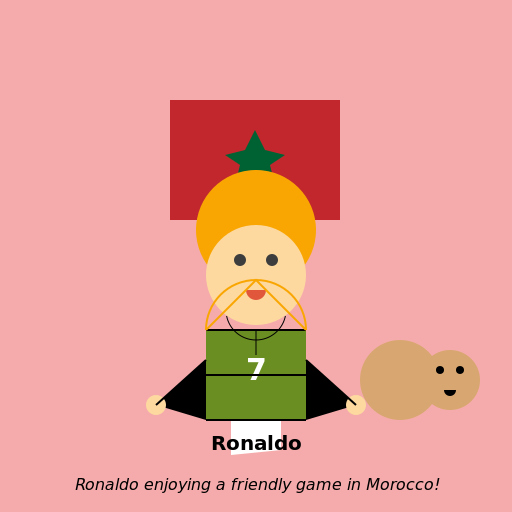
                        // Ronaldo in Morocco


// Drawing the background

ctx.fillStyle = "#F5ABAB"; // sandy color for the desert

ctx.fillRect(0, 0, 512, 512);


// Drawing the Moroccan flag

ctx.fillStyle = "#C1272D"; // red color for the flag

ctx.fillRect(170, 100, 170, 120); // rectangle for the flag

ctx.fillStyle = "#006233"; // green color for the star

ctx.beginPath(); // drawing the star

ctx.moveTo(255, 130);

ctx.lineTo(265, 150);

ctx.lineTo(285, 155);

ctx.lineTo(270, 165);

ctx.lineTo(275, 185);

ctx.lineTo(255, 170);

ctx.lineTo(235, 185);

ctx.lineTo(240, 165);

ctx.lineTo(225, 155);

ctx.lineTo(245, 150);

ctx.closePath();

ctx.fill();


// Drawing Ronaldo

ctx.fillStyle = "#F9A602"; // golden color for Ronaldo's hair

ctx.beginPath(); // drawing Ronaldo's hair

ctx.arc(256, 230, 60, 0, Math.PI * 2);

ctx.closePath();

ctx.fill();

ctx.fillStyle = "#FDD9A0"; // light skin color for Ronaldo's face

ctx.beginPath(); // drawing Ronaldo's face

ctx.arc(256, 275, 50, 0, Math.PI * 2);

ctx.closePath();

ctx.fill();

ctx.fillStyle = "#3D3D3D"; // dark color for Ronaldo's eyes

ctx.beginPath(); // drawing Ronaldo's eyes

ctx.arc(240, 260, 6, 0, Math.PI * 2);

ctx.closePath();

ctx.fill();

ctx.beginPath();

ctx.arc(272, 260, 6, 0, Math.PI * 2);

ctx.closePath();

ctx.fill();

ctx.fillStyle = "#E0573C"; // reddish color for Ronaldo's lips

ctx.beginPath(); // drawing Ronaldo's lips

ctx.arc(256, 290, 10, 0, Math.PI);

ctx.closePath();

ctx.fill();


// Drawing Ronaldo's body

ctx.fillStyle = "#6B8E23"; // olive color for Ronaldo's shirt

ctx.beginPath(); // drawing Ronaldo's shirt

ctx.moveTo(206, 330);

ctx.lineTo(306, 330);

ctx.lineTo(306, 420);

ctx.lineTo(206, 420);

ctx.closePath();

ctx.fill();

ctx.fillStyle = "#FFFFFF"; // white color for Ronaldo's shorts

ctx.beginPath(); // drawing Ronaldo's shorts

ctx.moveTo(231, 420);

ctx.lineTo(281, 420);

ctx.lineTo(281, 450);

ctx.lineTo(231, 455);

ctx.closePath();

ctx.fill();


// Adding details to Ronaldo's body

ctx.fillStyle = "#000000"; // black color for the details

ctx.beginPath(); // drawing Ronaldo's neck

ctx.moveTo(256, 330);

ctx.lineTo(256, 355);

ctx.closePath();

ctx.stroke();

ctx.beginPath(); // drawing Ronaldo's arms

ctx.moveTo(206, 360);

ctx.lineTo(206, 420);

ctx.lineTo(156, 405);

ctx.closePath();

ctx.fill();

ctx.beginPath();

ctx.moveTo(306, 360);

ctx.lineTo(306, 420);

ctx.lineTo(356, 405);

ctx.closePath();

ctx.fill();

ctx.fillStyle = "#FDD9A0"; // light skin color for Ronaldo's hands

ctx.beginPath(); // drawing Ronaldo's hands

ctx.arc(156, 405, 10, 0, Math.PI * 2);

ctx.closePath();

ctx.fill();

ctx.beginPath();

ctx.arc(356, 405, 10, 0, Math.PI * 2);

ctx.closePath();

ctx.fill();


// Adding Ronaldo's number

ctx.font = "bold 30px Arial"; // font for the number

ctx.fillStyle = "#FFFFFF"; // white color for the number

ctx.textAlign = "center";

ctx.fillText("7", 256, 380);


// Adding Ronaldo's name

ctx.font = "bold 20px Arial"; // font for the name

ctx.fillStyle = "#000000"; // black color for the name

ctx.textAlign = "center";

ctx.fillText("Ronaldo", 256, 450);


// Adding a camel friend for Ronaldo

ctx.fillStyle = "#D8A670"; // sandy color for the camel's body

ctx.beginPath(); // drawing the camel's body

ctx.arc(400, 380, 40, 0, Math.PI * 2);

ctx.closePath();

ctx.fill();

ctx.beginPath(); // drawing the camel's head

ctx.arc(450, 380, 30, 0, Math.PI * 2);

ctx.closePath();

ctx.fill();

ctx.fillStyle = "#000000"; // black color for the details

ctx.beginPath(); // drawing the camel's eyes

ctx.arc(440, 370, 4, 0, Math.PI * 2);

ctx.closePath();

ctx.fill();

ctx.beginPath();

ctx.arc(460, 370, 4, 0, Math.PI * 2);

ctx.closePath();

ctx.fill();

ctx.beginPath(); // drawing the camel's mouth

ctx.arc(450, 390, 6, 0, Math.PI);

ctx.closePath();

ctx.fill();


// Adding a friendly smile to Ronaldo

ctx.strokeStyle = "#000000"; // black color for the smile

ctx.beginPath(); // drawing the smile

ctx.arc(256, 310, 30, 0.2, Math.PI - 0.2);

ctx.stroke();


// Adding Ronaldo's football skills

ctx.strokeStyle = "#000000"; // black color for the lines

ctx.lineWidth = 2; // thicker lines for the skills

ctx.beginPath(); // drawing the skill lines

ctx.moveTo(206, 330);

ctx.lineTo(306, 330);

ctx.moveTo(206, 420);

ctx.lineTo(306, 420);

ctx.moveTo(206, 375);

ctx.lineTo(306, 375);

ctx.moveTo(206, 360);

ctx.lineTo(156, 405);

ctx.moveTo(306, 360);

ctx.lineTo(356, 405);

ctx.stroke();


// Adding Ronaldo's signature move

ctx.strokeStyle = "#F9A602"; // golden color for the move

ctx.beginPath(); // drawing the move

ctx.arc(256, 330, 50, Math.PI, Math.PI * 2);

ctx.stroke();

ctx.beginPath();

ctx.moveTo(206, 330);

ctx.lineTo(256, 280);

ctx.lineTo(306, 330);

ctx.stroke();


// Adding a touch of humor

ctx.fillStyle = "#000000"; // black color for the text

ctx.font = "italic 16px Arial"; // font for the text

ctx.textAlign = "center";

ctx.fillText("Ronaldo enjoying a friendly game in Morocco!", 256, 490);


// All done! Phew, that was a lot of drawing!

// I hope Ronaldo and the camel become best friends!

//
AI
Model: gpt-3.5-turbo-16k-0613
Time: 44 seconds
Prompt Tokens: 180
Completion Tokens: 1448
Total Token Cost: 1628
 balloon party
 beautiful beach
 cute puppy dog
 happy cat
 house
house