
Javascript Code
                        // Lord Krishna and Lord Arjun Beat the Summer Heat on Janmashtami

// Two divine beings discuss their secret to staying cool in the scorching summer


ctx.fillStyle = "#FFFFE0"; // Setting the canvas background color to a light yellow

ctx.fillRect(0, 0, 512, 512); // Drawing a rectangle to represent the canvas


// Drawing Lord Krishna

ctx.fillStyle = "#4169E1"; // Setting the fill color to a royal blue

ctx.fillRect(100, 100, 100, 300); // Drawing Lord Krishna's body

ctx.beginPath(); // Starting a new path for Lord Krishna's head

ctx.arc(150, 80, 40, 0, Math.PI * 2); // Drawing Lord Krishna's head as a circle

ctx.fillStyle = "#FFD700"; // Setting the fill color to a golden yellow

ctx.fill(); // Filling Lord Krishna's head with color


// Drawing Lord Arjun

ctx.fillStyle = "#FF8C00"; // Setting the fill color to a dark orange

ctx.fillRect(300, 100, 100, 300); // Drawing Lord Arjun's body

ctx.beginPath(); // Starting a new path for Lord Arjun's head

ctx.arc(350, 80, 40, 0, Math.PI * 2); // Drawing Lord Arjun's head as a circle

ctx.fillStyle = "#FFD700"; // Setting the fill color to a golden yellow

ctx.fill(); // Filling Lord Arjun's head with color


// Drawing Lord Krishna's peacock feather crown

ctx.beginPath(); // Starting a new path for the peacock feather

ctx.moveTo(140, 80); // Moving to the starting point of the feather

ctx.lineTo(130, 50); // Drawing the feather's first segment

ctx.lineTo(120, 60); // Drawing the feather's second segment

ctx.lineTo(110, 50); // Drawing the feather's third segment

ctx.lineTo(100, 60); // Drawing the feather's fourth segment

ctx.lineTo(90, 50); // Drawing the feather's fifth segment

ctx.lineTo(80, 60); // Drawing the feather's sixth segment

ctx.lineTo(70, 50); // Drawing the feather's seventh segment

ctx.lineTo(60, 80); // Drawing the feather's eighth segment

ctx.lineTo(140, 80); // Drawing the feather's final segment to complete the shape

ctx.fillStyle = "#00CED1"; // Setting the fill color to a bright turquoise

ctx.fill(); // Filling the peacock feather with color

ctx.closePath(); // Closing the path


// Drawing Lord Krishna's flute

ctx.beginPath(); // Starting a new path for the flute

ctx.moveTo(120, 300); // Moving to the starting point of the flute

ctx.lineTo(160, 280); // Drawing the first segment of the flute

ctx.lineTo(160, 260); // Drawing the second segment of the flute

ctx.lineTo(120, 240); // Drawing the third segment of the flute

ctx.lineTo(120, 300); // Drawing the final segment of the flute to complete the shape

ctx.fillStyle = "#8B4513"; // Setting the fill color to a dark brown

ctx.fill(); // Filling the flute with color

ctx.closePath(); // Closing the path


// Drawing Lord Arjun's bow

ctx.beginPath(); // Starting a new path for the bow

ctx.moveTo(350, 240); // Moving to the starting point of the bow

ctx.lineTo(350, 260); // Drawing the first segment of the bow

ctx.lineTo(450, 240); // Drawing the second segment of the bow

ctx.lineTo(350, 220); // Drawing the third segment of the bow

ctx.lineTo(350, 240); // Drawing the final segment of the bow to complete the shape

ctx.fillStyle = "#8B4513"; // Setting the fill color to a dark brown

ctx.fill(); // Filling the bow with color

ctx.closePath(); // Closing the path


// Drawing a sun to represent the summer heat

ctx.beginPath(); // Starting a new path for the sun

ctx.arc(256, 50, 40, 0, Math.PI * 2); // Drawing the sun as a circle

ctx.fillStyle = "#FF4500"; // Setting the fill color to a vibrant orange

ctx.fill(); // Filling the sun with color

ctx.closePath(); // Closing the path


// Drawing speech bubbles for Lord Krishna and Lord Arjun

ctx.beginPath(); // Starting a new path for Lord Krishna's speech bubble

ctx.moveTo(170, 150); // Moving to the starting point of the speech bubble

ctx.lineTo(210, 130); // Drawing the first segment of the speech bubble

ctx.lineTo(210, 170); // Drawing the second segment of the speech bubble

ctx.lineTo(170, 190); // Drawing the third segment of the speech bubble

ctx.lineTo(170, 150); // Drawing the final segment of the speech bubble to complete the shape

ctx.fillStyle = "#FFFFFF"; // Setting the fill color to white

ctx.fill(); // Filling Lord Krishna's speech bubble with color

ctx.closePath(); // Closing the path


ctx.beginPath(); // Starting a new path for Lord Arjun's speech bubble

ctx.moveTo(300, 200); // Moving to the starting point of the speech bubble

ctx.lineTo(340, 180); // Drawing the first segment of the speech bubble

ctx.lineTo(340, 220); // Drawing the second segment of the speech bubble

ctx.lineTo(300, 240); // Drawing the third segment of the speech bubble

ctx.lineTo(300, 200); // Drawing the final segment of the speech bubble to complete the shape

ctx.fillStyle = "#FFFFFF"; // Setting the fill color to white

ctx.fill(); // Filling Lord Arjun's speech bubble with color

ctx.closePath(); // Closing the path


// Adding text inside the speech bubbles

ctx.fillStyle = "#000000"; // Setting the fill color to black

ctx.font = "14px Arial"; // Setting the font size and type

ctx.fillText("Krishna: Let's find a", 180, 160); // Adding Lord Krishna's dialogue

ctx.fillText("way to beat the heat!", 180, 180); // Adding Lord Krishna's dialogue

ctx.fillText("Arjun: I agree! Maybe", 320, 200); // Adding Lord Arjun's dialogue

ctx.fillText("we can take shelter", 320, 220); // Adding Lord Arjun's dialogue

ctx.fillText("under a cool tree.", 320, 240); // Adding Lord Arjun's dialogue


// Adding the final touch - a refreshing glass of lemonade!

ctx.beginPath(); // Starting a new path for the glass

ctx.moveTo(400, 350); // Moving to the starting point of the glass

ctx.lineTo(400, 450); // Drawing the first segment of the glass

ctx.lineTo(350, 450); // Drawing the second segment of the glass

ctx.lineTo(350, 400); // Drawing the third segment of the glass

ctx.lineTo(400, 400); // Drawing the fourth segment of the glass

ctx.lineTo(400, 350); // Drawing the final segment of the glass to complete the shape

ctx.fillStyle = "#00CED1"; // Setting the fill color to a bright turquoise

ctx.fill(); // Filling the glass with color

ctx.closePath(); // Closing the path


// Drawing a lemon slice inside the glass

ctx.beginPath(); // Starting a new path for the lemon slice

ctx.arc(375, 400, 20, 0, Math.PI * 2); // Drawing the lemon slice as a circle

ctx.fillStyle = "#FFFF00"; // Setting the fill color to a vibrant yellow

ctx.fill(); // Filling the lemon slice with color

ctx.closePath(); // Closing the path


// Adding a straw to the glass

ctx.beginPath(); // Starting a new path for the straw

ctx.moveTo(375, 400); // Moving to the starting point of the straw

ctx.lineTo(375, 350); // Drawing the straw

ctx.strokeStyle = "#A52A2A"; // Setting the stroke color to a dark brown

ctx.lineWidth = 5; // Setting the stroke width

ctx.stroke(); // Drawing the straw

ctx.closePath(); // Closing the path


// Adding a smiley face on the lemon slice

ctx.beginPath(); // Starting a new path for the smiley face

ctx.arc(375, 390, 5, 0, Math.PI * 2); // Drawing the first eye of the smiley face

ctx.arc(375, 410, 5, 0, Math.PI * 2); // Drawing the second eye of the smiley face

ctx.moveTo(365, 395); // Moving to the starting point of the smiley face's mouth

ctx.lineTo(385, 395); // Drawing the smiley face's mouth

ctx.strokeStyle = "#000000"; // Setting the stroke color to black

ctx.lineWidth = 2; // Setting the stroke width

ctx.stroke(); // Drawing the smiley face

ctx.closePath(); // Closing the path


// PHEW! That should help them cool down!

// If only we could all have a refreshing glass of lemonade on a hot day! 🍋🥤
AI
Model: gpt-3.5-turbo-16k-0613
Time: 106 seconds
Prompt Tokens: 205
Completion Tokens: 1956
Total Token Cost: 2161
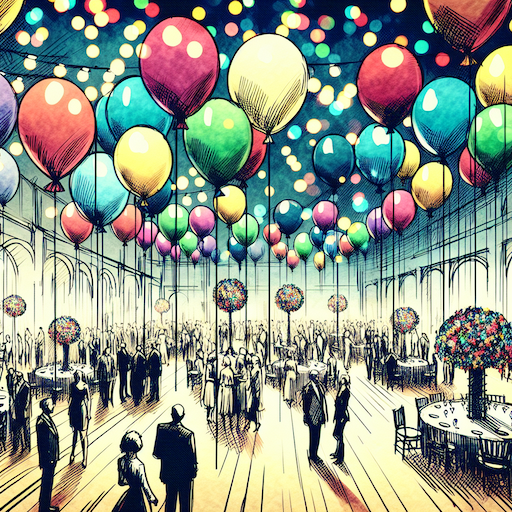 balloon party
 beautiful beach
 cute puppy dog
 happy cat
 house
house