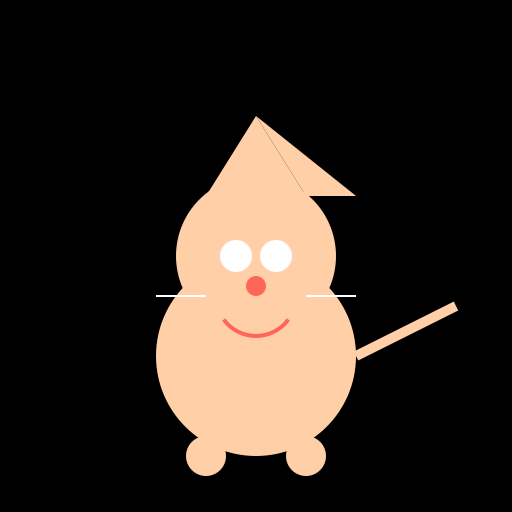

Javascript Code
                        // Kitty Cat

// Meow meow meow!


ctx.fillStyle = "#000"; // Set background color to black

ctx.fillRect(0, 0, 512, 512); // Draw a black background


// Draw the cat's body

ctx.fillStyle = "#FFCFA8"; // Set body color to light brown

ctx.beginPath(); // Start drawing the body shape

ctx.arc(256, 356, 100, 0, Math.PI * 2); // Draw a circular body shape

ctx.fill(); // Fill the body shape with color


// Draw the cat's head

ctx.beginPath(); // Start drawing the head shape

ctx.arc(256, 256, 80, 0, Math.PI * 2); // Draw a circular head shape

ctx.fill(); // Fill the head shape with color


// Draw the cat's ears

ctx.fillStyle = "#FFCFA8"; // Set ear color to light brown

ctx.beginPath(); // Start drawing the left ear shape

ctx.moveTo(206, 196); // Move to the starting point of the left ear

ctx.lineTo(256, 116); // Draw a line to the top of the left ear

ctx.lineTo(306, 196); // Draw a line to the ending point of the left ear

ctx.closePath(); // Close the shape

ctx.fill(); // Fill the left ear shape with color


ctx.beginPath(); // Start drawing the right ear shape

ctx.moveTo(306, 196); // Move to the starting point of the right ear

ctx.lineTo(256, 116); // Draw a line to the top of the right ear

ctx.lineTo(356, 196); // Draw a line to the ending point of the right ear

ctx.closePath(); // Close the shape

ctx.fill(); // Fill the right ear shape with color


// Draw the cat's eyes

ctx.fillStyle = "#FFF"; // Set eye color to white

ctx.beginPath(); // Start drawing the left eye shape

ctx.arc(236, 256, 16, 0, Math.PI * 2); // Draw a circular left eye shape

ctx.fill(); // Fill the left eye shape with color


ctx.beginPath(); // Start drawing the right eye shape

ctx.arc(276, 256, 16, 0, Math.PI * 2); // Draw a circular right eye shape

ctx.fill(); // Fill the right eye shape with color


// Draw the cat's nose

ctx.fillStyle = "#FF665A"; // Set nose color to pink

ctx.beginPath(); // Start drawing the nose shape

ctx.arc(256, 286, 10, 0, Math.PI * 2); // Draw a circular nose shape

ctx.fill(); // Fill the nose shape with color


// Draw the cat's mouth

ctx.strokeStyle = "#FF665A"; // Set mouth color to pink

ctx.lineWidth = 4; // Set mouth line width

ctx.beginPath(); // Start drawing the mouth shape

ctx.arc(256, 296, 40, 0.2 * Math.PI, 0.8 * Math.PI); // Draw an arc for the mouth shape

ctx.stroke(); // Stroke the mouth shape


// Draw the cat's whiskers

ctx.strokeStyle = "#FFF"; // Set whiskers color to white

ctx.lineWidth = 2; // Set whiskers line width

ctx.beginPath(); // Start drawing the left whiskers

ctx.moveTo(206, 296); // Move to the starting point of the left whiskers

ctx.lineTo(156, 296); // Draw a line for the left whiskers

ctx.stroke(); // Stroke the left whiskers


ctx.beginPath(); // Start drawing the right whiskers

ctx.moveTo(306, 296); // Move to the starting point of the right whiskers

ctx.lineTo(356, 296); // Draw a line for the right whiskers

ctx.stroke(); // Stroke the right whiskers


// Draw the cat's paws

ctx.fillStyle = "#FFCFA8"; // Set paw color to light brown

ctx.beginPath(); // Start drawing the left front paw

ctx.arc(206, 396, 20, 0, Math.PI * 2); // Draw a circular left front paw

ctx.fill(); // Fill the left front paw with color


ctx.beginPath(); // Start drawing the right front paw

ctx.arc(306, 396, 20, 0, Math.PI * 2); // Draw a circular right front paw

ctx.fill(); // Fill the right front paw with color


ctx.beginPath(); // Start drawing the left back paw

ctx.arc(206, 456, 20, 0, Math.PI * 2); // Draw a circular left back paw

ctx.fill(); // Fill the left back paw with color


ctx.beginPath(); // Start drawing the right back paw

ctx.arc(306, 456, 20, 0, Math.PI * 2); // Draw a circular right back paw

ctx.fill(); // Fill the right back paw with color


// Draw the cat's tail

ctx.strokeStyle = "#FFCFA8"; // Set tail color to light brown

ctx.lineWidth = 10; // Set tail line width

ctx.beginPath(); // Start drawing the tail

ctx.moveTo(356, 356); // Move to the starting point of the tail

ctx.lineTo(456, 306); // Draw a line for the tail

ctx.stroke(); // Stroke the tail


// Funny comment: "This cat is purr-fectly drawn!"
AI
Model: gpt-3.5-turbo-16k-0613
Time: 26 seconds
Prompt Tokens: 173
Completion Tokens: 1143
Total Token Cost: 1316


 balloon party
 beautiful beach
 cute puppy dog
 happy cat
 house
house