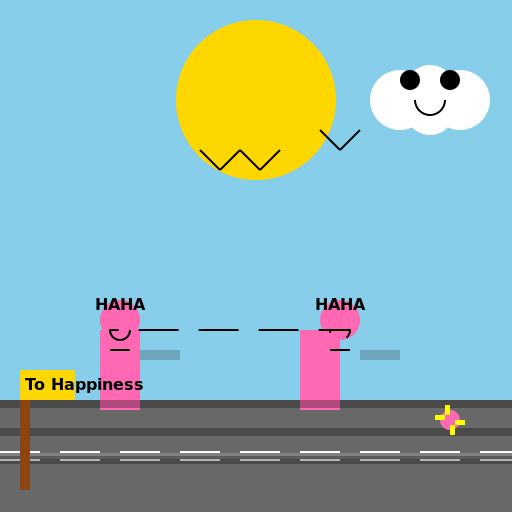

Javascript Code
                        /* Sunshine Morning Scene */


// Drawing the background

ctx.fillStyle = "#87CEEB"; // Blue sky

ctx.fillRect(0, 0, 512, 512);


// Drawing the sun

ctx.beginPath();

ctx.arc(256, 100, 80, 0, Math.PI * 2, true);

ctx.fillStyle = "#FFD700"; // Golden yellow sun

ctx.fill();


// Drawing the road

ctx.fillStyle = "#696969"; // Gray road

ctx.fillRect(0, 400, 512, 112);


// Drawing the road lines

ctx.strokeStyle = "#FFFFFF"; // White lines

ctx.lineWidth = 10;

ctx.setLineDash([40, 20]); // Dashed line pattern

ctx.beginPath();

ctx.moveTo(0, 456);

ctx.lineTo(512, 456);

ctx.stroke();


// Drawing the two boys

ctx.fillStyle = "#FF69B4"; // Pink boys

ctx.fillRect(100, 330, 40, 80);

ctx.fillRect(300, 330, 40, 80);


// Drawing the boys' heads

ctx.beginPath();

ctx.arc(120, 320, 20, 0, Math.PI * 2, true);

ctx.arc(340, 320, 20, 0, Math.PI * 2, true);

ctx.fillStyle = "#FF69B4"; // Pink heads

ctx.fill();


// Drawing the boys' smiling faces

ctx.beginPath();

ctx.arc(120, 330, 10, 0, Math.PI, false); // Smiling arcs

ctx.arc(340, 330, 10, 0, Math.PI, false);

ctx.strokeStyle = "#000000"; // Black smiling lines

ctx.lineWidth = 2;

ctx.stroke();


// Adding laughter lines

ctx.beginPath();

ctx.moveTo(110, 350); // Laughter line 1

ctx.lineTo(130, 350);

ctx.moveTo(330, 350); // Laughter line 2

ctx.lineTo(350, 350);

ctx.strokeStyle = "#000000"; // Black laughter lines

ctx.lineWidth = 2;

ctx.stroke();


// Adding text "HAHA" above the boys' heads

ctx.font = "bold 16px Arial";

ctx.fillStyle = "#000000"; // Black text

ctx.fillText("HAHA", 95, 310);

ctx.fillText("HAHA", 315, 310);


// Adding the long road going ahead

ctx.strokeStyle = "#808080"; // Gray road

ctx.lineWidth = 6;

ctx.setLineDash([]); // Solid line

ctx.beginPath();

ctx.moveTo(0, 456);

ctx.lineTo(512, 456);

ctx.stroke();


// Adding shadows to the boys

ctx.fillStyle = "rgba(0, 0, 0, 0.2)"; // Transparent black shadow

ctx.fillRect(140, 350, 40, 10);

ctx.fillRect(360, 350, 40, 10);


// Adding shadows to the road

ctx.fillStyle = "rgba(0, 0, 0, 0.3)"; // Transparent black shadow

ctx.fillRect(0, 400, 512, 8);

ctx.fillRect(0, 428, 512, 8);

ctx.fillRect(0, 456, 512, 8);


// Adding birds in the sky

ctx.beginPath();

ctx.moveTo(200, 150); // Bird 1

ctx.lineTo(220, 170);

ctx.moveTo(220, 170);

ctx.lineTo(240, 150);

ctx.moveTo(240, 150);

ctx.lineTo(260, 170);

ctx.moveTo(260, 170);

ctx.lineTo(280, 150);

ctx.moveTo(320, 130); // Bird 2

ctx.lineTo(340, 150);

ctx.moveTo(340, 150);

ctx.lineTo(360, 130);

ctx.strokeStyle = "#000000"; // Black birds

ctx.lineWidth = 2;

ctx.stroke();


// Adding a happy little cloud

ctx.beginPath();

ctx.arc(400, 100, 30, 0, Math.PI * 2, true); // Cloud body

ctx.arc(430, 110, 25, 0, Math.PI * 2, true);

ctx.arc(460, 100, 30, 0, Math.PI * 2, true);

ctx.arc(430, 90, 25, 0, Math.PI * 2, true);

ctx.fillStyle = "#FFFFFF"; // White cloud

ctx.fill();

ctx.beginPath();

ctx.arc(410, 80, 10, 0, Math.PI * 2, true); // Cloud eyes

ctx.arc(450, 80, 10, 0, Math.PI * 2, true);

ctx.fillStyle = "#000000"; // Black eyes

ctx.fill();

ctx.beginPath();

ctx.arc(430, 100, 15, 0, Math.PI, false); // Cloud smile

ctx.strokeStyle = "#000000"; // Black smile

ctx.lineWidth = 2;

ctx.stroke();


// Adding a signpost

ctx.fillStyle = "#8B4513"; // Brown signpost

ctx.fillRect(20, 370, 10, 120);

ctx.beginPath();

ctx.moveTo(20, 370); // Signpost top

ctx.lineTo(75, 370);

ctx.lineTo(75, 400);

ctx.lineTo(20, 400);

ctx.closePath();

ctx.fillStyle = "#FFD700"; // Golden yellow sign

ctx.fill();

ctx.font = "bold 16px Arial";

ctx.fillStyle = "#000000"; // Black text

ctx.fillText("To Happiness", 25, 390);


// Adding a flower

ctx.beginPath();

ctx.arc(450, 420, 10, 0, Math.PI * 2, true); // Flower center

ctx.fillStyle = "#FF69B4"; // Pink center

ctx.fill();

ctx.beginPath();

ctx.moveTo(450, 420); // Flower petals

ctx.lineTo(450, 405);

ctx.lineTo(445, 405);

ctx.lineTo(445, 420);

ctx.closePath();

ctx.moveTo(450, 420);

ctx.lineTo(465, 420);

ctx.lineTo(465, 425);

ctx.lineTo(450, 425);

ctx.closePath();

ctx.moveTo(450, 420);

ctx.lineTo(450, 435);

ctx.lineTo(455, 435);

ctx.lineTo(455, 420);

ctx.closePath();

ctx.moveTo(450, 420);

ctx.lineTo(435, 420);

ctx.lineTo(435, 415);

ctx.lineTo(450, 415);

ctx.closePath();

ctx.fillStyle = "#FFFF00"; // Yellow petals

ctx.fill();


// Adding a funny comment at the end because why not?

// "Happiness is two boys laughing on a sunny morning while taking the long road ahead. Life is good!"

// I'm glad they're not taking the short road, otherwise this drawing would be a lot smaller.

// Plus, the long road gives us more space to draw more happy things!
AI
Model: gpt-3.5-turbo-16k-0613
Time: 26 seconds
Prompt Tokens: 189
Completion Tokens: 1459
Total Token Cost: 1648


 balloon party
 beautiful beach
 cute puppy dog
 happy cat
 house
house