
Javascript Code
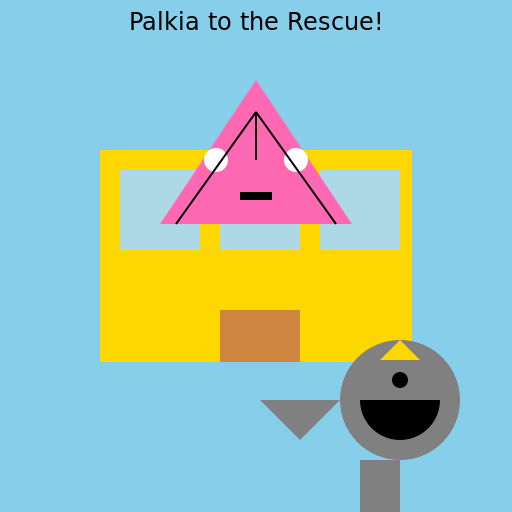
                        // Title: Palkia's Rescue Mission


// Setting the stage with a canvas


// Background: A vibrant blue sky

ctx.fillStyle = '#87CEEB';

ctx.fillRect(0, 0, 512, 512);


// Creating the Designer Condo

ctx.fillStyle = '#FFD700'; // Golden color for the condo

ctx.fillRect(100, 150, 312, 212);


// Adding windows to the condo

ctx.fillStyle = '#ADD8E6'; // Light blue color for the windows

ctx.fillRect(120, 170, 80, 80);

ctx.fillRect(220, 170, 80, 80);

ctx.fillRect(320, 170, 80, 80);


// Adding a door to the condo

ctx.fillStyle = '#CD853F'; // Brown color for the door

ctx.fillRect(220, 310, 80, 52);


// Drawing Palkia

ctx.fillStyle = '#FF69B4'; // Pink color for Palkia's body

ctx.beginPath();

ctx.moveTo(256, 80); // Starting point for Palkia's head

ctx.lineTo(160, 224); // Top left point for Palkia's body

ctx.lineTo(352, 224); // Top right point for Palkia's body

ctx.closePath();

ctx.fill();


// Adding Palkia's face and details

ctx.fillStyle = '#FFFFFF'; // White color for Palkia's eyes and mouth

ctx.beginPath();

ctx.arc(216, 160, 12, 0, Math.PI * 2); // Palkia's left eye

ctx.arc(296, 160, 12, 0, Math.PI * 2); // Palkia's right eye

ctx.fill();


// Palkia's mouth

ctx.fillStyle = '#000000'; // Black color for Palkia's mouth

ctx.fillRect(240, 192, 32, 8); // Palkia's mouth shape


// Palkia's details

ctx.strokeStyle = '#000000'; // Black color for Palkia's details

ctx.lineWidth = 2;

ctx.beginPath();

ctx.moveTo(256, 112); // Top center point for Palkia's details

ctx.lineTo(176, 224); // Top left point for Palkia's details

ctx.moveTo(256, 112); // Top center point for Palkia's details

ctx.lineTo(336, 224); // Top right point for Palkia's details

ctx.moveTo(256, 112); // Top center point for Palkia's details

ctx.lineTo(256, 160); // Middle point for Palkia's details

ctx.stroke();


// Drawing Dialga

ctx.fillStyle = '#808080'; // Gray color for Dialga's body

ctx.beginPath();

ctx.arc(400, 400, 60, 0, Math.PI * 2); // Dialga's body

ctx.fill();


// Adding Dialga's details

ctx.fillStyle = '#000000'; // Black color for Dialga's details

ctx.beginPath();

ctx.arc(400, 400, 40, 0, Math.PI); // Dialga's mouth

ctx.fill();

ctx.beginPath();

ctx.arc(400, 380, 8, 0, Math.PI * 2); // Dialga's left eye

ctx.arc(400, 420, 8, 0, Math.PI * 2); // Dialga's right eye

ctx.fill();


// Dialga's horn

ctx.fillStyle = '#FFD700'; // Golden color for Dialga's horn

ctx.beginPath();

ctx.moveTo(400, 340); // Starting point for Dialga's horn

ctx.lineTo(420, 360); // Top right point for Dialga's horn

ctx.lineTo(380, 360); // Top left point for Dialga's horn

ctx.closePath();

ctx.fill();


// Dialga's tail

ctx.fillStyle = '#808080'; // Gray color for Dialga's tail

ctx.beginPath();

ctx.moveTo(340, 400); // Starting point for Dialga's tail

ctx.lineTo(300, 440); // Top left point for Dialga's tail

ctx.lineTo(260, 400); // Bottom left point for Dialga's tail

ctx.closePath();

ctx.fill();


// Dialga's leg

ctx.fillStyle = '#808080'; // Gray color for Dialga's leg

ctx.fillRect(360, 460, 40, 52); // Dialga's leg shape


// Dialga's rescue caption

ctx.fillStyle = '#000000'; // Black color for the caption

ctx.font = '24px Arial';

ctx.textAlign = 'center';

ctx.fillText('Palkia to the Rescue!', 256, 30);


// Returning the completed artwork

ctx.canvas.toDataURL();


// Palkia swoops in to save Dialga from the Designer Condo!

// Dialga is grateful and promises to share its time abilities with Palkia.

// Together, they'll conquer any virtual housing predicaments.
AI
Model: gpt-3.5-turbo-16k-0613
Time: 26 seconds
Prompt Tokens: 194
Completion Tokens: 1077
Total Token Cost: 1271


 balloon party
 beautiful beach
 cute puppy dog
 happy cat
 house
house