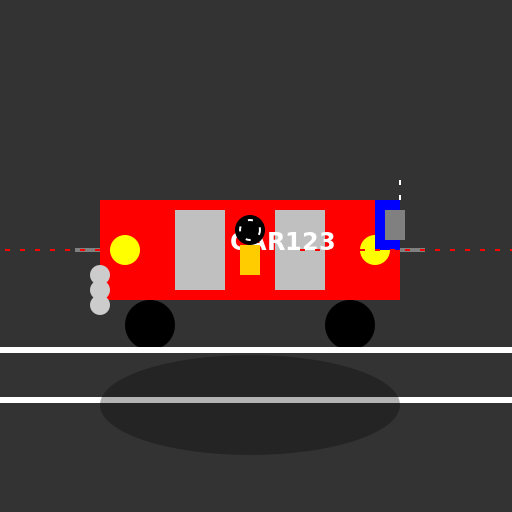

Javascript Code
                        // Title: Speeding Through the City

// Let's draw a car speeding through the city streets!


ctx.fillStyle = "#333333"; // Setting the background color to dark gray

ctx.fillRect(0, 0, 512, 512); // Filling the canvas with the background color


// Drawing the body of the car

ctx.fillStyle = "#FF0000"; // Setting the car body color to red

ctx.fillRect(100, 200, 300, 100); // Drawing the car body rectangle


// Drawing the wheels of the car

ctx.fillStyle = "#000000"; // Setting the wheel color to black

ctx.beginPath(); // Starting a new path for the first wheel

ctx.arc(150, 325, 25, 0, 2 * Math.PI); // Drawing the first wheel

ctx.fill(); // Filling the first wheel

ctx.beginPath(); // Starting a new path for the second wheel

ctx.arc(350, 325, 25, 0, 2 * Math.PI); // Drawing the second wheel

ctx.fill(); // Filling the second wheel


// Drawing the windows of the car

ctx.fillStyle = "#C0C0C0"; // Setting the window color to light gray

ctx.fillRect(175, 210, 50, 80); // Drawing the left window rectangle

ctx.fillRect(275, 210, 50, 80); // Drawing the right window rectangle


// Drawing the headlights of the car

ctx.fillStyle = "#FFFF00"; // Setting the headlight color to yellow

ctx.beginPath(); // Starting a new path for the first headlight

ctx.arc(125, 250, 15, 0, 2 * Math.PI); // Drawing the first headlight

ctx.fill(); // Filling the first headlight

ctx.beginPath(); // Starting a new path for the second headlight

ctx.arc(375, 250, 15, 0, 2 * Math.PI); // Drawing the second headlight

ctx.fill(); // Filling the second headlight


// Drawing the license plate of the car

ctx.fillStyle = "#FFFFFF"; // Setting the license plate color to white

ctx.font = "bold 24px Arial"; // Setting the font for the license plate text

ctx.fillText("CAR123", 230, 250); // Drawing the license plate text


// Drawing the exhaust pipes of the car

ctx.strokeStyle = "#808080"; // Setting the exhaust pipe color to gray

ctx.lineWidth = 4; // Setting the line width for the exhaust pipes

ctx.beginPath(); // Starting a new path for the first exhaust pipe

ctx.moveTo(75, 250); // Moving to the starting point of the first exhaust pipe

ctx.lineTo(100, 250); // Drawing the first exhaust pipe

ctx.stroke(); // Stroking the first exhaust pipe

ctx.beginPath(); // Starting a new path for the second exhaust pipe

ctx.moveTo(400, 250); // Moving to the starting point of the second exhaust pipe

ctx.lineTo(425, 250); // Drawing the second exhaust pipe

ctx.stroke(); // Stroking the second exhaust pipe


// Drawing the rear spoiler of the car

ctx.fillStyle = "#0000FF"; // Setting the spoiler color to blue

ctx.fillRect(375, 200, 25, 50); // Drawing the rear spoiler rectangle


// Drawing the road lines

ctx.strokeStyle = "#FFFFFF"; // Setting the road line color to white

ctx.lineWidth = 6; // Setting the line width for the road lines

ctx.beginPath(); // Starting a new path for the first road line

ctx.moveTo(0, 350); // Moving to the starting point of the first road line

ctx.lineTo(512, 350); // Drawing the first road line

ctx.stroke(); // Stroking the first road line

ctx.beginPath(); // Starting a new path for the second road line

ctx.moveTo(0, 400); // Moving to the starting point of the second road line

ctx.lineTo(512, 400); // Drawing the second road line

ctx.stroke(); // Stroking the second road line


// Drawing the speed lines to show the car's speed

ctx.strokeStyle = "#FF0000"; // Setting the speed line color to red

ctx.lineWidth = 2; // Setting the line width for the speed lines

ctx.setLineDash([5, 10]); // Setting the dash pattern for the speed lines

ctx.beginPath(); // Starting a new path for the first speed line

ctx.moveTo(100, 250); // Moving to the starting point of the first speed line

ctx.lineTo(0, 250); // Drawing the first speed line

ctx.stroke(); // Stroking the first speed line

ctx.beginPath(); // Starting a new path for the second speed line

ctx.moveTo(300, 250); // Moving to the starting point of the second speed line

ctx.lineTo(512, 250); // Drawing the second speed line

ctx.stroke(); // Stroking the second speed line


// Drawing the driver inside the car

ctx.fillStyle = "#000000"; // Setting the driver color to black

ctx.beginPath(); // Starting a new path for the driver's head

ctx.arc(250, 230, 15, 0, 2 * Math.PI); // Drawing the driver's head

ctx.fill(); // Filling the driver's head

ctx.fillStyle = "#FFCC00"; // Setting the driver's shirt color to yellow

ctx.fillRect(240, 245, 20, 30); // Drawing the driver's shirt rectangle


// Drawing the steering wheel inside the car

ctx.strokeStyle = "#FFFFFF"; // Setting the steering wheel color to white

ctx.lineWidth = 2; // Setting the line width for the steering wheel

ctx.beginPath(); // Starting a new path for the steering wheel

ctx.arc(250, 230, 10, 0, 2 * Math.PI); // Drawing the steering wheel

ctx.stroke(); // Stroking the steering wheel


// Drawing the rearview mirror on the car

ctx.fillStyle = "#808080"; // Setting the rearview mirror color to gray

ctx.fillRect(385, 210, 20, 30); // Drawing the rearview mirror rectangle


// Drawing the antenna on the car

ctx.strokeStyle = "#FFFFFF"; // Setting the antenna color to white

ctx.lineWidth = 2; // Setting the line width for the antenna

ctx.beginPath(); // Starting a new path for the antenna

ctx.moveTo(400, 200); // Moving to the starting point of the antenna

ctx.lineTo(400, 180); // Drawing the antenna

ctx.stroke(); // Stroking the antenna


// Drawing the exhaust smoke from the car

ctx.fillStyle = "#CCCCCC"; // Setting the exhaust smoke color to light gray

ctx.beginPath(); // Starting a new path for the exhaust smoke

ctx.arc(100, 275, 10, 0, 2 * Math.PI); // Drawing the first exhaust smoke

ctx.arc(100, 290, 10, 0, 2 * Math.PI); // Drawing the second exhaust smoke

ctx.arc(100, 305, 10, 0, 2 * Math.PI); // Drawing the third exhaust smoke

ctx.fill(); // Filling the exhaust smoke


// Drawing the car's shadow

ctx.fillStyle = "rgba(0, 0, 0, 0.3)"; // Setting the shadow color to black with transparency

ctx.beginPath(); // Starting a new path for the car's shadow

ctx.ellipse(250, 405, 150, 50, 0, 0, 2 * Math.PI); // Drawing the car's shadow ellipse

ctx.fill(); // Filling the car's shadow


// All done! Time to hit the road!

// Vroom vroom!
AI
Model: gpt-3.5-turbo-16k-0613
Time: 26 seconds
Prompt Tokens: 174
Completion Tokens: 1630
Total Token Cost: 1804


 balloon party
 beautiful beach
 cute puppy dog
 happy cat
 house
house