
Javascript Code
                        /* Mia */


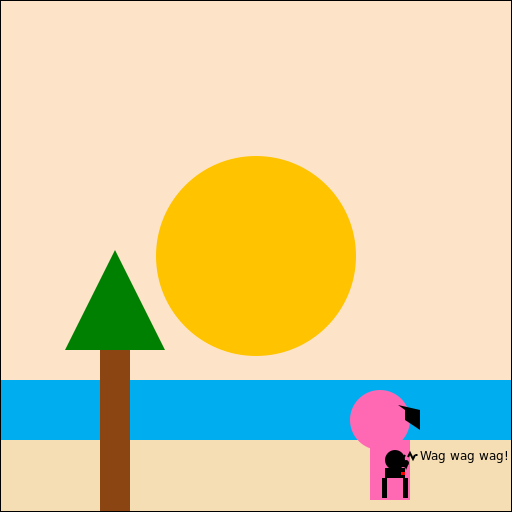
// Drawing a beautiful sunset on the beach, where Mia is enjoying the view with her pet dog


// Background - Sky

ctx.fillStyle = '#FDE4C8'; // Setting the fill color to a light orange

ctx.fillRect(0, 0, 512, 512); // Drawing a rectangle as the background


// Sun

ctx.fillStyle = '#FFC300'; // Setting the fill color to a bright yellow

ctx.beginPath(); // Starting a new path

ctx.arc(256, 256, 100, 0, Math.PI * 2); // Drawing a circle for the sun

ctx.fill(); // Filling the circle with the fill color


// Waves - Ocean

ctx.fillStyle = '#00AEEF'; // Setting the fill color to a vibrant blue

ctx.fillRect(0, 380, 512, 132); // Drawing a rectangle for the ocean waves


// Beach

ctx.fillStyle = '#F5DEB3'; // Setting the fill color to a sandy brown

ctx.fillRect(0, 440, 512, 72); // Drawing a rectangle for the sandy beach


// Palm tree

ctx.fillStyle = '#8B4513'; // Setting the fill color to a dark brown

ctx.fillRect(100, 330, 30, 220); // Drawing the trunk of the palm tree


// Palm tree leaves

ctx.fillStyle = '#008000'; // Setting the fill color to a vibrant green

ctx.beginPath(); // Starting a new path

ctx.moveTo(115, 250); // Moving to the top of the leaves

ctx.lineTo(65, 350); // Drawing the left leaf

ctx.lineTo(165, 350); // Drawing the right leaf

ctx.closePath(); // Closing the path

ctx.fill(); // Filling the leaves with the fill color


// Mia

ctx.fillStyle = '#FF69B4'; // Setting the fill color to a lovely pink

ctx.beginPath(); // Starting a new path

ctx.arc(380, 420, 30, 0, Math.PI * 2); // Drawing a circle for Mia's head

ctx.fill(); // Filling the circle with the fill color


// Mia's hair

ctx.fillStyle = '#000000'; // Setting the fill color to black

ctx.beginPath(); // Starting a new path

ctx.moveTo(398, 405); // Moving to the top of Mia's hair

ctx.lineTo(420, 410); // Drawing the first strand of hair

ctx.lineTo(420, 430); // Drawing the second strand of hair

ctx.lineTo(405, 420); // Drawing the third strand of hair

ctx.lineTo(405, 410); // Drawing the fourth strand of hair

ctx.closePath(); // Closing the path

ctx.fill(); // Filling the hair with the fill color


// Mia's body

ctx.fillStyle = '#FF69B4'; // Setting the fill color to a lovely pink

ctx.fillRect(370, 440, 40, 60); // Drawing a rectangle for Mia's body


// Mia's pet dog

ctx.fillStyle = '#000000'; // Setting the fill color to black

ctx.beginPath(); // Starting a new path

ctx.arc(395, 460, 10, 0, Math.PI * 2); // Drawing a circle for the dog's head

ctx.fill(); // Filling the circle with the fill color


// Mia's dog's tail

ctx.strokeStyle = '#000000'; // Setting the stroke color to black

ctx.lineWidth = 2; // Setting the line width

ctx.beginPath(); // Starting a new path

ctx.moveTo(402, 460); // Moving to the base of the tail

ctx.lineTo(405, 455); // Drawing the tail

ctx.stroke(); // Stroking the path


// Mia's dog's ears

ctx.fillStyle = '#000000'; // Setting the fill color to black

ctx.beginPath(); // Starting a new path

ctx.moveTo(390, 455); // Moving to the top of the left ear

ctx.lineTo(385, 460); // Drawing the left ear

ctx.lineTo(390, 465); // Drawing the right ear

ctx.closePath(); // Closing the path

ctx.fill(); // Filling the ears with the fill color


// Mia's dog's body

ctx.fillStyle = '#000000'; // Setting the fill color to black

ctx.fillRect(385, 468, 20, 10); // Drawing a rectangle for the dog's body


// Mia's dog's legs

ctx.fillStyle = '#000000'; // Setting the fill color to black

ctx.fillRect(382, 478, 5, 20); // Drawing the left leg

ctx.fillRect(403, 478, 5, 20); // Drawing the right leg


// Mia's dog's tail wagging

ctx.strokeStyle = '#000000'; // Setting the stroke color to black

ctx.lineWidth = 2; // Setting the line width

ctx.beginPath(); // Starting a new path

ctx.moveTo(408, 457); // Moving to the tip of the tail

ctx.lineTo(410, 453); // Drawing the first wag

ctx.lineTo(413, 459); // Drawing the second wag

ctx.lineTo(415, 455); // Drawing the third wag

ctx.stroke(); // Stroking the path


// Mia's dog's happy face

ctx.fillStyle = '#000000'; // Setting the fill color to black

ctx.beginPath(); // Starting a new path

ctx.arc(400, 463, 3, 0, Math.PI * 2); // Drawing the left eye

ctx.arc(406, 463, 3, 0, Math.PI * 2); // Drawing the right eye

ctx.arc(403, 470, 3, 0, Math.PI, true); // Drawing the mouth

ctx.fill(); // Filling the face with the fill color


// Mia's dog's tongue

ctx.fillStyle = '#FF0000'; // Setting the fill color to red

ctx.beginPath(); // Starting a new path

ctx.moveTo(401, 472); // Moving to the top of the tongue

ctx.lineTo(401, 475); // Drawing the left side of the tongue

ctx.lineTo(405, 475); // Drawing the bottom of the tongue

ctx.lineTo(405, 472); // Drawing the right side of the tongue

ctx.closePath(); // Closing the path

ctx.fill(); // Filling the tongue with the fill color


// Mia's dog's wagging tail motion lines

ctx.strokeStyle = '#000000'; // Setting the stroke color to black

ctx.lineWidth = 1; // Setting the line width

ctx.beginPath(); // Starting a new path

ctx.moveTo(415, 455); // Moving to the first motion line position

ctx.lineTo(417, 455); // Drawing the first motion line

ctx.moveTo(416, 454); // Moving to the second motion line position

ctx.lineTo(416, 456); // Drawing the second motion line

ctx.moveTo(417, 454); // Moving to the third motion line position

ctx.lineTo(417, 456); // Drawing the third motion line

ctx.stroke(); // Stroking the path


// Mia's dog's tail wags caption

ctx.font = '12px Arial'; // Setting the font style

ctx.fillStyle = '#000000'; // Setting the fill color to black

ctx.fillText('Wag wag wag!', 420, 460); // Adding the caption


// Finishing touches

ctx.strokeStyle = '#000000'; // Setting the stroke color to black

ctx.lineWidth = 2; // Setting the line width

ctx.strokeRect(0, 0, 512, 512); // Drawing a border around the canvas


// All done!

// "Mia, the beach, and her wagging dog - a perfect sunset scene!"
AI
Model: gpt-3.5-turbo-16k-0613
Time: 47 seconds
Prompt Tokens: 173
Completion Tokens: 1666
Total Token Cost: 1839


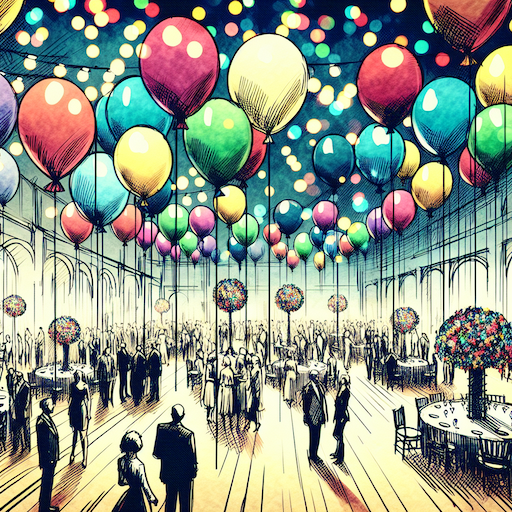 balloon party
 beautiful beach
 cute puppy dog
 happy cat
 house
house