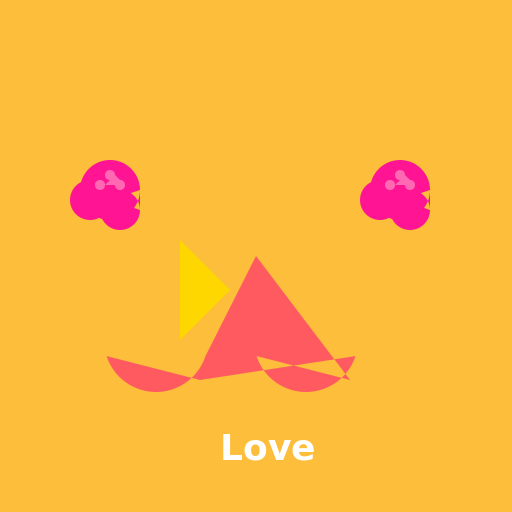

Javascript Code
                        // Heart crossed by an arrow with roses around in a sunset


// Creating the sunset background

ctx.fillStyle = "#FDBE3B"; // Setting the sky color to a warm yellow

ctx.fillRect(0, 0, 512, 512); // Filling the canvas with the sky color


// Drawing the sunset gradient

var gradient = ctx.createLinearGradient(0, 0, 0, 512); // Creating a linear gradient from top to bottom

ctx.fillStyle = gradient; // Setting the fill style to the gradient

ctx.fillRect(0, 0, 512, 512); // Filling the canvas with the gradient


// Drawing the heart

ctx.beginPath(); // Starting the path for the heart shape

ctx.moveTo(256, 256); // Moving to the center of the canvas

ctx.lineTo(350, 380); // Drawing the top right curve of the heart

ctx.arc(306, 340, 52, 0.9 * Math.PI, 2.1 * Math.PI, true); // Drawing the bottom curve of the heart

ctx.lineTo(200, 380); // Drawing the top left curve of the heart

ctx.arc(156, 340, 52, 0.9 * Math.PI, 2.1 * Math.PI, true); // Drawing the bottom curve of the heart

ctx.closePath(); // Closing the path

ctx.fillStyle = "#FF5A5F"; // Setting the fill color to a bright red

ctx.fill(); // Filling the heart shape


// Drawing the arrow

ctx.beginPath(); // Starting the path for the arrow

ctx.moveTo(180, 240); // Moving to the arrow's starting point

ctx.lineTo(230, 290); // Drawing the upper part of the arrow

ctx.lineTo(180, 340); // Drawing the lower part of the arrow

ctx.lineTo(180, 290); // Drawing the tail of the arrow

ctx.closePath(); // Closing the path

ctx.fillStyle = "#FFD700"; // Setting the fill color to a golden yellow

ctx.fill(); // Filling the arrow shape


// Drawing the roses

ctx.fillStyle = "#FF1493"; // Setting the fill color to a vibrant pink

ctx.beginPath(); // Starting the path for the first rose

ctx.arc(110, 190, 30, 0, 2 * Math.PI); // Drawing the first rose's center

ctx.arc(90, 200, 20, 0, 2 * Math.PI); // Drawing the first rose's petals

ctx.arc(120, 210, 20, 0, 2 * Math.PI); // Drawing the first rose's petals

ctx.fill(); // Filling the first rose shape


ctx.beginPath(); // Starting the path for the second rose

ctx.arc(400, 190, 30, 0, 2 * Math.PI); // Drawing the second rose's center

ctx.arc(380, 200, 20, 0, 2 * Math.PI); // Drawing the second rose's petals

ctx.arc(410, 210, 20, 0, 2 * Math.PI); // Drawing the second rose's petals

ctx.fill(); // Filling the second rose shape


// Adding some details to the roses

ctx.fillStyle = "#FF69B4"; // Setting the fill color to a lighter pink

ctx.beginPath(); // Starting the path for the first rose's details

ctx.arc(100, 185, 5, 0, 2 * Math.PI); // Drawing the first rose's details

ctx.arc(110, 175, 5, 0, 2 * Math.PI); // Drawing the first rose's details

ctx.arc(120, 185, 5, 0, 2 * Math.PI); // Drawing the first rose's details

ctx.fill(); // Filling the first rose's details


ctx.beginPath(); // Starting the path for the second rose's details

ctx.arc(390, 185, 5, 0, 2 * Math.PI); // Drawing the second rose's details

ctx.arc(400, 175, 5, 0, 2 * Math.PI); // Drawing the second rose's details

ctx.arc(410, 185, 5, 0, 2 * Math.PI); // Drawing the second rose's details

ctx.fill(); // Filling the second rose's details


// Adding some final touches

ctx.fillStyle = "#FFFFFF"; // Setting the fill color to white

ctx.font = "bold 36px Arial"; // Setting the font for the text

ctx.fillText("Love", 220, 460); // Writing "Love" below the heart


// Voilà! A heart crossed by an arrow with roses around in a sunset!


// Now I'm off to draw some more lovey-dovey stuff! 🌹❤️
AI
Model: gpt-3.5-turbo-16k-0613
Time: 32 seconds
Prompt Tokens: 182
Completion Tokens: 1066
Total Token Cost: 1248


 balloon party
 beautiful beach
 cute puppy dog
 happy cat
 house
house