
Javascript Code
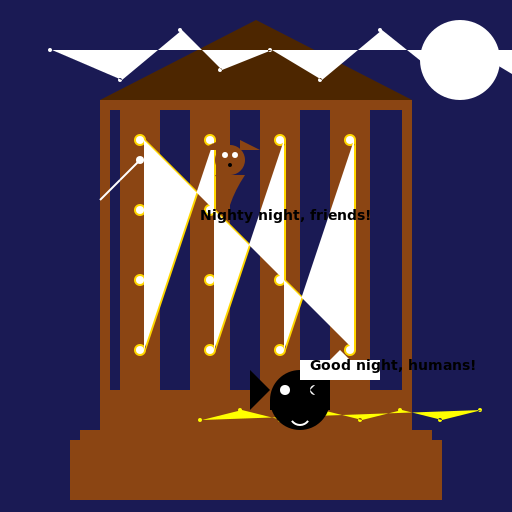
                        // Title: Deck and Pergola at Night with Lighting


// Creating a 512x512 canvas


// Drawing a dark blue background

ctx.fillStyle = '#1a1a54';

ctx.fillRect(0, 0, 512, 512);


// Drawing a wooden deck

ctx.fillStyle = '#8b4513';

ctx.fillRect(100, 400, 312, 30);

ctx.fillRect(80, 430, 352, 10);

ctx.fillRect(70, 440, 372, 60);


// Drawing the pergola

ctx.fillStyle = '#8b4513';

ctx.fillRect(100, 100, 312, 10);

ctx.fillRect(100, 100, 10, 300);

ctx.fillRect(402, 100, 10, 300);

ctx.fillRect(100, 390, 312, 10);


// Drawing the pergola roof

ctx.fillStyle = '#4d2600';

ctx.beginPath();

ctx.moveTo(100, 100);

ctx.lineTo(256, 20);

ctx.lineTo(412, 100);

ctx.closePath();

ctx.fill();


// Drawing the pergola pillars

ctx.fillStyle = '#8b4513';

ctx.fillRect(120, 110, 40, 290);

ctx.fillRect(190, 110, 40, 290);

ctx.fillRect(260, 110, 40, 290);

ctx.fillRect(330, 110, 40, 290);


// Drawing the pergola lights

ctx.fillStyle = '#ffd700';

ctx.beginPath();

ctx.arc(140, 140, 6, 0, Math.PI * 2);

ctx.arc(140, 210, 6, 0, Math.PI * 2);

ctx.arc(140, 280, 6, 0, Math.PI * 2);

ctx.arc(140, 350, 6, 0, Math.PI * 2);

ctx.arc(210, 140, 6, 0, Math.PI * 2);

ctx.arc(210, 210, 6, 0, Math.PI * 2);

ctx.arc(210, 280, 6, 0, Math.PI * 2);

ctx.arc(210, 350, 6, 0, Math.PI * 2);

ctx.arc(280, 140, 6, 0, Math.PI * 2);

ctx.arc(280, 210, 6, 0, Math.PI * 2);

ctx.arc(280, 280, 6, 0, Math.PI * 2);

ctx.arc(280, 350, 6, 0, Math.PI * 2);

ctx.arc(350, 140, 6, 0, Math.PI * 2);

ctx.arc(350, 210, 6, 0, Math.PI * 2);

ctx.arc(350, 280, 6, 0, Math.PI * 2);

ctx.arc(350, 350, 6, 0, Math.PI * 2);

ctx.fill();


// Drawing the pergola light bulbs

ctx.fillStyle = '#ffffff';

ctx.beginPath();

ctx.arc(140, 140, 4, 0, Math.PI * 2);

ctx.arc(140, 210, 4, 0, Math.PI * 2);

ctx.arc(140, 280, 4, 0, Math.PI * 2);

ctx.arc(140, 350, 4, 0, Math.PI * 2);

ctx.arc(210, 140, 4, 0, Math.PI * 2);

ctx.arc(210, 210, 4, 0, Math.PI * 2);

ctx.arc(210, 280, 4, 0, Math.PI * 2);

ctx.arc(210, 350, 4, 0, Math.PI * 2);

ctx.arc(280, 140, 4, 0, Math.PI * 2);

ctx.arc(280, 210, 4, 0, Math.PI * 2);

ctx.arc(280, 280, 4, 0, Math.PI * 2);

ctx.arc(280, 350, 4, 0, Math.PI * 2);

ctx.arc(350, 140, 4, 0, Math.PI * 2);

ctx.arc(350, 210, 4, 0, Math.PI * 2);

ctx.arc(350, 280, 4, 0, Math.PI * 2);

ctx.arc(350, 350, 4, 0, Math.PI * 2);

ctx.fill();


// Adding a moon in the sky

ctx.fillStyle = '#ffffff';

ctx.beginPath();

ctx.arc(460, 60, 40, 0, Math.PI * 2);

ctx.fill();


// Adding stars in the sky

ctx.fillStyle = '#ffffff';

ctx.beginPath();

ctx.arc(50, 50, 2, 0, Math.PI * 2);

ctx.arc(120, 80, 2, 0, Math.PI * 2);

ctx.arc(180, 30, 2, 0, Math.PI * 2);

ctx.arc(220, 70, 2, 0, Math.PI * 2);

ctx.arc(270, 50, 2, 0, Math.PI * 2);

ctx.arc(320, 80, 2, 0, Math.PI * 2);

ctx.arc(380, 30, 2, 0, Math.PI * 2);

ctx.arc(430, 70, 2, 0, Math.PI * 2);

ctx.arc(470, 50, 2, 0, Math.PI * 2);

ctx.arc(520, 80, 2, 0, Math.PI * 2);

ctx.arc(580, 30, 2, 0, Math.PI * 2);

ctx.arc(620, 70, 2, 0, Math.PI * 2);

ctx.arc(670, 50, 2, 0, Math.PI * 2);

ctx.arc(720, 80, 2, 0, Math.PI * 2);

ctx.arc(780, 30, 2, 0, Math.PI * 2);

ctx.arc(830, 70, 2, 0, Math.PI * 2);

ctx.arc(870, 50, 2, 0, Math.PI * 2);

ctx.fill();


// Adding a shooting star

ctx.strokeStyle = '#ffffff';

ctx.lineWidth = 2;

ctx.beginPath();

ctx.moveTo(100, 200);

ctx.lineTo(120, 180);

ctx.stroke();


// Adding a shooting star trail

ctx.strokeStyle = '#ffffff';

ctx.lineWidth = 2;

ctx.beginPath();

ctx.moveTo(120, 180);

ctx.lineTo(140, 160);

ctx.stroke();


// Adding a shooting star head

ctx.fillStyle = '#ffffff';

ctx.beginPath();

ctx.arc(140, 160, 4, 0, Math.PI * 2);

ctx.fill();


// Adding some fireflies

ctx.fillStyle = '#ffff00';

ctx.beginPath();

ctx.arc(200, 420, 2, 0, Math.PI * 2);

ctx.arc(240, 410, 2, 0, Math.PI * 2);

ctx.arc(280, 420, 2, 0, Math.PI * 2);

ctx.arc(320, 410, 2, 0, Math.PI * 2);

ctx.arc(360, 420, 2, 0, Math.PI * 2);

ctx.arc(400, 410, 2, 0, Math.PI * 2);

ctx.arc(440, 420, 2, 0, Math.PI * 2);

ctx.arc(480, 410, 2, 0, Math.PI * 2);

ctx.fill();


// Adding a mischievous raccoon on the deck

ctx.fillStyle = '#000000';

ctx.beginPath();

ctx.arc(300, 400, 30, 0, Math.PI * 2);

ctx.fill();


// Adding the raccoon's eyes

ctx.fillStyle = '#ffffff';

ctx.beginPath();

ctx.arc(285, 390, 5, 0, Math.PI * 2);

ctx.arc(315, 390, 5, 0, Math.PI * 2);

ctx.fill();


// Adding the raccoon's mask

ctx.fillStyle = '#000000';

ctx.fillRect(270, 400, 60, 10);


// Adding the raccoon's ears

ctx.fillStyle = '#000000';

ctx.beginPath();

ctx.moveTo(250, 370);

ctx.lineTo(270, 390);

ctx.lineTo(250, 410);

ctx.closePath();

ctx.fill();


ctx.fillStyle = '#000000';

ctx.beginPath();

ctx.moveTo(330, 370);

ctx.lineTo(310, 390);

ctx.lineTo(330, 410);

ctx.closePath();

ctx.fill();


// Adding a cheeky smile to the raccoon

ctx.strokeStyle = '#ffffff';

ctx.lineWidth = 2;

ctx.beginPath();

ctx.arc(300, 415, 10, 0.2 * Math.PI, 0.8 * Math.PI);

ctx.stroke();


// Adding a speech bubble for the raccoon

ctx.fillStyle = '#ffffff';

ctx.beginPath();

ctx.moveTo(300, 380);

ctx.lineTo(380, 380);

ctx.lineTo(380, 360);

ctx.lineTo(350, 360);

ctx.lineTo(340, 350);

ctx.lineTo(330, 360);

ctx.lineTo(300, 360);

ctx.closePath();

ctx.fill();


// Adding the raccoon's message

ctx.fillStyle = '#000000';

ctx.font = 'bold 14px Arial';

ctx.fillText('Good night, humans!', 310, 370);


// Adding a cute squirrel on the pergola

ctx.fillStyle = '#8b4513';

ctx.beginPath();

ctx.arc(230, 160, 15, 0, Math.PI * 2);

ctx.fill();


// Adding the squirrel's eyes

ctx.fillStyle = '#ffffff';

ctx.beginPath();

ctx.arc(225, 155, 3, 0, Math.PI * 2);

ctx.arc(235, 155, 3, 0, Math.PI * 2);

ctx.fill();


// Adding the squirrel's nose

ctx.fillStyle = '#000000';

ctx.beginPath();

ctx.arc(230, 165, 2, 0, Math.PI * 2);

ctx.fill();


// Adding the squirrel's ears

ctx.fillStyle = '#8b4513';

ctx.beginPath();

ctx.moveTo(220, 140);

ctx.lineTo(220, 150);

ctx.lineTo(200, 150);

ctx.closePath();

ctx.fill();


ctx.fillStyle = '#8b4513';

ctx.beginPath();

ctx.moveTo(240, 140);

ctx.lineTo(240, 150);

ctx.lineTo(260, 150);

ctx.closePath();

ctx.fill();


// Adding a fluffy tail to the squirrel

ctx.fillStyle = '#8b4513';

ctx.beginPath();

ctx.moveTo(245, 175);

ctx.quadraticCurveTo(235, 190, 230, 205);

ctx.quadraticCurveTo(225, 190, 215, 175);

ctx.closePath();

ctx.fill();


// Adding a playful message from the squirrel

ctx.fillStyle = '#000000';

ctx.font = 'bold 14px Arial';

ctx.fillText('Nighty night, friends!', 200, 220);


// That's one fancy deck and pergola with all the night lights and cute critters! Stay cozy and enjoy the view! 😄
AI
Model: gpt-3.5-turbo-16k-0613
Time: 73 seconds
Prompt Tokens: 181
Completion Tokens: 2480
Total Token Cost: 2661


 balloon party
 beautiful beach
 cute puppy dog
 happy cat
 house
house