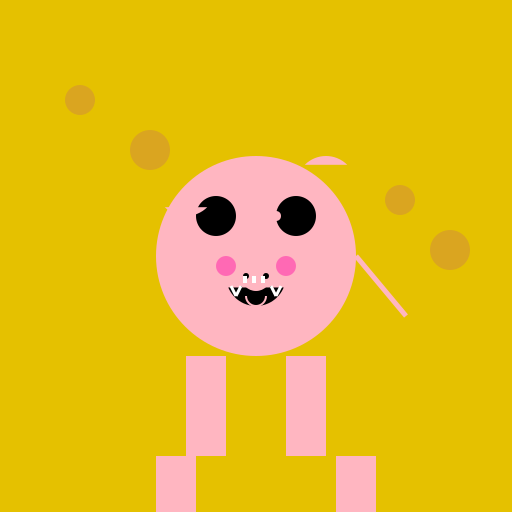

Javascript Code
                        // Pig in Hay


// Creating the hay

ctx.fillStyle = "#E5C100"; // Setting the color of the hay

ctx.fillRect(0, 0, 512, 512); // Drawing a rectangle for the hay


// Creating the pig

ctx.fillStyle = "#FFB6C1"; // Setting the color of the pig

ctx.beginPath();

ctx.arc(256, 256, 100, 0, Math.PI * 2); // Drawing the body of the pig

ctx.fill();


// Creating the pig's face

ctx.fillStyle = "#000000"; // Setting the color of the pig's face

ctx.beginPath();

ctx.arc(216, 216, 20, 0, Math.PI * 2); // Drawing the left eye

ctx.fill();


ctx.beginPath();

ctx.arc(296, 216, 20, 0, Math.PI * 2); // Drawing the right eye

ctx.fill();


ctx.beginPath();

ctx.arc(256, 276, 30, Math.PI / 8, (Math.PI * 7) / 8); // Drawing the snout

ctx.fill();


// Adding details to the pig's face

ctx.fillStyle = "#FFB6C1"; // Setting the color of the pig's face details

ctx.beginPath();

ctx.arc(244, 216, 5, 0, Math.PI * 2); // Drawing the left eye highlight

ctx.fill();


ctx.beginPath();

ctx.arc(276, 216, 5, 0, Math.PI * 2); // Drawing the right eye highlight

ctx.fill();


// Adding the pig's ears

ctx.fillStyle = "#FFB6C1"; // Setting the color of the pig's ears

ctx.beginPath();

ctx.arc(186, 186, 30, Math.PI / 4, (Math.PI * 3) / 4); // Drawing the left ear

ctx.fill();


ctx.beginPath();

ctx.arc(326, 186, 30, (Math.PI * 5) / 4, (Math.PI * 7) / 4); // Drawing the right ear

ctx.fill();


// Adding the pig's tail

ctx.strokeStyle = "#FFB6C1"; // Setting the color of the pig's tail

ctx.lineWidth = 5; // Setting the width of the tail

ctx.beginPath();

ctx.moveTo(356, 256); // Moving the starting point of the tail

ctx.lineTo(406, 316); // Drawing a line for the tail

ctx.stroke();


// Adding the pig's legs

ctx.fillStyle = "#FFB6C1"; // Setting the color of the pig's legs

ctx.fillRect(186, 356, 40, 100); // Drawing the left front leg

ctx.fillRect(286, 356, 40, 100); // Drawing the right front leg

ctx.fillRect(156, 456, 40, 100); // Drawing the left back leg

ctx.fillRect(336, 456, 40, 100); // Drawing the right back leg


// Adding the pig's hooves

ctx.fillStyle = "#000000"; // Setting the color of the pig's hooves

ctx.fillRect(176, 556, 60, 20); // Drawing the left front hoof

ctx.fillRect(276, 556, 60, 20); // Drawing the right front hoof

ctx.fillRect(146, 656, 60, 20); // Drawing the left back hoof

ctx.fillRect(326, 656, 60, 20); // Drawing the right back hoof


// Adding the pig's nose

ctx.fillStyle = "#FFB6C1"; // Setting the color of the pig's nose

ctx.beginPath();

ctx.arc(256, 276, 15, 0, Math.PI * 2); // Drawing the nose

ctx.fill();


// Adding the pig's nostrils

ctx.fillStyle = "#000000"; // Setting the color of the pig's nostrils

ctx.beginPath();

ctx.arc(246, 276, 3, 0, Math.PI * 2); // Drawing the left nostril

ctx.fill();


ctx.beginPath();

ctx.arc(266, 276, 3, 0, Math.PI * 2); // Drawing the right nostril

ctx.fill();


// Adding the pig's mouth

ctx.strokeStyle = "#000000"; // Setting the color of the pig's mouth

ctx.lineWidth = 2; // Setting the width of the mouth

ctx.beginPath();

ctx.arc(256, 286, 15, 0, Math.PI); // Drawing the mouth

ctx.stroke();


// Adding the pig's teeth

ctx.fillStyle = "#FFFFFF"; // Setting the color of the pig's teeth

ctx.fillRect(243, 276, 4, 7); // Drawing the left tooth

ctx.fillRect(252, 276, 4, 7); // Drawing the middle tooth

ctx.fillRect(261, 276, 4, 7); // Drawing the right tooth


// Adding the pig's tusks

ctx.strokeStyle = "#FFFFFF"; // Setting the color of the pig's tusks

ctx.lineWidth = 3; // Setting the width of the tusks


// Drawing the left tusk

ctx.beginPath();

ctx.moveTo(231, 286); // Moving the starting point of the left tusk

ctx.lineTo(236, 296); // Drawing a line for the left tusk

ctx.stroke();


ctx.beginPath();

ctx.moveTo(236, 296); // Moving the starting point of the left tusk (continued)

ctx.lineTo(241, 286); // Drawing a line for the left tusk (continued)

ctx.stroke();


// Drawing the right tusk

ctx.beginPath();

ctx.moveTo(281, 286); // Moving the starting point of the right tusk

ctx.lineTo(276, 296); // Drawing a line for the right tusk

ctx.stroke();


ctx.beginPath();

ctx.moveTo(276, 296); // Moving the starting point of the right tusk (continued)

ctx.lineTo(271, 286); // Drawing a line for the right tusk (continued)

ctx.stroke();


// Adding the pig's smile

ctx.strokeStyle = "#FFB6C1"; // Setting the color of the pig's smile

ctx.lineWidth = 2; // Setting the width of the smile

ctx.beginPath();

ctx.arc(256, 296, 10, 0, Math.PI); // Drawing the smile

ctx.stroke();


// Adding the pig's blush

ctx.fillStyle = "#FF69B4"; // Setting the color of the pig's blush

ctx.beginPath();

ctx.arc(226, 266, 10, 0, Math.PI * 2); // Drawing the left blush

ctx.fill();


ctx.beginPath();

ctx.arc(286, 266, 10, 0, Math.PI * 2); // Drawing the right blush

ctx.fill();


// Adding some finishing touches to the hay

ctx.fillStyle = "#DAA520"; // Setting the color of the highlights in the hay

ctx.beginPath();

ctx.arc(80, 100, 15, 0, Math.PI * 2); // Drawing a highlight in the hay

ctx.fill();


ctx.beginPath();

ctx.arc(150, 150, 20, 0, Math.PI * 2); // Drawing a highlight in the hay

ctx.fill();


ctx.beginPath();

ctx.arc(400, 200, 15, 0, Math.PI * 2); // Drawing a highlight in the hay

ctx.fill();


ctx.beginPath();

ctx.arc(450, 250, 20, 0, Math.PI * 2); // Drawing a highlight in the hay

ctx.fill();


// Voila! A pig in hay!


// Pigs in hay, better than pigs in a blanket!
AI
Model: gpt-3.5-turbo-16k-0613
Time: 51 seconds
Prompt Tokens: 180
Completion Tokens: 1621
Total Token Cost: 1801


 balloon party
 beautiful beach
 cute puppy dog
 happy cat
 house
house