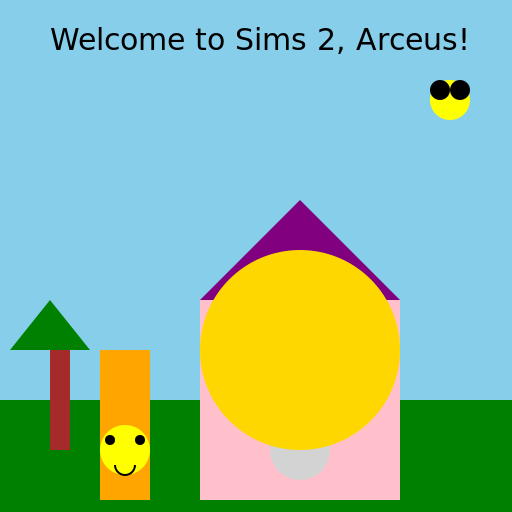

Javascript Code
                        // Title: Arceus in the Sims 2

// Let's bring Arceus, the legendary Pokemon, into the world of Sims 2!

// Time to create some artistic chaos!


ctx.fillStyle = "skyblue"; // Setting the sky color to a calm blue

ctx.fillRect(0, 0, 512, 512); // Creating the sky background


ctx.fillStyle = "green"; // Setting the ground color to a vibrant green

ctx.fillRect(0, 400, 512, 112); // Creating the ground


// Drawing a house for Arceus to live in

ctx.fillStyle = "pink"; // Giving the house a cute pink color

ctx.fillRect(200, 300, 200, 200); // Creating the house structure


// Adding a roof to the house

ctx.beginPath();

ctx.moveTo(200, 300);

ctx.lineTo(300, 200);

ctx.lineTo(400, 300);

ctx.closePath();

ctx.fillStyle = "purple"; // Using a lovely purple color for the roof

ctx.fill();


// Drawing Arceus

ctx.beginPath();

ctx.arc(300, 350, 50, 0, Math.PI * 2); // Drawing Arceus' head

ctx.fillStyle = "lightgray"; // Giving Arceus a soft gray color

ctx.fill();


ctx.beginPath();

ctx.arc(250, 325, 20, 0, Math.PI * 2); // Drawing Arceus' left eye

ctx.fillStyle = "white"; // Adding a white color to the eye

ctx.fill();


ctx.beginPath();

ctx.arc(350, 325, 20, 0, Math.PI * 2); // Drawing Arceus' right eye

ctx.fillStyle = "white"; // Adding a white color to the eye

ctx.fill();


ctx.beginPath();

ctx.arc(300, 375, 10, 0, Math.PI); // Drawing Arceus' smiling mouth

ctx.strokeStyle = "black"; // Outlining the mouth with black

ctx.lineWidth = 2; // Setting the line width to 2

ctx.stroke();


ctx.beginPath();

ctx.arc(300, 400, 20, 0, Math.PI * 2); // Drawing Arceus' body

ctx.fillStyle = "lightgray"; // Giving Arceus' body the same soft gray color

ctx.fill();


ctx.beginPath();

ctx.arc(250, 400, 20, 0, Math.PI * 2); // Drawing Arceus' left arm

ctx.fillStyle = "lightgray"; // Giving Arceus' arm the same soft gray color

ctx.fill();


ctx.beginPath();

ctx.arc(350, 400, 20, 0, Math.PI * 2); // Drawing Arceus' right arm

ctx.fillStyle = "lightgray"; // Giving Arceus' arm the same soft gray color

ctx.fill();


ctx.beginPath();

ctx.arc(300, 450, 30, 0, Math.PI * 2); // Drawing Arceus' tail

ctx.fillStyle = "lightgray"; // Giving Arceus' tail the same soft gray color

ctx.fill();


ctx.fillStyle = "gold"; // Giving Arceus' rings a shiny gold color

ctx.beginPath();

ctx.arc(300, 350, 60, 0, Math.PI * 2); // Drawing the first ring

ctx.fill();


ctx.beginPath();

ctx.arc(300, 350, 80, 0, Math.PI * 2); // Drawing the second ring

ctx.fill();


ctx.beginPath();

ctx.arc(300, 350, 100, 0, Math.PI * 2); // Drawing the third ring

ctx.fill();


// Adding a friendly neighbor

ctx.fillStyle = "orange"; // Giving the neighbor a warm orange color

ctx.fillRect(100, 350, 50, 150); // Creating the neighbor's house


// Adding a smiling face to the neighbor's house

ctx.beginPath();

ctx.arc(125, 450, 25, 0, Math.PI * 2); // Drawing the neighbor's head

ctx.fillStyle = "yellow"; // Giving the head a bright yellow color

ctx.fill();


ctx.beginPath();

ctx.arc(110, 440, 5, 0, Math.PI * 2); // Drawing the left eye

ctx.fillStyle = "black"; // Adding a black color to the eye

ctx.fill();


ctx.beginPath();

ctx.arc(140, 440, 5, 0, Math.PI * 2); // Drawing the right eye

ctx.fillStyle = "black"; // Adding a black color to the eye

ctx.fill();


ctx.beginPath();

ctx.arc(125, 465, 10, 0, Math.PI); // Drawing the smiling mouth

ctx.strokeStyle = "black"; // Outlining the mouth with black

ctx.lineWidth = 2; // Setting the line width to 2

ctx.stroke();


// Time for Arceus to explore the Sims 2 world!

ctx.fillStyle = "black"; // Using black color for the text

ctx.font = "30px Arial"; // Setting the font style

ctx.fillText("Welcome to Sims 2, Arceus!", 50, 50); // Displaying the welcome message


// Let's add some trees to the environment

ctx.fillStyle = "brown"; // Giving the trunk a brown color

ctx.fillRect(50, 350, 20, 100); // Drawing the trunk


ctx.fillStyle = "green"; // Giving the leaves a green color

ctx.beginPath();

ctx.moveTo(10, 350);

ctx.lineTo(90, 350);

ctx.lineTo(50, 300);

ctx.closePath();

ctx.fill(); // Drawing the leaves


// And a little birdie in the sky

ctx.beginPath();

ctx.arc(450, 100, 20, 0, Math.PI * 2); // Drawing the bird's body

ctx.fillStyle = "yellow"; // Giving the body a bright yellow color

ctx.fill();


ctx.beginPath();

ctx.arc(440, 90, 10, 0, Math.PI * 2); // Drawing the bird's left eye

ctx.fillStyle = "black"; // Adding a black color to the eye

ctx.fill();


ctx.beginPath();

ctx.arc(460, 90, 10, 0, Math.PI * 2); // Drawing the bird's right eye

ctx.fillStyle = "black"; // Adding a black color to the eye

ctx.fill();


// Phew! That was a lot of drawing. Time for a well-deserved rest!

// Just imagine Arceus living a peaceful life in the Sims 2 world, surrounded by colorful characters.

// It's a delightful blend of fantasy and simulation, and definitely a sight to behold!
AI
Model: gpt-3.5-turbo-16k-0613
Time: 36 seconds
Prompt Tokens: 183
Completion Tokens: 1397
Total Token Cost: 1580


 balloon party
 beautiful beach
 cute puppy dog
 happy cat
 house
house