
Javascript Code
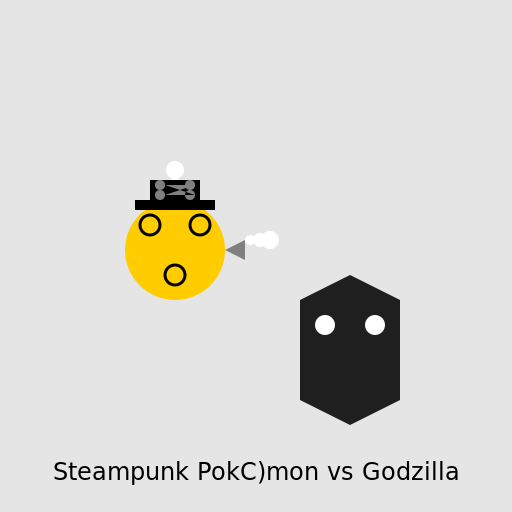
                        // Steampunk Pokémon fighting Godzilla


// Creating a steampunk background

ctx.fillStyle = "#e5e5e5"; // Setting background color

ctx.fillRect(0, 0, 512, 512); // Drawing background


// Drawing Godzilla

ctx.fillStyle = "#1f1f1f"; // Setting Godzilla's body color

ctx.beginPath(); // Start drawing Godzilla's body

ctx.moveTo(300, 300); // Starting point for Godzilla's body

ctx.lineTo(350, 275); // Drawing Godzilla's body

ctx.lineTo(400, 300); // Drawing Godzilla's body

ctx.lineTo(400, 400); // Drawing Godzilla's body

ctx.lineTo(350, 425); // Drawing Godzilla's body

ctx.lineTo(300, 400); // Drawing Godzilla's body

ctx.closePath(); // Closing the path for Godzilla's body

ctx.fill(); // Filling Godzilla's body


// Drawing Godzilla's eyes

ctx.fillStyle = "#ffffff"; // Setting eye color

ctx.beginPath(); // Start drawing Godzilla's eyes

ctx.arc(375, 325, 10, 0, Math.PI * 2); // Drawing Godzilla's eyes

ctx.arc(325, 325, 10, 0, Math.PI * 2); // Drawing Godzilla's eyes

ctx.closePath(); // Closing the path for Godzilla's eyes

ctx.fill(); // Filling Godzilla's eyes


// Drawing Steampunk Pokémon

ctx.fillStyle = "#ffcc00"; // Setting Pokémon's body color

ctx.beginPath(); // Start drawing Pokémon's body

ctx.arc(175, 250, 50, 0, Math.PI * 2); // Drawing Pokémon's body

ctx.closePath(); // Closing the path for Pokémon's body

ctx.fill(); // Filling Pokémon's body


// Drawing Pokémon's gears

ctx.strokeStyle = "#000000"; // Setting gear color

ctx.lineWidth = 3; // Setting gear width

ctx.beginPath(); // Start drawing Pokémon's gears

ctx.arc(150, 225, 10, 0, Math.PI * 2); // Drawing Pokémon's gears

ctx.stroke(); // Drawing Pokémon's gears

ctx.beginPath(); // Start drawing Pokémon's gears

ctx.arc(200, 225, 10, 0, Math.PI * 2); // Drawing Pokémon's gears

ctx.stroke(); // Drawing Pokémon's gears

ctx.beginPath(); // Start drawing Pokémon's gears

ctx.arc(175, 275, 10, 0, Math.PI * 2); // Drawing Pokémon's gears

ctx.stroke(); // Drawing Pokémon's gears


// Adding some steam

ctx.fillStyle = "#ffffff"; // Setting steam color

ctx.beginPath(); // Start drawing steam

ctx.arc(175, 200, 5, 0, Math.PI * 2); // Drawing steam

ctx.arc(175, 185, 7, 0, Math.PI * 2); // Drawing steam

ctx.arc(175, 170, 9, 0, Math.PI * 2); // Drawing steam

ctx.closePath(); // Closing the path for steam

ctx.fill(); // Filling steam


// Adding a top hat to Pokémon

ctx.fillStyle = "#000000"; // Setting top hat color

ctx.fillRect(150, 180, 50, 20); // Drawing top hat

ctx.fillRect(135, 200, 80, 10); // Drawing top hat


// Adding some gears to the top hat

ctx.fillStyle = "#808080"; // Setting gear color

ctx.beginPath(); // Start drawing gears

ctx.arc(160, 185, 5, 0, Math.PI * 2); // Drawing gears

ctx.arc(190, 185, 5, 0, Math.PI * 2); // Drawing gears

ctx.arc(160, 195, 5, 0, Math.PI * 2); // Drawing gears

ctx.arc(190, 195, 5, 0, Math.PI * 2); // Drawing gears

ctx.closePath(); // Closing the path for gears

ctx.fill(); // Filling gears


// Adding a steam-powered jetpack to Pokémon

ctx.fillStyle = "#808080"; // Setting jetpack color

ctx.beginPath(); // Start drawing jetpack

ctx.moveTo(225, 250); // Starting point for jetpack

ctx.lineTo(245, 260); // Drawing jetpack

ctx.lineTo(245, 240); // Drawing jetpack

ctx.closePath(); // Closing the path for jetpack

ctx.fill(); // Filling jetpack


// Adding some steam to the jetpack

ctx.fillStyle = "#ffffff"; // Setting steam color

ctx.beginPath(); // Start drawing steam

ctx.arc(250, 240, 5, 0, Math.PI * 2); // Drawing steam

ctx.arc(260, 240, 7, 0, Math.PI * 2); // Drawing steam

ctx.arc(270, 240, 9, 0, Math.PI * 2); // Drawing steam

ctx.closePath(); // Closing the path for steam

ctx.fill(); // Filling steam


// Adding a caption to the drawing

ctx.font = "24px Arial"; // Setting font size and type

ctx.fillStyle = "#000000"; // Setting text color

ctx.textAlign = "center"; // Centering the text

ctx.fillText("Steampunk Pokémon vs Godzilla", 256, 480); // Drawing the caption


// Hope you enjoy this epic battle of gears and steam!
AI
Model: gpt-3.5-turbo-16k-0613
Time: 23 seconds
Prompt Tokens: 180
Completion Tokens: 1143
Total Token Cost: 1323


 balloon party
 beautiful beach
 cute puppy dog
 happy cat
 house
house