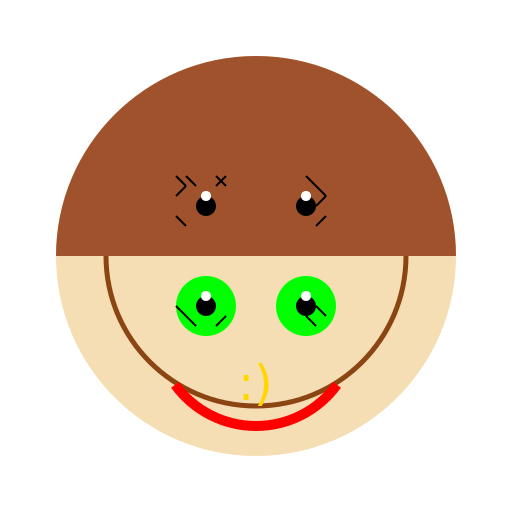

Javascript Code
                        // Human Head Covered in Eyeballs


// Drawing the background

ctx.fillStyle = "#FFFFFF"; // Setting the fill color to white

ctx.fillRect(0, 0, 512, 512); // Drawing a white background


// Drawing the head

ctx.fillStyle = "#F5DEB3"; // Setting the fill color to a light brown

ctx.beginPath(); // Start drawing the head

ctx.arc(256, 256, 200, 0, Math.PI * 2); // Drawing a circle for the head

ctx.closePath(); // Finish drawing the head

ctx.fill(); // Filling the head with the light brown color


// Drawing the eyeballs

ctx.fillStyle = "#00FF00"; // Setting the fill color to green

ctx.beginPath(); // Start drawing the eyeballs

ctx.arc(206, 206, 30, 0, Math.PI * 2); // Drawing the first eyeball on the upper left side of the head

ctx.closePath(); // Finish drawing the first eyeball

ctx.fill(); // Filling the first eyeball with green color


ctx.beginPath(); // Start drawing the second eyeball

ctx.arc(306, 206, 30, 0, Math.PI * 2); // Drawing the second eyeball on the upper right side of the head

ctx.closePath(); // Finish drawing the second eyeball

ctx.fill(); // Filling the second eyeball with green color


ctx.beginPath(); // Start drawing the third eyeball

ctx.arc(206, 306, 30, 0, Math.PI * 2); // Drawing the third eyeball on the lower left side of the head

ctx.closePath(); // Finish drawing the third eyeball

ctx.fill(); // Filling the third eyeball with green color


ctx.beginPath(); // Start drawing the fourth eyeball

ctx.arc(306, 306, 30, 0, Math.PI * 2); // Drawing the fourth eyeball on the lower right side of the head

ctx.closePath(); // Finish drawing the fourth eyeball

ctx.fill(); // Filling the fourth eyeball with green color


// Adding some details to the head

ctx.strokeStyle = "#8B4513"; // Setting the stroke color to brown

ctx.lineWidth = 5; // Setting the line width to 5

ctx.beginPath(); // Start drawing the details

ctx.arc(256, 256, 150, 0, Math.PI * 2); // Drawing a smaller circle inside the head to create a border

ctx.closePath(); // Finish drawing the details

ctx.stroke(); // Drawing the border with brown color


// Adding some shading to the head

ctx.fillStyle = "#A0522D"; // Setting the fill color to a darker brown

ctx.beginPath(); // Start drawing the shading

ctx.arc(256, 256, 200, 0, Math.PI, true); // Drawing a semicircle on the bottom half of the head

ctx.closePath(); // Finish drawing the shading

ctx.fill(); // Filling the shading with the darker brown color


// Adding a smile to the head

ctx.strokeStyle = "#FF0000"; // Setting the stroke color to red

ctx.lineWidth = 10; // Setting the line width to 10

ctx.beginPath(); // Start drawing the smile

ctx.arc(256, 326, 100, 0.2 * Math.PI, 0.8 * Math.PI); // Drawing an arc for the smile

ctx.stroke(); // Drawing the smile with red color


// Adding some pupils to the eyeballs

ctx.fillStyle = "#000000"; // Setting the fill color to black

ctx.beginPath(); // Start drawing the pupils

ctx.arc(206, 206, 10, 0, Math.PI * 2); // Drawing a small circle for the first pupil

ctx.closePath(); // Finish drawing the first pupil

ctx.fill(); // Filling the first pupil with black color


ctx.beginPath(); // Start drawing the second pupil

ctx.arc(306, 206, 10, 0, Math.PI * 2); // Drawing a small circle for the second pupil

ctx.closePath(); // Finish drawing the second pupil

ctx.fill(); // Filling the second pupil with black color


ctx.beginPath(); // Start drawing the third pupil

ctx.arc(206, 306, 10, 0, Math.PI * 2); // Drawing a small circle for the third pupil

ctx.closePath(); // Finish drawing the third pupil

ctx.fill(); // Filling the third pupil with black color


ctx.beginPath(); // Start drawing the fourth pupil

ctx.arc(306, 306, 10, 0, Math.PI * 2); // Drawing a small circle for the fourth pupil

ctx.closePath(); // Finish drawing the fourth pupil

ctx.fill(); // Filling the fourth pupil with black color


// Adding some eyelashes to the eyeballs

ctx.strokeStyle = "#000000"; // Setting the stroke color to black

ctx.lineWidth = 2; // Setting the line width to 2

ctx.beginPath(); // Start drawing the eyelashes

ctx.moveTo(186, 186); // Moving the starting point of the first eyelash

ctx.lineTo(176, 176); // Drawing the first eyelash

ctx.moveTo(196, 186); // Moving the starting point of the second eyelash

ctx.lineTo(186, 176); // Drawing the second eyelash

ctx.moveTo(216, 186); // Moving the starting point of the third eyelash

ctx.lineTo(226, 176); // Drawing the third eyelash

ctx.moveTo(316, 186); // Moving the starting point of the fourth eyelash

ctx.lineTo(306, 176); // Drawing the fourth eyelash

ctx.moveTo(326, 196); // Moving the starting point of the fifth eyelash

ctx.lineTo(316, 186); // Drawing the fifth eyelash

ctx.moveTo(326, 216); // Moving the starting point of the sixth eyelash

ctx.lineTo(316, 226); // Drawing the sixth eyelash

ctx.moveTo(326, 316); // Moving the starting point of the seventh eyelash

ctx.lineTo(316, 306); // Drawing the seventh eyelash

ctx.moveTo(316, 326); // Moving the starting point of the eighth eyelash

ctx.lineTo(306, 316); // Drawing the eighth eyelash

ctx.moveTo(216, 326); // Moving the starting point of the ninth eyelash

ctx.lineTo(226, 316); // Drawing the ninth eyelash

ctx.moveTo(196, 326); // Moving the starting point of the tenth eyelash

ctx.lineTo(186, 316); // Drawing the tenth eyelash

ctx.moveTo(186, 316); // Moving the starting point of the eleventh eyelash

ctx.lineTo(176, 306); // Drawing the eleventh eyelash

ctx.moveTo(176, 216); // Moving the starting point of the twelfth eyelash

ctx.lineTo(186, 226); // Drawing the twelfth eyelash

ctx.moveTo(176, 196); // Moving the starting point of the thirteenth eyelash

ctx.lineTo(186, 186); // Drawing the thirteenth eyelash

ctx.moveTo(216, 176); // Moving the starting point of the fourteenth eyelash

ctx.lineTo(226, 186); // Drawing the fourteenth eyelash

ctx.moveTo(306, 176); // Moving the starting point of the fifteenth eyelash

ctx.lineTo(316, 186); // Drawing the fifteenth eyelash

ctx.moveTo(326, 196); // Moving the starting point of the sixteenth eyelash

ctx.lineTo(316, 206); // Drawing the sixteenth eyelash

ctx.stroke(); // Drawing the eyelashes with black color


// Adding some sparkles to the eyeballs

ctx.fillStyle = "#FFFFFF"; // Setting the fill color to white

ctx.beginPath(); // Start drawing the sparkles

ctx.arc(206, 196, 5, 0, Math.PI * 2); // Drawing the first sparkle on the first eyeball

ctx.closePath(); // Finish drawing the first sparkle

ctx.fill(); // Filling the first sparkle with white color


ctx.beginPath(); // Start drawing the second sparkle

ctx.arc(306, 196, 5, 0, Math.PI * 2); // Drawing the second sparkle on the second eyeball

ctx.closePath(); // Finish drawing the second sparkle

ctx.fill(); // Filling the second sparkle with white color


ctx.beginPath(); // Start drawing the third sparkle

ctx.arc(206, 296, 5, 0, Math.PI * 2); // Drawing the third sparkle on the third eyeball

ctx.closePath(); // Finish drawing the third sparkle

ctx.fill(); // Filling the third sparkle with white color


ctx.beginPath(); // Start drawing the fourth sparkle

ctx.arc(306, 296, 5, 0, Math.PI * 2); // Drawing the fourth sparkle on the fourth eyeball

ctx.closePath(); // Finish drawing the fourth sparkle

ctx.fill(); // Filling the fourth sparkle with white color


// Adding the finishing touch - a happy face!

ctx.fillStyle = "#FFD700"; // Setting the fill color to gold

ctx.font = "48px Arial"; // Setting the font to Arial with a size of 48px

ctx.fillText(":)", 238, 400); // Drawing a happy face with a smiley emoticon


// All done! Hope you like my masterpiece! 😄
AI
Model: gpt-3.5-turbo-16k-0613
Time: 63 seconds
Prompt Tokens: 180
Completion Tokens: 1984
Total Token Cost: 2164


 balloon party
 beautiful beach
 cute puppy dog
 happy cat
 house
house