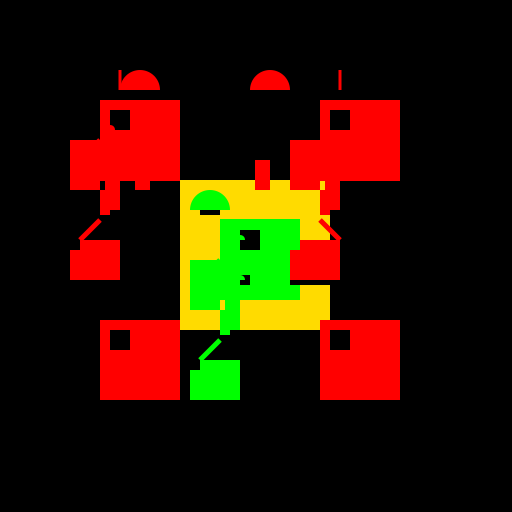

Javascript Code
                        // Robo Rumble Logo

// Let's defend the safe from those greedy Robo Bandits!


// Background

ctx.fillStyle = '#000';

ctx.fillRect(0, 0, 512, 512);


// Safe

ctx.fillStyle = '#FFDB00';

ctx.fillRect(180, 180, 150, 150);


// Robo Bandit 1

ctx.fillStyle = '#FF0000';

ctx.fillRect(100, 100, 80, 80);


// Robo Bandit 2

ctx.fillStyle = '#FF0000';

ctx.fillRect(320, 100, 80, 80);


// Robo Bandit 3

ctx.fillStyle = '#FF0000';

ctx.fillRect(100, 320, 80, 80);


// Robo Bandit 4

ctx.fillStyle = '#FF0000';

ctx.fillRect(320, 320, 80, 80);


// Robo Defender

ctx.fillStyle = '#00FF00';

ctx.fillRect(220, 220, 80, 80);


// Robo Bandit Eyes

ctx.fillStyle = '#000';

ctx.fillRect(110, 110, 20, 20);

ctx.fillRect(330, 110, 20, 20);

ctx.fillRect(110, 330, 20, 20);

ctx.fillRect(330, 330, 20, 20);


// Robo Defender Eyes

ctx.fillStyle = '#000';

ctx.fillRect(230, 230, 20, 20);


// Robo Defender Mouth

ctx.fillStyle = '#000';

ctx.fillRect(230, 275, 20, 10);


// Robo Bandit Mouths

ctx.fillStyle = '#000';

ctx.fillRect(110, 275, 20, 10);

ctx.fillRect(330, 275, 20, 10);


// Robo Bandit Antennas

ctx.strokeStyle = '#FF0000';

ctx.lineWidth = 3;

ctx.beginPath();

ctx.moveTo(120, 90);

ctx.lineTo(120, 70);

ctx.stroke();


ctx.strokeStyle = '#FF0000';

ctx.lineWidth = 3;

ctx.beginPath();

ctx.moveTo(340, 90);

ctx.lineTo(340, 70);

ctx.stroke();


// Robo Defender Antenna

ctx.strokeStyle = '#00FF00';

ctx.lineWidth = 3;

ctx.beginPath();

ctx.moveTo(240, 240);

ctx.lineTo(240, 220);

ctx.stroke();


// Robo Bandit Arms

ctx.strokeStyle = '#FF0000';

ctx.lineWidth = 5;

ctx.beginPath();

ctx.moveTo(100, 140);

ctx.lineTo(80, 160);

ctx.stroke();


ctx.strokeStyle = '#FF0000';

ctx.lineWidth = 5;

ctx.beginPath();

ctx.moveTo(320, 140);

ctx.lineTo(340, 160);

ctx.stroke();


// Robo Defender Arms

ctx.strokeStyle = '#00FF00';

ctx.lineWidth = 5;

ctx.beginPath();

ctx.moveTo(220, 260);

ctx.lineTo(200, 280);

ctx.stroke();


// Robo Bandit Legs

ctx.strokeStyle = '#FF0000';

ctx.lineWidth = 5;

ctx.beginPath();

ctx.moveTo(100, 220);

ctx.lineTo(80, 240);

ctx.stroke();


ctx.strokeStyle = '#FF0000';

ctx.lineWidth = 5;

ctx.beginPath();

ctx.moveTo(320, 220);

ctx.lineTo(340, 240);

ctx.stroke();


// Robo Defender Legs

ctx.strokeStyle = '#00FF00';

ctx.lineWidth = 5;

ctx.beginPath();

ctx.moveTo(220, 340);

ctx.lineTo(200, 360);

ctx.stroke();


// Robo Bandit Body Details

ctx.fillStyle = '#FF0000';

ctx.fillRect(105, 150, 15, 60);

ctx.fillRect(325, 150, 15, 60);


// Robo Defender Body Details

ctx.fillStyle = '#00FF00';

ctx.fillRect(225, 270, 15, 60);


// Robo Bandit Feet

ctx.fillStyle = '#FF0000';

ctx.fillRect(70, 250, 50, 30);

ctx.fillRect(290, 250, 50, 30);


// Robo Defender Feet

ctx.fillStyle = '#00FF00';

ctx.fillRect(190, 370, 50, 30);


// Robo Bandit Hands

ctx.fillStyle = '#FF0000';

ctx.fillRect(70, 140, 30, 50);

ctx.fillRect(290, 140, 30, 50);


// Robo Defender Hands

ctx.fillStyle = '#00FF00';

ctx.fillRect(190, 260, 30, 50);


// Robo Bandit Hat

ctx.fillStyle = '#FF0000';

ctx.beginPath();

ctx.arc(140, 90, 20, 0, Math.PI, true);

ctx.fill();


ctx.fillStyle = '#FF0000';

ctx.beginPath();

ctx.arc(270, 90, 20, 0, Math.PI, true);

ctx.fill();


// Robo Defender Hat

ctx.fillStyle = '#00FF00';

ctx.beginPath();

ctx.arc(210, 210, 20, 0, Math.PI, true);

ctx.fill();


// Robo Bandit Hat Details

ctx.fillStyle = '#000';

ctx.fillRect(130, 90, 20, 5);

ctx.fillRect(260, 90, 20, 5);


// Robo Defender Hat Details

ctx.fillStyle = '#000';

ctx.fillRect(200, 210, 20, 5);


// Robo Bandit Chest Details

ctx.fillStyle = '#FF0000';

ctx.fillRect(135, 160, 15, 30);

ctx.fillRect(255, 160, 15, 30);


// Robo Defender Chest Details

ctx.fillStyle = '#00FF00';

ctx.fillRect(195, 280, 15, 30);


// Robo Bandit Legs Details

ctx.fillStyle = '#FF0000';

ctx.fillRect(80, 240, 40, 10);

ctx.fillRect(300, 240, 40, 10);


// Robo Defender Legs Details

ctx.fillStyle = '#00FF00';

ctx.fillRect(200, 360, 40, 10);


// Robo Bandit Feet Details

ctx.fillStyle = '#000';

ctx.fillRect(70, 280, 50, 5);

ctx.fillRect(290, 280, 50, 5);


// Robo Defender Feet Details

ctx.fillStyle = '#000';

ctx.fillRect(190, 400, 50, 5);


// Robo Bandit Hands Details

ctx.fillStyle = '#FF0000';

ctx.fillRect(100, 190, 10, 25);

ctx.fillRect(320, 190, 10, 25);


// Robo Defender Hands Details

ctx.fillStyle = '#00FF00';

ctx.fillRect(220, 310, 10, 25);


// Robo Bandit Gun

ctx.fillStyle = '#000';

ctx.fillRect(90, 100, 20, 30);


// Robo Defender Gun

ctx.fillStyle = '#000';

ctx.fillRect(230, 230, 30, 20);


// Robo Bandit Gun Details

ctx.fillStyle = '#FF0000';

ctx.fillRect(100, 100, 10, 30);


// Robo Defender Gun Details

ctx.fillStyle = '#00FF00';

ctx.fillRect(230, 230, 10, 20);


// Robo Bandit Gun Bullets

ctx.fillStyle = '#FF0000';

ctx.beginPath();

ctx.arc(110, 110, 5, 0, Math.PI, true);

ctx.fill();


ctx.fillStyle = '#FF0000';

ctx.beginPath();

ctx.arc(110, 130, 5, 0, Math.PI, true);

ctx.fill();


ctx.fillStyle = '#FF0000';

ctx.beginPath();

ctx.arc(110, 150, 5, 0, Math.PI, true);

ctx.fill();


// Robo Defender Gun Bullets

ctx.fillStyle = '#00FF00';

ctx.beginPath();

ctx.arc(240, 240, 5, 0, Math.PI, true);

ctx.fill();


ctx.fillStyle = '#00FF00';

ctx.beginPath();

ctx.arc(240, 260, 5, 0, Math.PI, true);

ctx.fill();


ctx.fillStyle = '#00FF00';

ctx.beginPath();

ctx.arc(240, 280, 5, 0, Math.PI, true);

ctx.fill();


// Robo Bandit Body Lines

ctx.strokeStyle = '#FF0000';

ctx.lineWidth = 2;

ctx.beginPath();

ctx.moveTo(100, 180);

ctx.lineTo(180, 180);

ctx.stroke();


ctx.strokeStyle = '#FF0000';

ctx.lineWidth = 2;

ctx.beginPath();

ctx.moveTo(320, 180);

ctx.lineTo(400, 180);

ctx.stroke();


// Robo Defender Body Lines

ctx.strokeStyle = '#00FF00';

ctx.lineWidth = 2;

ctx.beginPath();

ctx.moveTo(220, 220);

ctx.lineTo(300, 220);

ctx.stroke();


// Robo Rumble Logo Complete!
AI
Model: gpt-3.5-turbo-16k-0613
Time: 54 seconds
Prompt Tokens: 210
Completion Tokens: 1943
Total Token Cost: 2153


 balloon party
 beautiful beach
 cute puppy dog
 happy cat
 house
house