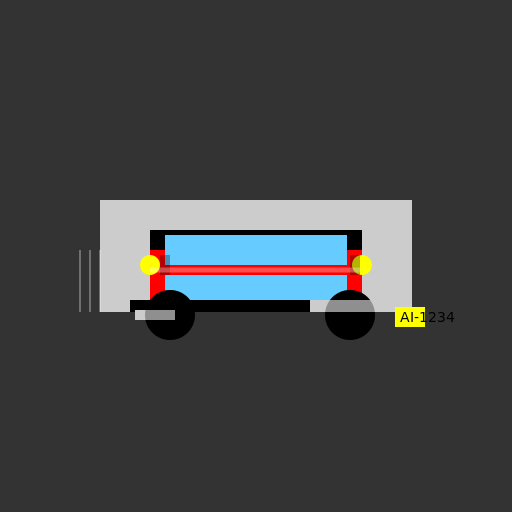

Javascript Code
                        // Title: "Zooming Through Traffic"


ctx.fillStyle = "#333333"; // Set background color to dark gray

ctx.fillRect(0, 0, 512, 512); // Draw a rectangle as the background


// Draw the road

ctx.fillStyle = "#CCCCCC"; // Set road color to light gray

ctx.fillRect(100, 200, 312, 112); // Draw a rectangle as the road


// Draw the car body

ctx.fillStyle = "#FF0000"; // Set car body color to red

ctx.fillRect(150, 250, 212, 62); // Draw a rectangle as the car body


// Draw the car roof

ctx.fillStyle = "#000000"; // Set car roof color to black

ctx.fillRect(150, 230, 212, 20); // Draw a rectangle as the car roof


// Draw the car windows

ctx.fillStyle = "#66CCFF"; // Set car window color to light blue

ctx.fillRect(165, 235, 182, 30); // Draw a rectangle as the front window

ctx.fillRect(165, 275, 182, 30); // Draw a rectangle as the back window


// Draw the car wheels

ctx.beginPath(); // Start drawing the wheels

ctx.arc(170, 315, 25, 0, Math.PI * 2); // Draw the front left wheel

ctx.arc(350, 315, 25, 0, Math.PI * 2); // Draw the front right wheel

ctx.arc(170, 315, 5, 0, Math.PI * 2); // Draw the hubcap for the front left wheel

ctx.arc(350, 315, 5, 0, Math.PI * 2); // Draw the hubcap for the front right wheel

ctx.fillStyle = "#000000"; // Set wheel color to black

ctx.fill(); // Fill the wheels with color


// Draw the headlights

ctx.beginPath(); // Start drawing the headlights

ctx.arc(150, 265, 10, 0, Math.PI * 2); // Draw the left headlight

ctx.arc(362, 265, 10, 0, Math.PI * 2); // Draw the right headlight

ctx.fillStyle = "#FFFF00"; // Set headlight color to yellow

ctx.fill(); // Fill the headlights with color


// Draw the car's front bumper

ctx.fillStyle = "#000000"; // Set bumper color to black

ctx.fillRect(130, 300, 252, 12); // Draw a rectangle as the front bumper


// Draw the car exhaust

ctx.fillStyle = "#CCCCCC"; // Set exhaust color to light gray

ctx.fillRect(135, 310, 40, 10); // Draw a rectangle as the exhaust pipe


// Draw the car's rear bumper

ctx.fillRect(310, 300, 72, 12); // Draw a rectangle as the rear bumper


// Draw the car's license plate

ctx.fillStyle = "#FFFF00"; // Set license plate color to yellow

ctx.fillRect(395, 307, 30, 20); // Draw a rectangle as the license plate


// Draw the license plate number

ctx.font = "14px Arial"; // Set font for the license plate number

ctx.fillStyle = "#000000"; // Set number color to black

ctx.fillText("AI-1234", 400, 322); // Write the license plate number


// Add some motion blur to the wheels

ctx.beginPath(); // Start drawing motion blur

ctx.arc(170, 315, 25, 0, Math.PI * 2); // Draw a circle for the front left wheel

ctx.arc(350, 315, 25, 0, Math.PI * 2); // Draw a circle for the front right wheel

ctx.globalAlpha = 0.3; // Set transparency for motion blur effect

ctx.fillStyle = "#000000"; // Set motion blur color to black

ctx.fill(); // Fill the motion blur circles with color


// Add some details to the car body

ctx.fillStyle = "#000000"; // Set detail color to black

ctx.fillRect(160, 255, 10, 20); // Draw a rectangle as the car's door handle

ctx.fillRect(350, 255, 10, 20); // Draw a rectangle as the car's door handle


// Add a cool racing stripe to the car

ctx.beginPath(); // Start drawing the racing stripe

ctx.moveTo(150, 270); // Move to the starting point of the stripe

ctx.lineTo(360, 270); // Draw a line to the ending point of the stripe

ctx.lineWidth = 5; // Set line width for the racing stripe

ctx.strokeStyle = "#FFFFFF"; // Set stripe color to white

ctx.stroke(); // Draw the racing stripe


// Add some speed lines to indicate motion

ctx.beginPath(); // Start drawing the speed lines

ctx.moveTo(100, 250); // Move to the starting point of the speed lines

ctx.lineTo(100, 312); // Draw a line for the first speed line

ctx.moveTo(90, 250); // Move to the starting point of the second speed line

ctx.lineTo(90, 312); // Draw a line for the second speed line

ctx.moveTo(80, 250); // Move to the starting point of the third speed line

ctx.lineTo(80, 312); // Draw a line for the third speed line

ctx.lineWidth = 2; // Set line width for the speed lines

ctx.strokeStyle = "#FFFFFF"; // Set speed line color to white

ctx.stroke(); // Draw the speed lines


// Add a funny comment at the end

// "Why did the car go to the dentist? Because it had plaque on its headlights!"
AI
Model: gpt-3.5-turbo-16k-0613
Time: 23 seconds
Prompt Tokens: 173
Completion Tokens: 1205
Total Token Cost: 1378


 balloon party
 beautiful beach
 cute puppy dog
 happy cat
 house
house