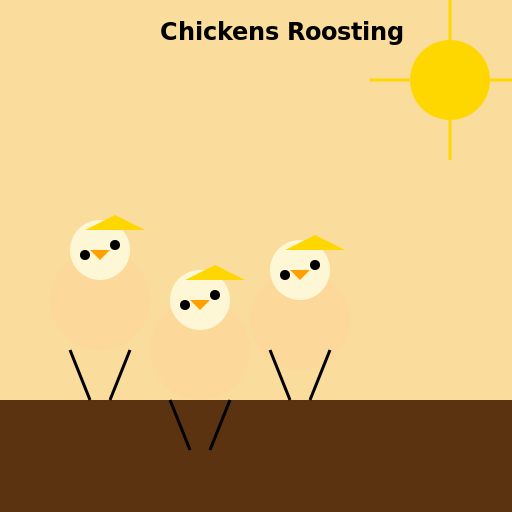

Javascript Code
                        // Chickens Roosting


// Drawing the background

ctx.fillStyle = "#FADC9C"; // Yellowish color for the sky

ctx.fillRect(0, 0, 512, 512); // Filling the entire canvas with the sky color


ctx.fillStyle = "#5B3310"; // Brown color for the ground

ctx.fillRect(0, 400, 512, 112); // Filling the bottom part of the canvas with the ground color


// Drawing the chickens

ctx.fillStyle = "#FCD89B"; // Light orange color for the chickens' bodies

ctx.beginPath();

ctx.arc(100, 300, 50, 0, Math.PI * 2); // Drawing the first chicken's body

ctx.fill();


ctx.beginPath();

ctx.arc(200, 350, 50, 0, Math.PI * 2); // Drawing the second chicken's body

ctx.fill();


ctx.beginPath();

ctx.arc(300, 320, 50, 0, Math.PI * 2); // Drawing the third chicken's body

ctx.fill();


// Drawing the chickens' heads

ctx.fillStyle = "#FEF7D6"; // Cream color for the chickens' heads

ctx.beginPath();

ctx.arc(100, 250, 30, 0, Math.PI * 2); // Drawing the first chicken's head

ctx.fill();


ctx.beginPath();

ctx.arc(200, 300, 30, 0, Math.PI * 2); // Drawing the second chicken's head

ctx.fill();


ctx.beginPath();

ctx.arc(300, 270, 30, 0, Math.PI * 2); // Drawing the third chicken's head

ctx.fill();


// Drawing the chickens' beaks

ctx.fillStyle = "#FF9F00"; // Orange color for the chickens' beaks

ctx.beginPath();

ctx.moveTo(90, 250); // Starting point for the first chicken's beak

ctx.lineTo(110, 250); // Drawing the first chicken's upper beak

ctx.lineTo(100, 260); // Drawing the first chicken's lower beak

ctx.closePath();

ctx.fill();


ctx.beginPath();

ctx.moveTo(190, 300); // Starting point for the second chicken's beak

ctx.lineTo(210, 300); // Drawing the second chicken's upper beak

ctx.lineTo(200, 310); // Drawing the second chicken's lower beak

ctx.closePath();

ctx.fill();


ctx.beginPath();

ctx.moveTo(290, 270); // Starting point for the third chicken's beak

ctx.lineTo(310, 270); // Drawing the third chicken's upper beak

ctx.lineTo(300, 280); // Drawing the third chicken's lower beak

ctx.closePath();

ctx.fill();


// Drawing the chickens' eyes

ctx.fillStyle = "#000000"; // Black color for the chickens' eyes

ctx.beginPath();

ctx.arc(115, 245, 5, 0, Math.PI * 2); // Drawing the first chicken's left eye

ctx.fill();


ctx.beginPath();

ctx.arc(85, 255, 5, 0, Math.PI * 2); // Drawing the first chicken's right eye

ctx.fill();


ctx.beginPath();

ctx.arc(215, 295, 5, 0, Math.PI * 2); // Drawing the second chicken's left eye

ctx.fill();


ctx.beginPath();

ctx.arc(185, 305, 5, 0, Math.PI * 2); // Drawing the second chicken's right eye

ctx.fill();


ctx.beginPath();

ctx.arc(315, 265, 5, 0, Math.PI * 2); // Drawing the third chicken's left eye

ctx.fill();


ctx.beginPath();

ctx.arc(285, 275, 5, 0, Math.PI * 2); // Drawing the third chicken's right eye

ctx.fill();


// Drawing the chickens' legs

ctx.strokeStyle = "#000000"; // Black color for the chickens' legs

ctx.lineWidth = 3;

ctx.beginPath();

ctx.moveTo(70, 350); // Starting point for the first chicken's left leg

ctx.lineTo(90, 400); // Drawing the first chicken's left leg

ctx.stroke();


ctx.beginPath();

ctx.moveTo(130, 350); // Starting point for the first chicken's right leg

ctx.lineTo(110, 400); // Drawing the first chicken's right leg

ctx.stroke();


ctx.beginPath();

ctx.moveTo(170, 400); // Starting point for the second chicken's left leg

ctx.lineTo(190, 450); // Drawing the second chicken's left leg

ctx.stroke();


ctx.beginPath();

ctx.moveTo(230, 400); // Starting point for the second chicken's right leg

ctx.lineTo(210, 450); // Drawing the second chicken's right leg

ctx.stroke();


ctx.beginPath();

ctx.moveTo(270, 350); // Starting point for the third chicken's left leg

ctx.lineTo(290, 400); // Drawing the third chicken's left leg

ctx.stroke();


ctx.beginPath();

ctx.moveTo(330, 350); // Starting point for the third chicken's right leg

ctx.lineTo(310, 400); // Drawing the third chicken's right leg

ctx.stroke();


// Adding details to the chickens

ctx.fillStyle = "#FFD700"; // Gold color for the chickens' feathers

ctx.beginPath();

ctx.moveTo(85, 230); // Starting point for the first chicken's feather

ctx.lineTo(115, 215); // Drawing the first chicken's feather

ctx.lineTo(145, 230); // Drawing the first chicken's feather

ctx.closePath();

ctx.fill();


ctx.beginPath();

ctx.moveTo(185, 280); // Starting point for the second chicken's feather

ctx.lineTo(215, 265); // Drawing the second chicken's feather

ctx.lineTo(245, 280); // Drawing the second chicken's feather

ctx.closePath();

ctx.fill();


ctx.beginPath();

ctx.moveTo(285, 250); // Starting point for the third chicken's feather

ctx.lineTo(315, 235); // Drawing the third chicken's feather

ctx.lineTo(345, 250); // Drawing the third chicken's feather

ctx.closePath();

ctx.fill();


// Adding the sun

ctx.fillStyle = "#FFD700"; // Gold color for the sun

ctx.beginPath();

ctx.arc(450, 80, 40, 0, Math.PI * 2); // Drawing the sun

ctx.fill();


// Adding the rays of the sun

ctx.strokeStyle = "#FFD700"; // Gold color for the rays

ctx.lineWidth = 3;

ctx.beginPath();

ctx.moveTo(450, 40); // Starting point for the first ray

ctx.lineTo(450, 0); // Drawing the first ray

ctx.stroke();


ctx.beginPath();

ctx.moveTo(450, 120); // Starting point for the second ray

ctx.lineTo(450, 160); // Drawing the second ray

ctx.stroke();


ctx.beginPath();

ctx.moveTo(490, 80); // Starting point for the third ray

ctx.lineTo(530, 80); // Drawing the third ray

ctx.stroke();


ctx.beginPath();

ctx.moveTo(410, 80); // Starting point for the fourth ray

ctx.lineTo(370, 80); // Drawing the fourth ray

ctx.stroke();


// Adding text

ctx.fillStyle = "#000000"; // Black color for the text

ctx.font = "bold 24px Arial"; // Setting the font and size for the text

ctx.fillText("Chickens Roosting", 160, 40); // Drawing the title text


// All done! Happy chickens roosting under the sun!
AI
Model: gpt-3.5-turbo-16k-0613
Time: 22 seconds
Prompt Tokens: 180
Completion Tokens: 1583
Total Token Cost: 1763


 balloon party
 beautiful beach
 cute puppy dog
 happy cat
 house
house