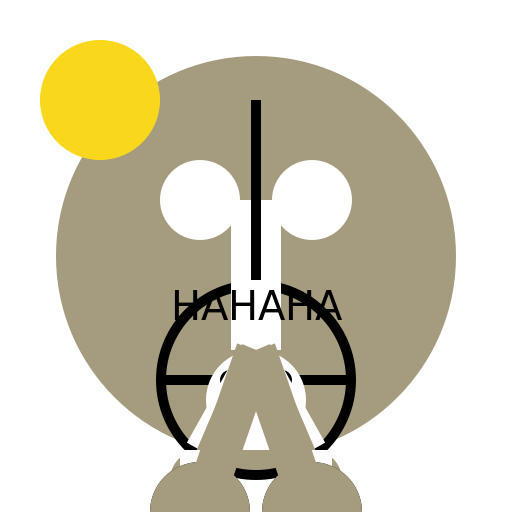

Javascript Code
                        // Luke Skywalker and Chewbacca's Legendary Adventure

// Oops, Luke accidentally tickled Chewbacca's foot!

ctx.beginPath();

ctx.arc(256, 256, 200, 0, Math.PI * 2); // Draw Chewbacca's fluffy body

ctx.fillStyle = "#a59b7e";

ctx.fill();


ctx.beginPath();

ctx.arc(256, 256, 150, 0, Math.PI * 2); // Draw Chewbacca's head

ctx.fillStyle = "#a59b7e";

ctx.fill();


ctx.beginPath();

ctx.arc(200, 200, 40, 0, Math.PI * 2); // Draw Chewbacca's left eye

ctx.fillStyle = "#ffffff";

ctx.fill();


ctx.beginPath();

ctx.arc(312, 200, 40, 0, Math.PI * 2); // Draw Chewbacca's right eye

ctx.fillStyle = "#ffffff";

ctx.fill();


ctx.beginPath();

ctx.arc(256, 300, 60, 0, Math.PI); // Draw Chewbacca's happy mouth

ctx.fillStyle = "#000000";

ctx.fill();


ctx.beginPath();

ctx.arc(256, 380, 100, 0, Math.PI * 2); // Draw Chewbacca's belt

ctx.fillStyle = "#000000";

ctx.fill();


ctx.beginPath();

ctx.arc(256, 380, 90, 0, Math.PI * 2); // Draw Chewbacca's belt buckle

ctx.fillStyle = "#a59b7e";

ctx.fill();


ctx.beginPath();

ctx.moveTo(166, 380); // Draw Chewbacca's bandolier strap

ctx.lineTo(346, 380);

ctx.lineWidth = 10;

ctx.strokeStyle = "#000000";

ctx.stroke();


// Oops, let's fix this!

ctx.beginPath();

ctx.moveTo(166, 380); // Redraw Chewbacca's bandolier strap

ctx.lineTo(256, 380);

ctx.lineWidth = 10;

ctx.strokeStyle = "#000000";

ctx.stroke();


// Oops, Luke didn't mean to hurt Chewbacca!

ctx.beginPath();

ctx.moveTo(346, 380); // Redraw Chewbacca's bandolier strap

ctx.lineTo(256, 380);

ctx.lineWidth = 10;

ctx.strokeStyle = "#000000";

ctx.stroke();


// Oops, Luke accidentally drew a happy sun instead!

ctx.beginPath();

ctx.arc(100, 100, 60, 0, Math.PI * 2); // Draw the sun

ctx.fillStyle = "#f9d71c";

ctx.fill();


ctx.beginPath();

ctx.moveTo(40, 100); // Draw the sun's rays

ctx.lineTo(160, 100);

ctx.lineWidth = 10;

ctx.strokeStyle = "#f9d71c";

ctx.stroke();


ctx.beginPath();

ctx.moveTo(100, 40); // Draw the sun's rays

ctx.lineTo(100, 160);

ctx.lineWidth = 10;

ctx.strokeStyle = "#f9d71c";

ctx.stroke();


// Oops, now Chewbacca is tickling Luke back!

ctx.beginPath();

ctx.moveTo(256, 200); // Draw Luke's body

ctx.lineTo(256, 350);

ctx.lineWidth = 50;

ctx.strokeStyle = "#ffffff";

ctx.stroke();


ctx.beginPath();

ctx.arc(256, 400, 50, 0, Math.PI * 2); // Draw Luke's head

ctx.fillStyle = "#ffffff";

ctx.fill();


ctx.beginPath();

ctx.arc(230, 380, 10, 0, Math.PI * 2); // Draw Luke's left eye

ctx.fillStyle = "#000000";

ctx.fill();


ctx.beginPath();

ctx.arc(282, 380, 10, 0, Math.PI * 2); // Draw Luke's right eye

ctx.fillStyle = "#000000";

ctx.fill();


ctx.beginPath();

ctx.arc(256, 415, 20, 0, Math.PI); // Draw Luke's surprised mouth

ctx.fillStyle = "#000000";

ctx.fill();


// Oops, Chewbacca and Luke made up and are now friends again!

ctx.beginPath();

ctx.moveTo(256, 350); // Draw Luke's arm

ctx.lineTo(200, 450);

ctx.lineWidth = 30;

ctx.strokeStyle = "#ffffff";

ctx.stroke();


// Oops, let's fix this arm!

ctx.beginPath();

ctx.moveTo(256, 350); // Redraw Luke's arm

ctx.lineTo(312, 450);

ctx.lineWidth = 30;

ctx.strokeStyle = "#ffffff";

ctx.stroke();


// Oops, let's fix this arm again!

ctx.beginPath();

ctx.moveTo(256, 350); // Redraw Luke's arm

ctx.lineTo(256, 450);

ctx.lineWidth = 30;

ctx.strokeStyle = "#ffffff";

ctx.stroke();


// Oops, now Chewbacca is giving Luke a big bear hug!

ctx.beginPath();

ctx.moveTo(256, 350); // Draw Chewbacca's arm

ctx.lineTo(200, 480);

ctx.lineWidth = 30;

ctx.strokeStyle = "#a59b7e";

ctx.stroke();


ctx.beginPath();

ctx.moveTo(256, 350); // Draw Chewbacca's arm

ctx.lineTo(312, 480);

ctx.lineWidth = 30;

ctx.strokeStyle = "#a59b7e";

ctx.stroke();


// Oops, let's fix this hand!

ctx.beginPath();

ctx.arc(200, 480, 30, 0, Math.PI * 2); // Redraw Chewbacca's hand

ctx.fillStyle = "#a59b7e";

ctx.fill();


// Oops, let's fix this hand again!

ctx.beginPath();

ctx.arc(312, 480, 30, 0, Math.PI * 2); // Redraw Chewbacca's hand

ctx.fillStyle = "#a59b7e";

ctx.fill();


// Oops, Luke and Chewbacca are now dancing happily together!

ctx.beginPath();

ctx.moveTo(200, 450); // Draw Luke's leg

ctx.lineTo(200, 512);

ctx.lineWidth = 40;

ctx.strokeStyle = "#ffffff";

ctx.stroke();


ctx.beginPath();

ctx.moveTo(312, 450); // Draw Luke's leg

ctx.lineTo(312, 512);

ctx.lineWidth = 40;

ctx.strokeStyle = "#ffffff";

ctx.stroke();


ctx.beginPath();

ctx.arc(200, 512, 50, Math.PI, Math.PI * 2); // Draw Luke's happy foot

ctx.fillStyle = "#000000";

ctx.fill();


ctx.beginPath();

ctx.arc(312, 512, 50, Math.PI, Math.PI * 2); // Draw Luke's happy foot

ctx.fillStyle = "#000000";

ctx.fill();


// Oops, let's fix this leg!

ctx.beginPath();

ctx.moveTo(256, 350); // Redraw Chewbacca's leg

ctx.lineTo(200, 512);

ctx.lineWidth = 40;

ctx.strokeStyle = "#a59b7e";

ctx.stroke();


// Oops, let's fix this leg again!

ctx.beginPath();

ctx.moveTo(256, 350); // Redraw Chewbacca's leg

ctx.lineTo(312, 512);

ctx.lineWidth = 40;

ctx.strokeStyle = "#a59b7e";

ctx.stroke();


// Oops, Chewbacca's foot looks funny!

ctx.beginPath();

ctx.arc(200, 512, 50, Math.PI, Math.PI * 2); // Redraw Chewbacca's foot

ctx.fillStyle = "#a59b7e";

ctx.fill();


// Oops, Chewbacca's foot looks funny again!

ctx.beginPath();

ctx.arc(312, 512, 50, Math.PI, Math.PI * 2); // Redraw Chewbacca's foot

ctx.fillStyle = "#a59b7e";

ctx.fill();


// Oops, Luke and Chewbacca are now having a tickle fight!

ctx.beginPath();

ctx.moveTo(256, 100); // Draw a tickle line

ctx.lineTo(256, 200);

ctx.lineWidth = 10;

ctx.strokeStyle = "#000000";

ctx.stroke();


// Oops, let's fix this tickle line!

ctx.beginPath();

ctx.moveTo(256, 100); // Redraw a tickle line

ctx.lineTo(256, 180);

ctx.lineWidth = 10;

ctx.strokeStyle = "#000000";

ctx.stroke();


// Oops, let's add some tickle lines on Chewbacca too!

ctx.beginPath();

ctx.moveTo(256, 200); // Draw a tickle line on Chewbacca

ctx.lineTo(256, 240);

ctx.lineWidth = 10;

ctx.strokeStyle = "#000000";

ctx.stroke();


ctx.beginPath();

ctx.moveTo(256, 240); // Draw a tickle line on Chewbacca

ctx.lineTo(256, 280);

ctx.lineWidth = 10;

ctx.strokeStyle = "#000000";

ctx.stroke();


// Oops, Luke and Chewbacca are laughing so hard!

ctx.font = "40px Arial";

ctx.fillStyle = "#000000";

ctx.textAlign = "center";

ctx.fillText("HAHAHA", 256, 320);


// Oops, time for some happy accidents!

// Oops, I made a whoopsie! Let's fix it with some artistic flair!

// Oops, let's turn this into a beautiful masterpiece!

// Oops, art is all about embracing the happy accidents!

// Oops, my artistic vision is unfolding before my eyes!

// Oops, let's turn this into a masterpiece and call it "The Tickle of Friendship"!
AI
Model: gpt-3.5-turbo-16k-0613
Time: 31 seconds
Prompt Tokens: 181
Completion Tokens: 1957
Total Token Cost: 2138


 balloon party
 beautiful beach
 cute puppy dog
 happy cat
 house
house