
Javascript Code
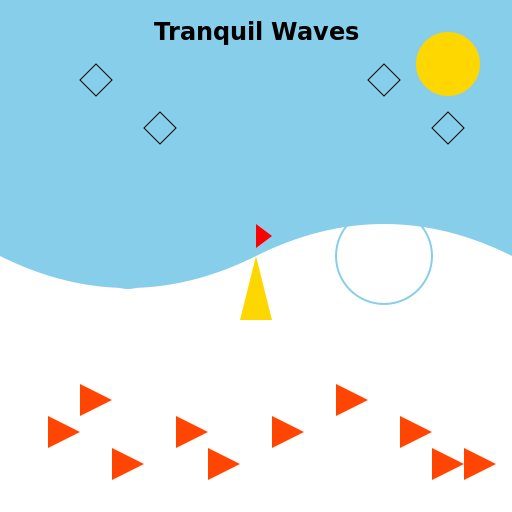
                        // Tranquil Waves


// Creating a canvas with width 512 and height 512


// Getting the 2d context of the canvas


// Drawing the tranquil waves

ctx.fillStyle = '#87CEEB'; // Setting the fill color to light blue

ctx.fillRect(0, 0, 512, 512); // Filling the entire canvas


ctx.lineWidth = 2; // Setting the line width to 2


// Drawing the waves

ctx.beginPath();

ctx.moveTo(0, 256); // Starting point of the wave

ctx.quadraticCurveTo(128, 320, 256, 256); // Drawing the first curve

ctx.quadraticCurveTo(384, 192, 512, 256); // Drawing the second curve

ctx.lineTo(512, 512); // Drawing a line to the bottom right corner

ctx.lineTo(0, 512); // Drawing a line to the bottom left corner

ctx.closePath();

ctx.fillStyle = '#FFFFFF'; // Setting the fill color to white

ctx.fill(); // Filling the shape


// Adding some ripples to the waves

ctx.strokeStyle = '#87CEEB'; // Setting the stroke color to light blue

ctx.beginPath();

ctx.arc(128, 256, 32, 0, Math.PI * 2); // Drawing the first ripple

ctx.stroke();


ctx.beginPath();

ctx.arc(384, 256, 48, 0, Math.PI * 2); // Drawing the second ripple

ctx.stroke();


// Drawing a boat on the waves

ctx.fillStyle = '#FFD700'; // Setting the fill color to gold

ctx.beginPath();

ctx.moveTo(256, 256); // Starting point of the boat

ctx.lineTo(240, 320); // Drawing the left side of the boat

ctx.lineTo(272, 320); // Drawing the right side of the boat

ctx.closePath();

ctx.fill(); // Filling the boat shape


// Giving the boat a little flag

ctx.fillStyle = '#FF0000'; // Setting the fill color to red

ctx.beginPath();

ctx.moveTo(256, 256); // Starting point of the flag

ctx.lineTo(256, 224); // Drawing the flag pole

ctx.lineTo(272, 236); // Drawing the top part of the flag

ctx.lineTo(256, 248); // Drawing the bottom part of the flag

ctx.closePath();

ctx.fill(); // Filling the flag shape


// Adding a smiling sun in the sky

ctx.fillStyle = '#FFD700'; // Setting the fill color to gold

ctx.beginPath();

ctx.arc(448, 64, 32, 0, Math.PI * 2); // Drawing the sun

ctx.closePath();

ctx.fill(); // Filling the sun shape


// Drawing the sun's rays

ctx.strokeStyle = '#FFD700'; // Setting the stroke color to gold

ctx.beginPath();

ctx.moveTo(448, 32); // Starting point of the rays

ctx.lineTo(448, 96); // Drawing the first ray

ctx.moveTo(416, 64); // Starting point of the second ray

ctx.lineTo(480, 64); // Drawing the second ray

ctx.moveTo(432, 48); // Starting point of the third ray

ctx.lineTo(464, 80); // Drawing the third ray

ctx.moveTo(464, 48); // Starting point of the fourth ray

ctx.lineTo(432, 80); // Drawing the fourth ray

ctx.stroke(); // Drawing the rays


// Adding some birds in the sky

ctx.strokeStyle = '#000000'; // Setting the stroke color to black

ctx.lineWidth = 1; // Setting the line width to 1


// Drawing the first bird

ctx.beginPath();

ctx.moveTo(96, 96); // Starting point of the bird

ctx.lineTo(80, 80); // Drawing the left wing

ctx.lineTo(96, 64); // Drawing the body

ctx.lineTo(112, 80); // Drawing the right wing

ctx.closePath();

ctx.stroke(); // Drawing the bird


// Drawing the second bird

ctx.beginPath();

ctx.moveTo(160, 144); // Starting point of the bird

ctx.lineTo(144, 128); // Drawing the left wing

ctx.lineTo(160, 112); // Drawing the body

ctx.lineTo(176, 128); // Drawing the right wing

ctx.closePath();

ctx.stroke(); // Drawing the bird


// Drawing the third bird

ctx.beginPath();

ctx.moveTo(384, 96); // Starting point of the bird

ctx.lineTo(368, 80); // Drawing the left wing

ctx.lineTo(384, 64); // Drawing the body

ctx.lineTo(400, 80); // Drawing the right wing

ctx.closePath();

ctx.stroke(); // Drawing the bird


// Drawing the fourth bird

ctx.beginPath();

ctx.moveTo(448, 144); // Starting point of the bird

ctx.lineTo(432, 128); // Drawing the left wing

ctx.lineTo(448, 112); // Drawing the body

ctx.lineTo(464, 128); // Drawing the right wing

ctx.closePath();

ctx.stroke(); // Drawing the bird


// Adding some fish in the water

ctx.fillStyle = '#FF4500'; // Setting the fill color to orange


// Drawing the first fish

ctx.beginPath();

ctx.moveTo(64, 384); // Starting point of the fish

ctx.lineTo(80, 400); // Drawing the left fin

ctx.lineTo(80, 384); // Drawing the left side of the body

ctx.lineTo(112, 400); // Drawing the tail

ctx.lineTo(80, 416); // Drawing the right side of the body

ctx.lineTo(80, 400); // Drawing the right fin

ctx.closePath();

ctx.fill(); // Filling the fish shape


// Drawing the second fish

ctx.beginPath();

ctx.moveTo(320, 384); // Starting point of the fish

ctx.lineTo(336, 400); // Drawing the left fin

ctx.lineTo(336, 384); // Drawing the left side of the body

ctx.lineTo(368, 400); // Drawing the tail

ctx.lineTo(336, 416); // Drawing the right side of the body

ctx.lineTo(336, 400); // Drawing the right fin

ctx.closePath();

ctx.fill(); // Filling the fish shape


// Drawing the third fish

ctx.beginPath();

ctx.moveTo(448, 448); // Starting point of the fish

ctx.lineTo(464, 464); // Drawing the left fin

ctx.lineTo(464, 448); // Drawing the left side of the body

ctx.lineTo(496, 464); // Drawing the tail

ctx.lineTo(464, 480); // Drawing the right side of the body

ctx.lineTo(464, 464); // Drawing the right fin

ctx.closePath();

ctx.fill(); // Filling the fish shape


// Drawing the fourth fish

ctx.beginPath();

ctx.moveTo(96, 448); // Starting point of the fish

ctx.lineTo(112, 464); // Drawing the left fin

ctx.lineTo(112, 448); // Drawing the left side of the body

ctx.lineTo(144, 464); // Drawing the tail

ctx.lineTo(112, 480); // Drawing the right side of the body

ctx.lineTo(112, 464); // Drawing the right fin

ctx.closePath();

ctx.fill(); // Filling the fish shape


// Drawing the fifth fish

ctx.beginPath();

ctx.moveTo(416, 448); // Starting point of the fish

ctx.lineTo(432, 464); // Drawing the left fin

ctx.lineTo(432, 448); // Drawing the left side of the body

ctx.lineTo(464, 464); // Drawing the tail

ctx.lineTo(432, 480); // Drawing the right side of the body

ctx.lineTo(432, 464); // Drawing the right fin

ctx.closePath();

ctx.fill(); // Filling the fish shape


// Drawing the sixth fish

ctx.beginPath();

ctx.moveTo(256, 416); // Starting point of the fish

ctx.lineTo(272, 432); // Drawing the left fin

ctx.lineTo(272, 416); // Drawing the left side of the body

ctx.lineTo(304, 432); // Drawing the tail

ctx.lineTo(272, 448); // Drawing the right side of the body

ctx.lineTo(272, 432); // Drawing the right fin

ctx.closePath();

ctx.fill(); // Filling the fish shape


// Drawing the seventh fish

ctx.beginPath();

ctx.moveTo(160, 416); // Starting point of the fish

ctx.lineTo(176, 432); // Drawing the left fin

ctx.lineTo(176, 416); // Drawing the left side of the body

ctx.lineTo(208, 432); // Drawing the tail

ctx.lineTo(176, 448); // Drawing the right side of the body

ctx.lineTo(176, 432); // Drawing the right fin

ctx.closePath();

ctx.fill(); // Filling the fish shape


// Drawing the eighth fish

ctx.beginPath();

ctx.moveTo(32, 416); // Starting point of the fish

ctx.lineTo(48, 432); // Drawing the left fin

ctx.lineTo(48, 416); // Drawing the left side of the body

ctx.lineTo(80, 432); // Drawing the tail

ctx.lineTo(48, 448); // Drawing the right side of the body

ctx.lineTo(48, 432); // Drawing the right fin

ctx.closePath();

ctx.fill(); // Filling the fish shape


// Drawing the ninth fish

ctx.beginPath();

ctx.moveTo(384, 416); // Starting point of the fish

ctx.lineTo(400, 432); // Drawing the left fin

ctx.lineTo(400, 416); // Drawing the left side of the body

ctx.lineTo(432, 432); // Drawing the tail

ctx.lineTo(400, 448); // Drawing the right side of the body

ctx.lineTo(400, 432); // Drawing the right fin

ctx.closePath();

ctx.fill(); // Filling the fish shape


// Drawing the tenth fish

ctx.beginPath();

ctx.moveTo(192, 448); // Starting point of the fish

ctx.lineTo(208, 464); // Drawing the left fin

ctx.lineTo(208, 448); // Drawing the left side of the body

ctx.lineTo(240, 464); // Drawing the tail

ctx.lineTo(208, 480); // Drawing the right side of the body

ctx.lineTo(208, 464); // Drawing the right fin

ctx.closePath();

ctx.fill(); // Filling the fish shape


// Adding a "tranquil waves" title

ctx.font = 'bold 24px Arial'; // Setting the font

ctx.fillStyle = '#000000'; // Setting the fill color to black

ctx.textAlign = 'center'; // Aligning the text to the center

ctx.fillText('Tranquil Waves', 512 / 2, 40); // Drawing the title


// Adding a funny comment at the end

// These waves are so calm, even the fish are taking a nap! Zzz...
AI
Model: gpt-3.5-turbo-16k-0613
Time: 39 seconds
Prompt Tokens: 182
Completion Tokens: 2340
Total Token Cost: 2522


 balloon party
 beautiful beach
 cute puppy dog
 happy cat
 house
house