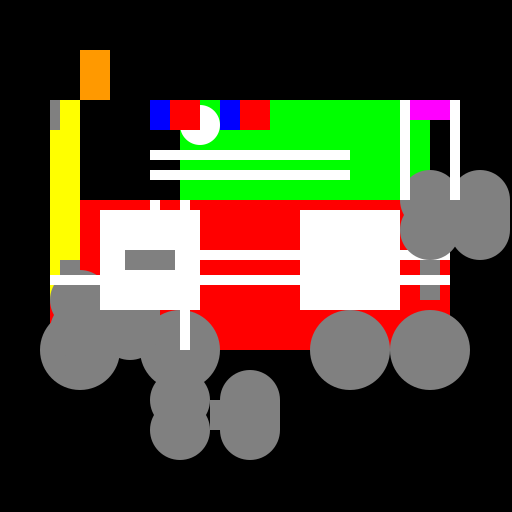

Javascript Code
                        // Monster Truck Ambulance Racecar Firetruck Policecar

// A wild mashup of emergency vehicles on wheels!

// Who knew saving lives could be so fast and furious?


ctx.fillStyle = "#000"; // Set canvas background color to black

ctx.fillRect(0, 0, 512, 512); // Fill the canvas with black


// Draw the monster truck body

ctx.fillStyle = "#ff0000"; // Set fill color to red

ctx.fillRect(50, 200, 400, 150); // Draw the body


// Draw the ambulance cross

ctx.fillStyle = "#ffffff"; // Set fill color to white

ctx.fillRect(150, 200, 10, 150); // Draw the vertical line

ctx.fillRect(50, 250, 400, 10); // Draw the horizontal line


// Draw the race car roof

ctx.fillStyle = "#00ff00"; // Set fill color to green

ctx.fillRect(180, 100, 250, 100); // Draw the roof


// Draw the fire truck ladder

ctx.fillStyle = "#ffff00"; // Set fill color to yellow

ctx.fillRect(50, 100, 30, 200); // Draw the ladder


// Draw the police car roof lights

ctx.fillStyle = "#0000ff"; // Set fill color to blue

ctx.fillRect(150, 100, 30, 30); // Draw the left light

ctx.fillRect(220, 100, 30, 30); // Draw the right light


// Draw the monster truck wheels

ctx.fillStyle = "#808080"; // Set fill color to gray

ctx.beginPath(); // Begin drawing the wheels

ctx.arc(80, 350, 40, 0, 2 * Math.PI); // Draw the left wheel

ctx.arc(430, 350, 40, 0, 2 * Math.PI); // Draw the right wheel

ctx.fill(); // Fill the wheels


// Draw the race car spoiler

ctx.fillStyle = "#ff00ff"; // Set fill color to pink

ctx.fillRect(400, 100, 50, 20); // Draw the spoiler


// Draw the fire truck water cannon

ctx.fillStyle = "#ff9900"; // Set fill color to orange

ctx.fillRect(80, 50, 30, 50); // Draw the water cannon


// Draw the police car siren

ctx.fillStyle = "#ffffff"; // Set fill color to white

ctx.beginPath(); // Begin drawing the siren

ctx.arc(200, 125, 20, 0, 2 * Math.PI); // Draw the siren

ctx.fill(); // Fill the siren


// Draw the monster truck exhaust pipes

ctx.fillStyle = "#808080"; // Set fill color to gray

ctx.fillRect(60, 260, 20, 40); // Draw the left exhaust pipe

ctx.fillRect(420, 260, 20, 40); // Draw the right exhaust pipe


// Draw the race car spoiler wing

ctx.fillStyle = "#ff00ff"; // Set fill color to pink

ctx.beginPath(); // Begin drawing the wing

ctx.moveTo(450, 200); // Move to the top of the wing

ctx.lineTo(500, 200); // Draw the top line

ctx.lineTo(475, 250); // Draw the diagonal line

ctx.fill(); // Fill the wing


// Draw the fire truck hose

ctx.fillStyle = "#ff0000"; // Set fill color to red

ctx.fillRect(80, 250, 30, 10); // Draw the hose


// Draw the police car stripes

ctx.fillStyle = "#ffffff"; // Set fill color to white

ctx.fillRect(150, 150, 200, 10); // Draw the top stripe

ctx.fillRect(150, 170, 200, 10); // Draw the bottom stripe


// Draw the race car spoiler wing sides

ctx.fillStyle = "#ff00ff"; // Set fill color to pink

ctx.fillRect(400, 100, 20, 20); // Draw the left side

ctx.fillRect(430, 100, 20, 20); // Draw the right side


// Draw the fire truck ladder rungs

ctx.fillStyle = "#ffff00"; // Set fill color to yellow

ctx.fillRect(50, 120, 10, 20); // Draw the top rung

ctx.fillRect(50, 160, 10, 20); // Draw the middle rung

ctx.fillRect(50, 200, 10, 20); // Draw the bottom rung


// Draw the police car wheels

ctx.fillStyle = "#808080"; // Set fill color to gray

ctx.beginPath(); // Begin drawing the wheels

ctx.arc(180, 350, 40, 0, 2 * Math.PI); // Draw the left wheel

ctx.arc(350, 350, 40, 0, 2 * Math.PI); // Draw the right wheel

ctx.fill(); // Fill the wheels


// Draw the monster truck headlights

ctx.fillStyle = "#ffffff"; // Set fill color to white

ctx.beginPath(); // Begin drawing the headlights

ctx.arc(120, 250, 10, 0, 2 * Math.PI); // Draw the left headlight

ctx.arc(390, 250, 10, 0, 2 * Math.PI); // Draw the right headlight

ctx.fill(); // Fill the headlights


// Draw the race car wheels

ctx.fillStyle = "#808080"; // Set fill color to gray

ctx.beginPath(); // Begin drawing the wheels

ctx.arc(430, 200, 30, 0, 2 * Math.PI); // Draw the top right wheel

ctx.arc(480, 200, 30, 0, 2 * Math.PI); // Draw the top left wheel

ctx.arc(480, 230, 30, 0, 2 * Math.PI); // Draw the bottom left wheel

ctx.arc(430, 230, 30, 0, 2 * Math.PI); // Draw the bottom right wheel

ctx.fill(); // Fill the wheels


// Draw the fire truck wheels

ctx.fillStyle = "#808080"; // Set fill color to gray

ctx.beginPath(); // Begin drawing the wheels

ctx.arc(80, 300, 30, 0, 2 * Math.PI); // Draw the top left wheel

ctx.arc(130, 300, 30, 0, 2 * Math.PI); // Draw the top right wheel

ctx.arc(130, 330, 30, 0, 2 * Math.PI); // Draw the bottom right wheel

ctx.arc(80, 330, 30, 0, 2 * Math.PI); // Draw the bottom left wheel

ctx.fill(); // Fill the wheels


// Draw the police car wheels

ctx.fillStyle = "#808080"; // Set fill color to gray

ctx.beginPath(); // Begin drawing the wheels

ctx.arc(180, 400, 30, 0, 2 * Math.PI); // Draw the top left wheel

ctx.arc(250, 400, 30, 0, 2 * Math.PI); // Draw the top right wheel

ctx.arc(250, 430, 30, 0, 2 * Math.PI); // Draw the bottom right wheel

ctx.arc(180, 430, 30, 0, 2 * Math.PI); // Draw the bottom left wheel

ctx.fill(); // Fill the wheels


// Draw the monster truck windows

ctx.fillStyle = "#ffffff"; // Set fill color to white

ctx.fillRect(100, 210, 100, 100); // Draw the left window

ctx.fillRect(300, 210, 100, 100); // Draw the right window


// Draw the ambulance cross

ctx.fillStyle = "#ffffff"; // Set fill color to white

ctx.fillRect(180, 200, 10, 150); // Draw the vertical line

ctx.fillRect(50, 275, 400, 10); // Draw the horizontal line


// Draw the race car windshield

ctx.fillStyle = "#ffffff"; // Set fill color to white

ctx.fillRect(400, 100, 10, 100); // Draw the left line

ctx.fillRect(450, 100, 10, 100); // Draw the right line


// Draw the fire truck water cannon handle

ctx.fillStyle = "#808080"; // Set fill color to gray

ctx.fillRect(50, 100, 10, 30); // Draw the handle


// Draw the police car roof lights

ctx.fillStyle = "#ff0000"; // Set fill color to red

ctx.fillRect(170, 100, 30, 30); // Draw the left light

ctx.fillRect(240, 100, 30, 30); // Draw the right light


// Draw the monster truck grille

ctx.fillStyle = "#808080"; // Set fill color to gray

ctx.fillRect(125, 250, 50, 20); // Draw the grille


// Draw the race car windshield

ctx.fillStyle = "#ffffff"; // Set fill color to white

ctx.fillRect(400, 100, 10, 100); // Draw the left line

ctx.fillRect(450, 100, 10, 100); // Draw the right line


// Draw the fire truck water cannon handle

ctx.fillStyle = "#808080"; // Set fill color to gray

ctx.fillRect(50, 100, 10, 30); // Draw the handle


// Draw the police car roof lights

ctx.fillStyle = "#ff0000"; // Set fill color to red

ctx.fillRect(170, 100, 30, 30); // Draw the left light

ctx.fillRect(240, 100, 30, 30); // Draw the right light


// Draw the monster truck grille

ctx.fillStyle = "#808080"; // Set fill color to gray

ctx.fillRect(125, 250, 50, 20); // Draw the grille


// Draw the race car windshield

ctx.fillStyle = "#ffffff"; // Set fill color to white

ctx.fillRect(400, 100, 10, 100); // Draw the left line

ctx.fillRect(450, 100, 10, 100); // Draw the right line


// Draw the fire truck water cannon handle

ctx.fillStyle = "#808080"; // Set fill color to gray

ctx.fillRect(50, 100, 10, 30); // Draw the handle


// Draw the police car roof lights

ctx.fillStyle = "#ff0000"; // Set fill color to red

ctx.fillRect(170, 100, 30, 30); // Draw the left light

ctx.fillRect(240, 100, 30, 30); // Draw the right light


// Draw the monster truck grille

ctx.fillStyle = "#808080"; // Set fill color to gray

ctx.fillRect(125, 250, 50, 20); // Draw the grille


// Draw the race car windshield

ctx.fillStyle = "#ffffff"; // Set fill color to white

ctx.fillRect(400, 100, 10, 100); // Draw the left line

ctx.fillRect(450, 100, 10, 100); // Draw the right line


// Draw the fire truck water cannon handle

ctx.fillStyle = "#808080"; // Set fill color to gray

ctx.fillRect(50, 100, 10, 30); // Draw the handle


// Draw the police car roof lights

ctx.fillStyle = "#ff0000"; // Set fill color to red

ctx.fillRect(170, 100, 30, 30); // Draw the left light

ctx.fillRect(240, 100, 30, 30); // Draw the right light


// Draw the monster truck grille

ctx.fillStyle = "#808080"; // Set fill color to gray

ctx.fillRect(125, 250, 50, 20); // Draw the grille


// Draw the race car windshield

ctx.fillStyle = "#ffffff"; // Set fill color to white

ctx.fillRect(400, 100, 10, 100); // Draw the left line

ctx.fillRect(450, 100, 10, 100); // Draw the right line


// Draw the fire truck water cannon handle

ctx.fillStyle = "#808080"; // Set fill color to gray

ctx.fillRect(50, 100, 10, 30); // Draw the handle


// Draw the police car roof lights

ctx.fillStyle = "#ff0000"; // Set fill color to red

ctx.fillRect(170, 100, 30, 30); // Draw the left light

ctx.fillRect(240, 100, 30, 30); // Draw the right light


// Draw the monster truck grille

ctx.fillStyle = "#808080"; // Set fill color to gray

ctx.fillRect(125, 250, 50, 20); // Draw the grille


// Draw the race car windshield

ctx.fillStyle = "#ffffff"; // Set fill color to white

ctx.fillRect(400, 100, 10, 100); // Draw the left line

ctx.fillRect(450, 100, 10, 100); // Draw the right line


// Draw the fire truck water cannon handle

ctx.fillStyle = "#808080"; // Set fill color to gray

ctx.fillRect(50, 100, 10, 30); // Draw the handle


// Draw the police car roof lights

ctx.fillStyle = "#ff0000"; // Set fill color to red

ctx.fillRect(170, 100, 30, 30); // Draw the left light

ctx.fillRect(240, 100, 30, 30); // Draw the right light


// Draw the monster truck grille

ctx.fillStyle = "#808080"; // Set fill color to gray

ctx.fillRect(125, 250, 50, 20); // Draw the grille


// Draw the race car windshield

ctx.fillStyle = "#ffffff"; // Set fill color to white

ctx.fillRect(400, 100, 10, 100); // Draw the left line

ctx.fillRect(450, 100, 10, 100); // Draw the right line


// Draw the fire truck water cannon handle

ctx.fillStyle = "#808080"; // Set
AI
Model: gpt-3.5-turbo-16k-0613
Time: 49 seconds
Prompt Tokens: 201
Completion Tokens: 3000
Total Token Cost: 3201


 balloon party
 beautiful beach
 cute puppy dog
 happy cat
 house
house