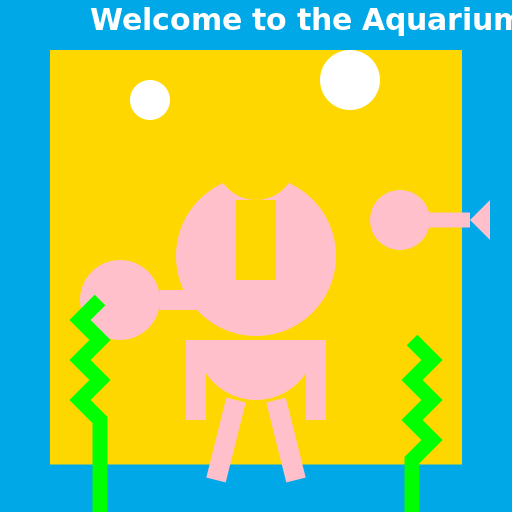

Javascript Code
                        // Title: "Underwater Exploration"


ctx.beginPath(); // Getting ready to draw


// Draw the aquarium background

ctx.fillStyle = "#00A8E8"; // Blue water color

ctx.fillRect(0, 0, 512, 512); // Filling the canvas with water


// Draw the aquarium walls

ctx.fillStyle = "#FFD700"; // Gold color

ctx.fillRect(50, 50, 412, 412); // Drawing the walls of the aquarium


// Draw the aquarium floor

ctx.beginPath();

ctx.moveTo(50, 462); // Starting point of the floor

ctx.lineTo(462, 462); // Drawing the floor line

ctx.lineWidth = 5; // Setting the line width to make it solid

ctx.strokeStyle = "#FFD700"; // Gold color

ctx.stroke(); // Drawing the floor line


// Draw the dad

ctx.beginPath();

ctx.arc(256, 256, 80, 0, 2 * Math.PI); // Drawing dad's head

ctx.fillStyle = "#FFC0CB"; // Light pink color for dad's head

ctx.fill(); // Filling dad's head


ctx.beginPath();

ctx.arc(256, 340, 60, 0, Math.PI); // Drawing dad's body

ctx.fillStyle = "#FFC0CB"; // Light pink color for dad's body

ctx.fill(); // Filling dad's body


// Draw dad's arms

ctx.beginPath();

ctx.moveTo(196, 340); // Starting point of left arm

ctx.lineTo(196, 420); // Drawing left arm

ctx.lineWidth = 20; // Setting the line width for arms

ctx.strokeStyle = "#FFC0CB"; // Light pink color

ctx.stroke(); // Drawing left arm


ctx.beginPath();

ctx.moveTo(316, 340); // Starting point of right arm

ctx.lineTo(316, 420); // Drawing right arm

ctx.lineWidth = 20; // Setting the line width for arms

ctx.strokeStyle = "#FFC0CB"; // Light pink color

ctx.stroke(); // Drawing right arm


// Draw dad's legs

ctx.beginPath();

ctx.moveTo(236, 400); // Starting point of left leg

ctx.lineTo(216, 480); // Drawing left leg

ctx.lineWidth = 20; // Setting the line width for legs

ctx.strokeStyle = "#FFC0CB"; // Light pink color

ctx.stroke(); // Drawing left leg


ctx.beginPath();

ctx.moveTo(276, 400); // Starting point of right leg

ctx.lineTo(296, 480); // Drawing right leg

ctx.lineWidth = 20; // Setting the line width for legs

ctx.strokeStyle = "#FFC0CB"; // Light pink color

ctx.stroke(); // Drawing right leg


// Draw the son

ctx.beginPath();

ctx.arc(256, 160, 40, 0, 2 * Math.PI); // Drawing son's head

ctx.fillStyle = "#FFD700"; // Gold color for son's head

ctx.fill(); // Filling son's head


ctx.beginPath();

ctx.moveTo(256, 200); // Starting point of son's body

ctx.lineTo(256, 280); // Drawing son's body

ctx.lineWidth = 40; // Setting the line width for son's body

ctx.strokeStyle = "#FFD700"; // Gold color

ctx.stroke(); // Drawing son's body


// Draw the aquarium fish

ctx.beginPath();

ctx.arc(120, 300, 40, 0, 2 * Math.PI); // Drawing fish1 head

ctx.fillStyle = "#FFC0CB"; // Light pink color for fish1 head

ctx.fill(); // Filling fish1 head


ctx.beginPath();

ctx.moveTo(160, 300); // Starting point of fish1 body

ctx.lineTo(220, 300); // Drawing fish1 body

ctx.lineWidth = 20; // Setting the line width for fish1 body

ctx.strokeStyle = "#FFC0CB"; // Light pink color

ctx.stroke(); // Drawing fish1 body


ctx.beginPath();

ctx.moveTo(220, 300); // Starting point of fish1 tail

ctx.lineTo(240, 280); // Drawing fish1 tail

ctx.lineTo(240, 320); // Drawing fish1 tail

ctx.closePath(); // Closing the path

ctx.fillStyle = "#FFC0CB"; // Light pink color for fish1 tail

ctx.fill(); // Filling fish1 tail


ctx.beginPath();

ctx.arc(400, 220, 30, 0, 2 * Math.PI); // Drawing fish2 head

ctx.fillStyle = "#FFC0CB"; // Light pink color for fish2 head

ctx.fill(); // Filling fish2 head


ctx.beginPath();

ctx.moveTo(430, 220); // Starting point of fish2 body

ctx.lineTo(470, 220); // Drawing fish2 body

ctx.lineWidth = 15; // Setting the line width for fish2 body

ctx.strokeStyle = "#FFC0CB"; // Light pink color

ctx.stroke(); // Drawing fish2 body


ctx.beginPath();

ctx.moveTo(470, 220); // Starting point of fish2 tail

ctx.lineTo(490, 200); // Drawing fish2 tail

ctx.lineTo(490, 240); // Drawing fish2 tail

ctx.closePath(); // Closing the path

ctx.fillStyle = "#FFC0CB"; // Light pink color for fish2 tail

ctx.fill(); // Filling fish2 tail


// Draw the aquarium bubbles

ctx.beginPath();

ctx.arc(150, 100, 20, 0, 2 * Math.PI); // Drawing bubble1

ctx.fillStyle = "#FFFFFF"; // White color for bubble1

ctx.fill(); // Filling bubble1


ctx.beginPath();

ctx.arc(350, 80, 30, 0, 2 * Math.PI); // Drawing bubble2

ctx.fillStyle = "#FFFFFF"; // White color for bubble2

ctx.fill(); // Filling bubble2


// Draw the aquarium seaweed

ctx.beginPath();

ctx.moveTo(100, 512); // Starting point of seaweed1

ctx.lineTo(100, 420); // Drawing seaweed1

ctx.lineTo(80, 400); // Drawing seaweed1

ctx.lineTo(100, 380); // Drawing seaweed1

ctx.lineTo(80, 360); // Drawing seaweed1

ctx.lineTo(100, 340); // Drawing seaweed1

ctx.lineTo(80, 320); // Drawing seaweed1

ctx.lineTo(100, 300); // Drawing seaweed1

ctx.lineWidth = 15; // Setting the line width for seaweed1

ctx.strokeStyle = "#00FF00"; // Green color for seaweed1

ctx.stroke(); // Drawing seaweed1


ctx.beginPath();

ctx.moveTo(412, 512); // Starting point of seaweed2

ctx.lineTo(412, 460); // Drawing seaweed2

ctx.lineTo(432, 440); // Drawing seaweed2

ctx.lineTo(412, 420); // Drawing seaweed2

ctx.lineTo(432, 400); // Drawing seaweed2

ctx.lineTo(412, 380); // Drawing seaweed2

ctx.lineTo(432, 360); // Drawing seaweed2

ctx.lineTo(412, 340); // Drawing seaweed2

ctx.lineWidth = 15; // Setting the line width for seaweed2

ctx.strokeStyle = "#00FF00"; // Green color for seaweed2

ctx.stroke(); // Drawing seaweed2


// Draw the aquarium sign

ctx.font = "bold 30px Arial"; // Setting the font for the sign

ctx.fillStyle = "#FFFFFF"; // White color for the text

ctx.fillText("Welcome to the Aquarium!", 90, 30); // Drawing the sign text


// Finish drawing

ctx.closePath(); // Closing the path


// Funny comment: "Dad and son diving into a sea of underwater wonders!"
AI
Model: gpt-3.5-turbo-16k-0613
Time: 66 seconds
Prompt Tokens: 191
Completion Tokens: 1646
Total Token Cost: 1837


 balloon party
 beautiful beach
 cute puppy dog
 happy cat
 house
house