
Javascript Code
                        // "Touma"


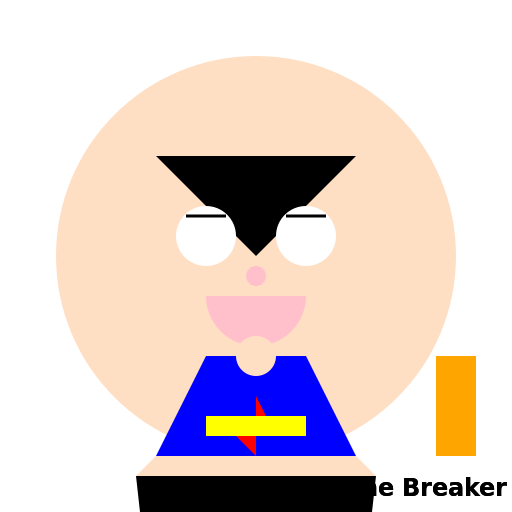
// Drawing a portrait of Touma from the anime series "A Certain Magical Index"


// Drawing Touma's face

ctx.beginPath();

ctx.arc(256, 256, 200, 0, Math.PI * 2); // Drawing a circle for the face

ctx.fillStyle = "#FFDFC4"; // Setting the face color to a light peach

ctx.fill();


// Drawing Touma's hair

ctx.beginPath();

ctx.moveTo(156, 156); // Starting point for the hair

ctx.lineTo(356, 156); // Drawing the top of the hair

ctx.lineTo(256, 256); // Connecting to the center of the face

ctx.closePath();

ctx.fillStyle = "#000000"; // Setting the hair color to black

ctx.fill();


// Drawing Touma's eyes

ctx.beginPath();

ctx.arc(206, 236, 30, 0, Math.PI * 2); // Drawing the left eye

ctx.arc(306, 236, 30, 0, Math.PI * 2); // Drawing the right eye

ctx.fillStyle = "#FFFFFF"; // Setting the eye color to white

ctx.fill();


// Drawing Touma's eyebrows

ctx.beginPath();

ctx.moveTo(186, 216); // Starting point for the left eyebrow

ctx.lineTo(226, 216); // Drawing the left eyebrow

ctx.moveTo(286, 216); // Starting point for the right eyebrow

ctx.lineTo(326, 216); // Drawing the right eyebrow

ctx.lineWidth = 3; // Setting the line width for the eyebrows

ctx.strokeStyle = "#000000"; // Setting the eyebrow color to black

ctx.stroke();


// Drawing Touma's mouth

ctx.beginPath();

ctx.arc(256, 296, 50, 0, Math.PI); // Drawing the mouth

ctx.fillStyle = "#FFC0CB"; // Setting the mouth color to a light pink

ctx.fill();


// Drawing Touma's nose

ctx.beginPath();

ctx.arc(256, 276, 10, 0, Math.PI * 2); // Drawing the nose

ctx.fillStyle = "#FFC0CB"; // Setting the nose color to a light pink

ctx.fill();


// Drawing Touma's collar

ctx.beginPath();

ctx.moveTo(206, 356); // Starting point for the left collar

ctx.lineTo(306, 356); // Drawing the top of the collar

ctx.lineTo(256, 456); // Connecting to the center of the face

ctx.closePath();

ctx.fillStyle = "#FFFFFF"; // Setting the collar color to white

ctx.fill();


// Drawing Touma's shirt

ctx.beginPath();

ctx.moveTo(156, 456); // Starting point for the left side of the shirt

ctx.lineTo(356, 456); // Drawing the bottom of the shirt

ctx.lineTo(306, 356); // Connecting to the right collar

ctx.lineTo(206, 356); // Connecting to the left collar

ctx.closePath();

ctx.fillStyle = "#0000FF"; // Setting the shirt color to blue

ctx.fill();


// Drawing Touma's tie

ctx.beginPath();

ctx.moveTo(256, 396); // Starting point for the top of the tie

ctx.lineTo(256, 456); // Drawing the bottom of the tie

ctx.lineTo(236, 436); // Drawing the left side of the tie

ctx.lineTo(276, 436); // Drawing the right side of the tie

ctx.closePath();

ctx.fillStyle = "#FF0000"; // Setting the tie color to red

ctx.fill();


// Drawing Touma's name tag

ctx.beginPath();

ctx.moveTo(206, 416); // Starting point for the left side of the name tag

ctx.lineTo(306, 416); // Drawing the top of the name tag

ctx.lineTo(306, 436); // Drawing the right side of the name tag

ctx.lineTo(206, 436); // Drawing the bottom of the name tag

ctx.closePath();

ctx.fillStyle = "#FFFF00"; // Setting the name tag color to yellow

ctx.fill();


// Drawing Touma's neck

ctx.beginPath();

ctx.arc(256, 356, 20, 0, Math.PI * 2); // Drawing the neck

ctx.fillStyle = "#FFDFC4"; // Setting the neck color to match the face

ctx.fill();


// Drawing Touma's shoulders

ctx.beginPath();

ctx.moveTo(156, 456); // Starting point for the left shoulder

ctx.lineTo(356, 456); // Drawing the bottom of the shoulders

ctx.lineTo(376, 476); // Drawing the right shoulder

ctx.lineTo(136, 476); // Drawing the left shoulder

ctx.closePath();

ctx.fillStyle = "#FFDFC4"; // Setting the shoulder color to match the face

ctx.fill();


// Drawing Touma's body

ctx.beginPath();

ctx.moveTo(136, 476); // Starting point for the left side of the body

ctx.lineTo(376, 476); // Drawing the bottom of the body

ctx.lineTo(356, 656); // Connecting to the right leg

ctx.lineTo(256, 656); // Drawing the crotch area

ctx.lineTo(156, 656); // Connecting to the left leg

ctx.closePath();

ctx.fillStyle = "#000000"; // Setting the body color to black

ctx.fill();


// Drawing Touma's legs

ctx.beginPath();

ctx.moveTo(156, 656); // Starting point for the left leg

ctx.lineTo(256, 656); // Drawing the bottom of the left leg

ctx.lineTo(236, 776); // Drawing the left foot

ctx.lineTo(136, 736); // Drawing the left thigh

ctx.lineTo(136, 656); // Connecting to the left leg

ctx.moveTo(356, 656); // Starting point for the right leg

ctx.lineTo(256, 656); // Drawing the bottom of the right leg

ctx.lineTo(276, 776); // Drawing the right foot

ctx.lineTo(376, 736); // Drawing the right thigh

ctx.lineTo(376, 656); // Connecting to the right leg

ctx.closePath();

ctx.fillStyle = "#000000"; // Setting the leg color to black

ctx.fill();


// Drawing Touma's shoes

ctx.beginPath();

ctx.arc(236, 776, 20, 0, Math.PI * 2); // Drawing the left shoe

ctx.arc(276, 776, 20, 0, Math.PI * 2); // Drawing the right shoe

ctx.fillStyle = "#000000"; // Setting the shoe color to black

ctx.fill();


// Drawing Touma's esper ability

ctx.beginPath();

ctx.moveTo(436, 356); // Starting point for the esper ability

ctx.lineTo(476, 356); // Drawing the top of the ability

ctx.lineTo(476, 456); // Drawing the right side of the ability

ctx.lineTo(436, 456); // Drawing the bottom of the ability

ctx.closePath();

ctx.fillStyle = "#FFA500"; // Setting the esper ability color to orange

ctx.fill();


// Drawing Touma's catchphrase "Imagine Breaker"

ctx.font = "bold 24px Arial"; // Setting the font for the catchphrase

ctx.fillStyle = "#000000"; // Setting the text color to black

ctx.fillText("Imagine Breaker", 286, 496); // Drawing the catchphrase

ctx.fillText("Imagine Breaker", 286, 496); // Drawing the catchphrase again for emphasis


// A certain artistic masterpiece of Touma from "A Certain Magical Index"


// I hope you can imagine the breaker of imagination!
AI
Model: gpt-3.5-turbo-16k-0613
Time: 35 seconds
Prompt Tokens: 177
Completion Tokens: 1574
Total Token Cost: 1751


 balloon party
 beautiful beach
 cute puppy dog
 happy cat
 house
house