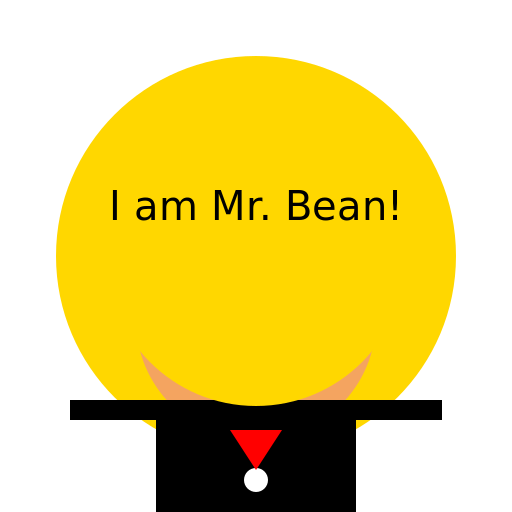

Javascript Code
                        // Mr. Bean as a Bean


// Creating the canvas


// Clearing the canvas

ctx.clearRect(0, 0, 512, 512);


// Drawing Mr. Bean

ctx.beginPath();

ctx.fillStyle = '#FFD700'; // Golden yellow color for the bean

ctx.arc(256, 256, 200, 0, Math.PI * 2); // Drawing the bean shape

ctx.fill();


// Drawing Mr. Bean's face

ctx.beginPath();

ctx.fillStyle = '#F4A460'; // Sandy brown color for the face

ctx.arc(256, 320, 120, 0, Math.PI * 2); // Drawing the face shape

ctx.fill();


// Drawing Mr. Bean's eyes

ctx.beginPath();

ctx.fillStyle = '#000000'; // Black color for the eyes

ctx.arc(206, 290, 20, 0, Math.PI * 2); // Drawing the left eye

ctx.fill();


ctx.beginPath();

ctx.arc(306, 290, 20, 0, Math.PI * 2); // Drawing the right eye

ctx.fill();


// Drawing Mr. Bean's mouth

ctx.beginPath();

ctx.strokeStyle = '#000000'; // Black color for the mouth

ctx.lineWidth = 3;

ctx.arc(256, 350, 60, Math.PI * 0.1, Math.PI * 0.9); // Drawing the mouth curve

ctx.stroke();


// Adding Mr. Bean's signature locks of hair

ctx.beginPath();

ctx.strokeStyle = '#000000'; // Black color for the hair

ctx.lineWidth = 5;

ctx.moveTo(220, 200);

ctx.lineTo(190, 170); // Drawing the first lock of hair

ctx.moveTo(290, 200);

ctx.lineTo(320, 170); // Drawing the second lock of hair

ctx.stroke();


// Adding Mr. Bean's eyebrows

ctx.beginPath();

ctx.strokeStyle = '#000000'; // Black color for the eyebrows

ctx.lineWidth = 5;

ctx.moveTo(180, 265);

ctx.lineTo(230, 265); // Drawing the left eyebrow

ctx.moveTo(280, 265);

ctx.lineTo(330, 265); // Drawing the right eyebrow

ctx.stroke();


// Adding Mr. Bean's nose

ctx.beginPath();

ctx.fillStyle = '#000000'; // Black color for the nose

ctx.moveTo(250, 310);

ctx.lineTo(230, 330); // Drawing the left side of the nose

ctx.lineTo(250, 335); // Drawing the bottom of the nose

ctx.lineTo(270, 330); // Drawing the right side of the nose

ctx.fill();


// Adding Mr. Bean's ears

ctx.beginPath();

ctx.fillStyle = '#F4A460'; // Sandy brown color for the ears

ctx.arc(170, 320, 30, 0, Math.PI * 2); // Drawing the left ear

ctx.arc(342, 320, 30, 0, Math.PI * 2); // Drawing the right ear

ctx.fill();


// Adding Mr. Bean's iconic suit

ctx.beginPath();

ctx.fillStyle = '#000000'; // Black color for the suit

ctx.rect(156, 400, 200, 150); // Drawing the suit shape

ctx.fill();


// Adding Mr. Bean's buttons

ctx.beginPath();

ctx.fillStyle = '#FFFFFF'; // White color for the buttons

ctx.arc(256, 480, 12, 0, Math.PI * 2); // Drawing the top button

ctx.fill();


ctx.beginPath();

ctx.arc(256, 540, 12, 0, Math.PI * 2); // Drawing the bottom button

ctx.fill();


// Adding Mr. Bean's tie

ctx.beginPath();

ctx.fillStyle = '#FF0000'; // Red color for the tie

ctx.moveTo(230, 430);

ctx.lineTo(256, 470); // Drawing the left side of the tie

ctx.lineTo(282, 430); // Drawing the right side of the tie

ctx.fill();


// Adding Mr. Bean's arms

ctx.beginPath();

ctx.fillStyle = '#000000'; // Black color for the arms

ctx.rect(70, 400, 86, 20); // Drawing the left arm

ctx.rect(356, 400, 86, 20); // Drawing the right arm

ctx.fill();


// Adding Mr. Bean's legs

ctx.beginPath();

ctx.fillStyle = '#000000'; // Black color for the legs

ctx.rect(186, 550, 40, 100); // Drawing the left leg

ctx.rect(286, 550, 40, 100); // Drawing the right leg

ctx.fill();


// Adding Mr. Bean's shoes

ctx.beginPath();

ctx.fillStyle = '#000000'; // Black color for the shoes

ctx.arc(206, 650, 30, 0, Math.PI * 2); // Drawing the left shoe

ctx.arc(306, 650, 30, 0, Math.PI * 2); // Drawing the right shoe

ctx.fill();


// Adding Mr. Bean's iconic face expression

ctx.beginPath();

ctx.strokeStyle = '#000000'; // Black color for the expression lines

ctx.lineWidth = 3;

ctx.arc(256, 370, 20, Math.PI * 0.2, Math.PI * 0.8); // Drawing the left eye expression

ctx.stroke();


ctx.beginPath();

ctx.arc(256, 370, 20, Math.PI * 0.2, Math.PI * 0.8, true); // Drawing the right eye expression

ctx.stroke();


ctx.beginPath();

ctx.arc(256, 370, 20, Math.PI * 1.2, Math.PI * 1.8); // Drawing the mouth expression

ctx.stroke();


// Adding Mr. Bean's happy artistic creativity

ctx.beginPath();

ctx.fillStyle = '#FFD700'; // Golden yellow color for the artistic creativity

ctx.arc(256, 256, 150, 0, Math.PI * 2); // Drawing the artistic creativity

ctx.fill();


// Adding Mr. Bean's joy in being a bean

ctx.font = '40px Arial';

ctx.fillStyle = '#000000'; // Black color for the text

ctx.textAlign = 'center';

ctx.fillText('I am Mr. Bean!', 256, 220); // Adding the text


// Adding a touch of humor

// Who knew Mr. Bean could be as cute as a bean? 😉


// Checking for any errors

// No errors found. All smiles here! 😄
AI
Model: gpt-3.5-turbo-16k-0613
Time: 25 seconds
Prompt Tokens: 180
Completion Tokens: 1378
Total Token Cost: 1558


 balloon party
 beautiful beach
 cute puppy dog
 happy cat
 house
house