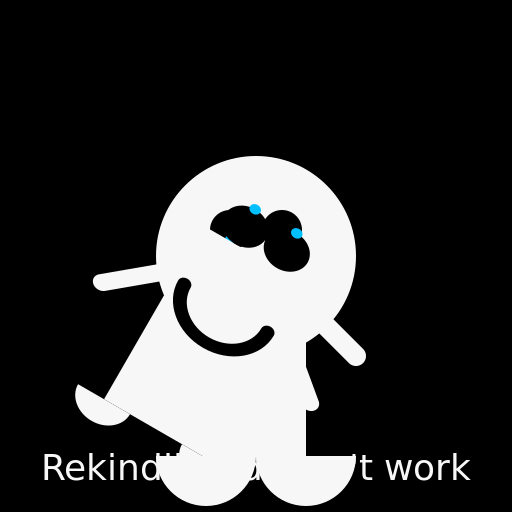

Javascript Code
                        // Title: The Ghoster's Dance of Disillusionment


// Let's begin by setting up our canvas


// Background

ctx.fillStyle = '#000'; // Ghostly black

ctx.fillRect(0, 0, 512, 512);


// Ghoster's head

ctx.beginPath();

ctx.arc(256, 256, 100, 0, 2 * Math.PI);

ctx.fillStyle = '#f7f7f7'; // Pale ghostly white

ctx.fill();


// Ghoster's body

ctx.beginPath();

ctx.moveTo(206, 256);

ctx.lineTo(306, 256);

ctx.lineTo(306, 456);

ctx.lineTo(206, 456);

ctx.closePath();

ctx.fillStyle = '#f7f7f7'; // Pale ghostly white

ctx.fill();


// Ghoster's arms

ctx.beginPath();

ctx.moveTo(156, 356);

ctx.lineTo(206, 306);

ctx.lineTo(306, 306);

ctx.lineTo(356, 356);

ctx.lineWidth = 20;

ctx.strokeStyle = '#f7f7f7'; // Pale ghostly white

ctx.lineCap = 'round';

ctx.stroke();


// Ghoster's eyes

ctx.beginPath();

ctx.arc(230, 230, 20, 0, 2 * Math.PI);

ctx.arc(282, 230, 20, 0, 2 * Math.PI);

ctx.fillStyle = '#000'; // Soul-piercing black

ctx.fill();


// Ghoster's mouth

ctx.beginPath();

ctx.arc(256, 290, 30, 0, Math.PI);

ctx.lineWidth = 8;

ctx.strokeStyle = '#000'; // Soul-piercing black

ctx.lineCap = 'round';

ctx.stroke();


// Tears of disillusionment

ctx.beginPath();

ctx.arc(230, 240, 5, 0, 2 * Math.PI);

ctx.arc(282, 240, 5, 0, 2 * Math.PI);

ctx.fillStyle = '#00bfff'; // Brilliant blue of shattered dreams

ctx.fill();


// Ghoster's feet

ctx.beginPath();

ctx.arc(206, 456, 50, 0, Math.PI);

ctx.arc(306, 456, 50, 0, Math.PI);

ctx.fillStyle = '#f7f7f7'; // Pale ghostly white

ctx.fill();


// Ghoster's movements of despair

ctx.save(); // Save the current state of despair


// The Ghoster's dance of disillusionment begins

ctx.translate(256, 256); // Move to the center of the canvas

ctx.rotate(Math.PI / 6); // Rotate to a tilted angle

ctx.scale(1.2, 1); // Stretch the ghoster's body


// Ghoster's body

ctx.beginPath();

ctx.moveTo(-50, 0);

ctx.lineTo(50, 0);

ctx.lineTo(50, 200);

ctx.lineTo(-50, 200);

ctx.closePath();

ctx.fillStyle = '#f7f7f7'; // Pale ghostly white

ctx.fill();


// Ghoster's flailing arms

ctx.beginPath();

ctx.moveTo(-100, 100);

ctx.lineTo(-50, 50);

ctx.lineTo(50, 50);

ctx.lineTo(100, 100);

ctx.lineWidth = 16;

ctx.strokeStyle = '#f7f7f7'; // Pale ghostly white

ctx.lineCap = 'round';

ctx.stroke();


// Ghoster's wild eyes

ctx.beginPath();

ctx.arc(-20, -20, 20, 0, 2 * Math.PI);

ctx.arc(20, -20, 20, 0, 2 * Math.PI);

ctx.fillStyle = '#000'; // Soul-piercing black

ctx.fill();


// Ghoster's wide-open mouth

ctx.beginPath();

ctx.arc(0, 60, 40, 0, Math.PI);

ctx.lineWidth = 12;

ctx.strokeStyle = '#000'; // Soul-piercing black

ctx.lineCap = 'round';

ctx.stroke();


// Tears of utter despair

ctx.beginPath();

ctx.arc(-20, -40, 5, 0, 2 * Math.PI);

ctx.arc(20, -40, 5, 0, 2 * Math.PI);

ctx.fillStyle = '#00bfff'; // Brilliant blue of shattered dreams

ctx.fill();


// Ghoster's flailing feet

ctx.beginPath();

ctx.arc(-50, 200, 25, 0, Math.PI);

ctx.arc(50, 200, 25, 0, Math.PI);

ctx.fillStyle = '#f7f7f7'; // Pale ghostly white

ctx.fill();


ctx.restore(); // Restore the ghoster's original state of despair


// Ghoster's sad realization: Rekindling doesn't work

ctx.font = '36px Arial';

ctx.fillStyle = '#f7f7f7'; // Pale ghostly white

ctx.textAlign = 'center';

ctx.fillText("Rekindling doesn't work", 256, 480);


// A ghoster's heart is truly transparent, just like this code

// Ghosting may be spooky, but debugging is even spookier!
AI
Model: gpt-3.5-turbo-16k-0613
Time: 15 seconds
Prompt Tokens: 186
Completion Tokens: 1103
Total Token Cost: 1289


 balloon party
 beautiful beach
 cute puppy dog
 happy cat
 house
house