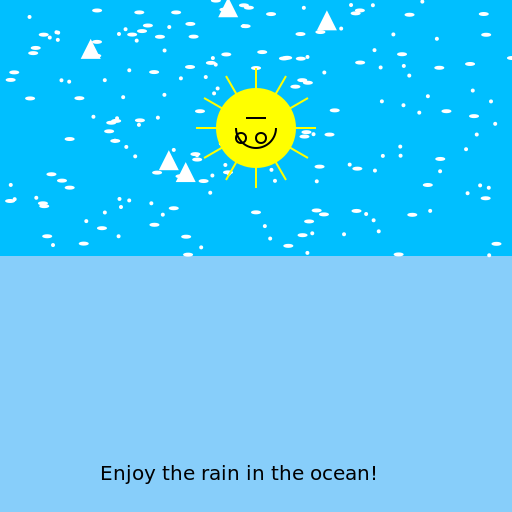

Javascript Code
                        // Title: Raining in an Empty Blue Ocean


ctx.fillStyle = "deepskyblue"; // Setting the background color to a beautiful deep sky blue

ctx.fillRect(0, 0, 512, 512); // Filling the entire canvas with the background color


// Drawing the empty blue ocean

ctx.fillStyle = "lightskyblue"; // Setting the color for the ocean

ctx.fillRect(0, 256, 512, 256); // Drawing the lower half of the canvas as the ocean


// Drawing raindrops in the ocean

ctx.fillStyle = "white"; // Setting the color for the raindrops


// Drawing the raindrops in a loop

for (let i = 0; i < 100; i++) {

  let x = Math.random() * 512; // Random X position within the canvas width

  let y = Math.random() * 256; // Random Y position within the upper half of the canvas


// Drawing a raindrop as a small circle

  ctx.beginPath();

  ctx.arc(x, y, 2, 0, Math.PI * 2); // Drawing a circle with a radius of 2 pixels

  ctx.fill();

}


// Adding a little splash effect to the raindrops

ctx.fillStyle = "white"; // Setting the color for the splash effect


// Drawing the splash effect for each raindrop

for (let i = 0; i < 100; i++) {

  let x = Math.random() * 512; // Random X position within the canvas width

  let y = Math.random() * 256; // Random Y position within the upper half of the canvas


// Drawing the splash effect as a small ellipse

  ctx.beginPath();

  ctx.ellipse(x, y, 5, 2, 0, 0, Math.PI * 2); // Drawing an ellipse with a width of 5 pixels and a height of 2 pixels

  ctx.fill();

}


// Adding some seagulls to the scene

ctx.fillStyle = "white"; // Setting the color for the seagulls


// Drawing the seagulls in a loop

for (let i = 0; i < 5; i++) {

  let x = Math.random() * 512; // Random X position within the canvas width

  let y = Math.random() * 200; // Random Y position within the upper part of the canvas


// Drawing a seagull as a simple triangle

  ctx.beginPath();

  ctx.moveTo(x, y); // Starting point of the triangle

  ctx.lineTo(x + 10, y - 20); // Point on the top of the triangle

  ctx.lineTo(x + 20, y); // Point on the right side of the triangle

  ctx.closePath();

  ctx.fill();

}


// Adding a happy sun to the scene

ctx.fillStyle = "yellow"; // Setting the color for the sun


// Drawing the sun as a circle

ctx.beginPath();

ctx.arc(256, 128, 40, 0, Math.PI * 2); // Drawing a circle with a radius of 40 pixels at the center of the canvas

ctx.fill();


// Adding some sun rays to make the sun even happier

ctx.strokeStyle = "yellow"; // Setting the color for the sun rays

ctx.lineWidth = 2; // Setting the width of the sun rays


// Drawing the sun rays in a loop

for (let i = 0; i < 12; i++) {

  let angle = (i * Math.PI) / 6; // Calculating the angle for each sun ray


// Drawing each sun ray as a line

  ctx.beginPath();

  ctx.moveTo(256, 128); // Starting point at the center of the canvas

  ctx.lineTo(256 + Math.cos(angle) * 60, 128 + Math.sin(angle) * 60); // Endpoint of the sun ray

  ctx.stroke();

}


// Adding a little smiley face to the sun to make it extra happy

ctx.strokeStyle = "black"; // Setting the color for the smiley face

ctx.lineWidth = 2; // Setting the width of the smiley face


// Drawing the smiley face using arcs and lines

ctx.beginPath();

ctx.arc(256, 128, 20, 0, Math.PI, false); // Drawing the curved part of the smile

ctx.moveTo(246, 118); // Moving to the left endpoint of the smile

ctx.lineTo(266, 118); // Drawing the line to the right endpoint of the smile

ctx.moveTo(246, 138); // Moving to the left eye

ctx.arc(241, 138, 5, 0, Math.PI * 2); // Drawing the left eye as a small circle

ctx.moveTo(266, 138); // Moving to the right eye

ctx.arc(261, 138, 5, 0, Math.PI * 2); // Drawing the right eye as a small circle

ctx.stroke();


// Adding a little message to the artwork to bring a smile

ctx.font = "20px Arial"; // Setting the font for the message

ctx.fillStyle = "black"; // Setting the color for the message

ctx.fillText("Enjoy the rain in the ocean!", 100, 480); // Drawing the message at the bottom of the canvas


// Time for a happy dance in the rain! 💃🌧️
AI
Model: gpt-3.5-turbo-16k-0613
Time: 19 seconds
Prompt Tokens: 181
Completion Tokens: 1127
Total Token Cost: 1308


 balloon party
 beautiful beach
 cute puppy dog
 happy cat
 house
house