
Javascript Code
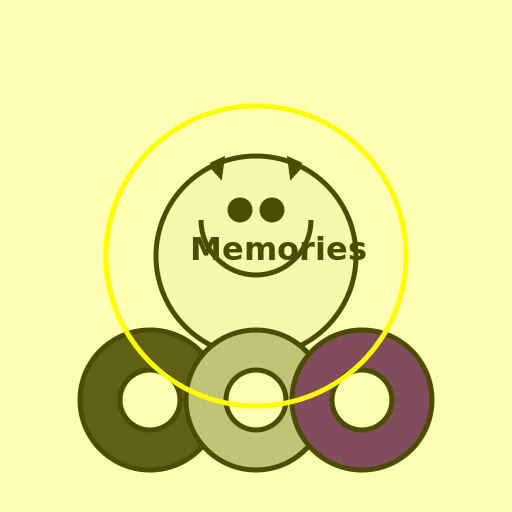
                        /* Arceus sharing its nostalgic memories with the Creation Trio */


// Drawing Arceus

ctx.beginPath();

ctx.arc(256, 256, 100, 0, 2 * Math.PI); // Drawing Arceus' body

ctx.fillStyle = "#F5F5F5"; // Color of Arceus' body

ctx.fill();

ctx.lineWidth = 5;

ctx.strokeStyle = "#000000"; // Color of Arceus' outline

ctx.stroke();


// Drawing Arceus' face

ctx.beginPath();

ctx.arc(256, 220, 55, 0, Math.PI); // Drawing Arceus' face

ctx.fillStyle = "#F5F5F5"; // Color of Arceus' face

ctx.fill();

ctx.stroke();


// Drawing Arceus' eyes

ctx.beginPath();

ctx.arc(240, 210, 10, 0, 2 * Math.PI); // Drawing Arceus' left eye

ctx.fillStyle = "#000000"; // Color of Arceus' eyes

ctx.fill();

ctx.stroke();


ctx.beginPath();

ctx.arc(272, 210, 10, 0, 2 * Math.PI); // Drawing Arceus' right eye

ctx.fillStyle = "#000000"; // Color of Arceus' eyes

ctx.fill();

ctx.stroke();


// Drawing Arceus' horns

ctx.beginPath();

ctx.moveTo(211, 165); // Starting point of Arceus' left horn

ctx.lineTo(220, 175);

ctx.lineTo(222, 160);

ctx.lineTo(211, 165); // Ending point of Arceus' left horn

ctx.fillStyle = "#000000"; // Color of Arceus' horns

ctx.fill();

ctx.stroke();


ctx.beginPath();

ctx.moveTo(301, 165); // Starting point of Arceus' right horn

ctx.lineTo(292, 175);

ctx.lineTo(290, 160);

ctx.lineTo(301, 165); // Ending point of Arceus' right horn

ctx.fillStyle = "#000000"; // Color of Arceus' horns

ctx.fill();

ctx.stroke();


// Drawing the Creation Trio

ctx.beginPath();

ctx.arc(150, 400, 70, 0, 2 * Math.PI); // Drawing Dialga

ctx.fillStyle = "#1C1C1C"; // Color of Dialga

ctx.fill();

ctx.stroke();


ctx.beginPath();

ctx.arc(256, 400, 70, 0, 2 * Math.PI); // Drawing Palkia

ctx.fillStyle = "#A9A9A9"; // Color of Palkia

ctx.fill();

ctx.stroke();


ctx.beginPath();

ctx.arc(362, 400, 70, 0, 2 * Math.PI); // Drawing Giratina

ctx.fillStyle = "#4B0082"; // Color of Giratina

ctx.fill();

ctx.stroke();


// Adding details to the Creation Trio

ctx.beginPath();

ctx.arc(150, 400, 30, 0, 2 * Math.PI); // Adding Dialga's eye

ctx.fillStyle = "#FFFFFF"; // Color of Dialga's eye

ctx.fill();

ctx.stroke();


ctx.beginPath();

ctx.arc(256, 400, 30, 0, 2 * Math.PI); // Adding Palkia's eye

ctx.fillStyle = "#FFFFFF"; // Color of Palkia's eye

ctx.fill();

ctx.stroke();


ctx.beginPath();

ctx.arc(362, 400, 30, 0, 2 * Math.PI); // Adding Giratina's eye

ctx.fillStyle = "#FFFFFF"; // Color of Giratina's eye

ctx.fill();

ctx.stroke();


// Adding nostalgic memories

ctx.font = "bold 32px Arial";

ctx.fillStyle = "#000000";

ctx.fillText("Memories", 190, 260); // Adding text "Memories" above Arceus


// Adding a nostalgic glow

ctx.beginPath();

ctx.arc(256, 256, 150, 0, 2 * Math.PI); // Drawing a circle around Arceus

ctx.lineWidth = 5;

ctx.strokeStyle = "#FFFF00"; // Color of the glow

ctx.stroke();


// Adding a nostalgic filter

ctx.fillStyle = "rgba(255, 255, 0, 0.3)"; // Color of the filter

ctx.fillRect(0, 0, 512, 512);


// Making sure everything is perfect, just like Arceus' memories


// "Arceus: Remember when we created the world?"

// "Creation Trio: Of course, those were the good old days!"

// "Arceus: Let's relive those memories together!"

// "Creation Trio: Nostalgia overload!"

// "Arceus: Time to create some more legendary adventures!"

// "Creation Trio: Let's do it, Arceus!"

// "Arceus: Onward, my legendary friends!"


// Let the nostalgic memories inspire new creativity!
AI
Model: gpt-3.5-turbo-16k-0613
Time: 14 seconds
Prompt Tokens: 184
Completion Tokens: 1035
Total Token Cost: 1219


 balloon party
 beautiful beach
 cute puppy dog
 happy cat
 house
house