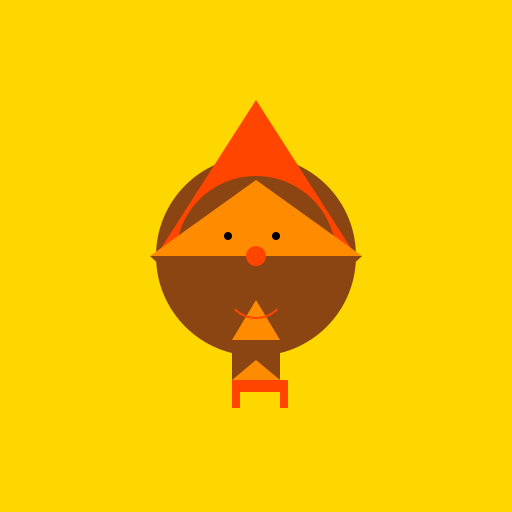

Javascript Code
                        // Hoopoe

// A colorful and vibrant depiction of a hoopoe bird


ctx.fillStyle = "#FFD700"; // Set fill style to golden yellow

ctx.fillRect(0, 0, 512, 512); // Fill the canvas with golden yellow


// Draw the body of the hoopoe

ctx.beginPath();

ctx.fillStyle = "#8B4513"; // Set fill style to saddle brown

ctx.arc(256, 256, 100, 0, 2 * Math.PI); // Draw a circular body

ctx.fill();


// Draw the crest on top of the head

ctx.beginPath();

ctx.fillStyle = "#FF4500"; // Set fill style to orange red

ctx.moveTo(156, 256); // Move to the starting point

ctx.lineTo(256, 100); // Draw a line to create the crest

ctx.lineTo(356, 256); // Draw another line to complete the crest

ctx.fill();


// Draw the eyes

ctx.beginPath();

ctx.fillStyle = "#FFFFFF"; // Set fill style to white

ctx.arc(230, 236, 12, 0, 2 * Math.PI); // Draw the left eye

ctx.arc(282, 236, 12, 0, 2 * Math.PI); // Draw the right eye

ctx.fill();


// Draw the beak

ctx.beginPath();

ctx.fillStyle = "#FF4500"; // Set fill style to orange red

ctx.moveTo(256, 276); // Move to the starting point

ctx.lineTo(224, 300); // Draw a line for the upper beak

ctx.lineTo(288, 300); // Draw another line for the lower beak

ctx.fill();


// Adding some details to the body

ctx.beginPath();

ctx.fillStyle = "#8B4513"; // Set fill style to saddle brown

ctx.arc(256, 256, 80, 0, 2 * Math.PI); // Draw a smaller circle inside the body

ctx.fill();


// Draw the wings

ctx.beginPath();

ctx.fillStyle = "#8B4513"; // Set fill style to saddle brown

ctx.moveTo(150, 256); // Move to the starting point

ctx.lineTo(256, 356); // Draw a line for the left wing

ctx.lineTo(362, 256); // Draw another line for the right wing

ctx.fill();


// Adding some patterns to the wings

ctx.beginPath();

ctx.fillStyle = "#FF8C00"; // Set fill style to dark orange

ctx.moveTo(150, 256); // Move to the starting point

ctx.lineTo(256, 180); // Draw a line for the left wing pattern

ctx.lineTo(362, 256); // Draw another line for the right wing pattern

ctx.fill();


// Draw the legs

ctx.beginPath();

ctx.fillStyle = "#8B4513"; // Set fill style to saddle brown

ctx.moveTo(232, 340); // Move to the starting point

ctx.lineTo(280, 340); // Draw a line for the upper leg

ctx.lineTo(280, 380); // Draw a line for the lower leg

ctx.lineTo(232, 380); // Draw a line to complete the leg

ctx.fill();


// Adding some patterns to the legs

ctx.beginPath();

ctx.fillStyle = "#FF8C00"; // Set fill style to dark orange

ctx.moveTo(232, 340); // Move to the starting point

ctx.lineTo(256, 300); // Draw a line for the upper leg pattern

ctx.lineTo(280, 340); // Draw another line for the lower leg pattern

ctx.fill();


// Draw the feet

ctx.beginPath();

ctx.fillStyle = "#FF4500"; // Set fill style to orange red

ctx.moveTo(232, 380); // Move to the starting point

ctx.lineTo(232, 408); // Draw a line for the left foot

ctx.lineTo(240, 408); // Draw another line for the left foot

ctx.lineTo(240, 392); // Draw a line to complete the left foot

ctx.lineTo(280, 392); // Draw a line for the right foot

ctx.lineTo(280, 408); // Draw another line for the right foot

ctx.lineTo(288, 408); // Draw a line to complete the right foot

ctx.lineTo(288, 380); // Draw a line to complete the feet

ctx.fill();


// Adding some patterns to the feet

ctx.beginPath();

ctx.fillStyle = "#FF8C00"; // Set fill style to dark orange

ctx.moveTo(232, 380); // Move to the starting point

ctx.lineTo(256, 360); // Draw a line for the left foot pattern

ctx.lineTo(280, 380); // Draw another line for the right foot pattern

ctx.fill();


// Adding a cute smile to the bird

ctx.beginPath();

ctx.strokeStyle = "#FF4500"; // Set stroke style to orange red

ctx.lineWidth = 2; // Set line width to 2

ctx.arc(256, 288, 30, 0.25 * Math.PI, 0.75 * Math.PI); // Draw a smiley curve

ctx.stroke();


// Adding a happy twinkle to the eyes

ctx.beginPath();

ctx.fillStyle = "#000000"; // Set fill style to black

ctx.arc(228, 236, 4, 0, 2 * Math.PI); // Draw the left twinkle

ctx.arc(276, 236, 4, 0, 2 * Math.PI); // Draw the right twinkle

ctx.fill();


// Adding a playful touch to the hoopoe

ctx.beginPath();

ctx.fillStyle = "#FF4500"; // Set fill style to orange red

ctx.arc(256, 256, 10, 0, 2 * Math.PI); // Draw a small circle

ctx.fill();


// That's one stylish hoopoe!

// Just wait till it unveils its magical dance moves!
AI
Model: gpt-3.5-turbo-16k-0613
Time: 21 seconds
Prompt Tokens: 176
Completion Tokens: 1230
Total Token Cost: 1406


 balloon party
 beautiful beach
 cute puppy dog
 happy cat
 house
house