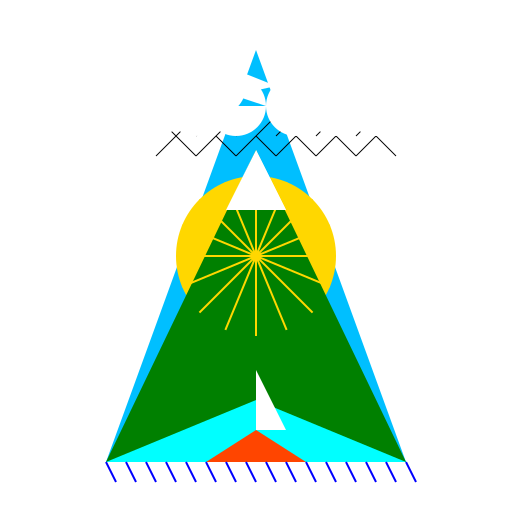

Javascript Code
                        // Logo for "Rayan's Adventure"

// "Untitled Web App"


// Initializing canvas


// Drawing the background

ctx.fillStyle = "#fff"; // White color

ctx.fillRect(0, 0, 512, 512);


// Drawing the main shape

ctx.fillStyle = "#00bfff"; // Sky blue color

ctx.beginPath();

ctx.moveTo(256, 50); // Top point

ctx.lineTo(106, 462); // Left point

ctx.lineTo(406, 462); // Right point

ctx.closePath();

ctx.fill();


// Drawing the sun

ctx.fillStyle = "#ffd700"; // Gold color

ctx.beginPath();

ctx.arc(256, 256, 80, 0, Math.PI * 2);

ctx.closePath();

ctx.fill();


// Drawing the mountains

ctx.fillStyle = "#008000"; // Green color

ctx.beginPath();

ctx.moveTo(106, 462); // Left mountain base

ctx.lineTo(256, 150); // Left mountain peak

ctx.lineTo(406, 462); // Right mountain base

ctx.closePath();

ctx.fill();


// Drawing the river

ctx.fillStyle = "#00ffff"; // Cyan color

ctx.beginPath();

ctx.moveTo(106, 462); // Left river bank

ctx.lineTo(406, 462); // Right river bank

ctx.lineTo(256, 400); // River end

ctx.closePath();

ctx.fill();


// Drawing the boat

ctx.fillStyle = "#ff4500"; // Orange color

ctx.beginPath();

ctx.moveTo(206, 462); // Left boat side

ctx.lineTo(256, 462); // Boat front

ctx.lineTo(306, 462); // Right boat side

ctx.lineTo(256, 430); // Boat back

ctx.closePath();

ctx.fill();


// Drawing the sail

ctx.fillStyle = "#fff"; // White color

ctx.beginPath();

ctx.moveTo(256, 430); // Sail top

ctx.lineTo(256, 370); // Sail bottom

ctx.lineTo(286, 430); // Sail right

ctx.closePath();

ctx.fill();


// Drawing the waves

ctx.strokeStyle = "#0000ff"; // Blue color

ctx.lineWidth = 2; // Wave thickness

ctx.beginPath();

for (let i = 106; i <= 406; i += 20) {

  ctx.moveTo(i, 462); // Wave start

  ctx.lineTo(i + 10, 482); // Wave end

}

ctx.stroke();


// Drawing the sun rays

ctx.strokeStyle = "#ffd700"; // Gold color

ctx.lineWidth = 2; // Ray thickness

ctx.beginPath();

for (let angle = 0; angle < Math.PI * 2; angle += Math.PI / 8) {

  const x = 256 + Math.cos(angle) * 80;

  const y = 256 + Math.sin(angle) * 80;

  ctx.moveTo(256, 256); // Ray start

  ctx.lineTo(x, y); // Ray end

}

ctx.stroke();


// Drawing the seagulls

ctx.strokeStyle = "#000"; // Black color

ctx.lineWidth = 1; // Seagull thickness

ctx.beginPath();

ctx.moveTo(156, 156); // First seagull

ctx.lineTo(176, 136);

ctx.lineTo(196, 156);

ctx.moveTo(176, 136);

ctx.lineTo(156, 116);

ctx.moveTo(196, 156);

ctx.lineTo(216, 136);

ctx.moveTo(176, 136);

ctx.lineTo(196, 116);

ctx.moveTo(216, 136);

ctx.lineTo(236, 156);

ctx.moveTo(196, 136);

ctx.lineTo(216, 116);

ctx.moveTo(236, 156);

ctx.lineTo(256, 136);

ctx.moveTo(216, 136);

ctx.lineTo(236, 116);

ctx.moveTo(256, 136);

ctx.lineTo(276, 156);

ctx.moveTo(236, 136);

ctx.lineTo(256, 116);

ctx.moveTo(276, 156);

ctx.lineTo(296, 136);

ctx.moveTo(256, 136);

ctx.lineTo(276, 116);

ctx.moveTo(296, 136);

ctx.lineTo(316, 156);

ctx.moveTo(276, 136);

ctx.lineTo(296, 116);

ctx.moveTo(316, 156);

ctx.lineTo(336, 136);

ctx.moveTo(296, 136);

ctx.lineTo(316, 116);

ctx.moveTo(336, 136);

ctx.lineTo(356, 156);

ctx.moveTo(316, 136);

ctx.lineTo(336, 116);

ctx.moveTo(356, 156);

ctx.lineTo(376, 136);

ctx.moveTo(336, 136);

ctx.lineTo(356, 116);

ctx.moveTo(376, 136);

ctx.lineTo(396, 156);

ctx.moveTo(356, 136);

ctx.lineTo(376, 116);

ctx.stroke();


// Drawing the clouds

ctx.fillStyle = "#fff"; // White color

ctx.beginPath();

ctx.arc(156, 106, 30, 0, Math.PI * 2); // First cloud

ctx.arc(196, 106, 30, 0, Math.PI * 2);

ctx.arc(236, 106, 30, 0, Math.PI * 2);

ctx.arc(176, 86, 30, 0, Math.PI * 2);

ctx.arc(216, 86, 30, 0, Math.PI * 2);

ctx.arc(196, 66, 30, 0, Math.PI * 2);

ctx.arc(296, 106, 30, 0, Math.PI * 2); // Second cloud

ctx.arc(336, 106, 30, 0, Math.PI * 2);

ctx.arc(376, 106, 30, 0, Math.PI * 2);

ctx.arc(316, 86, 30, 0, Math.PI * 2);

ctx.arc(356, 86, 30, 0, Math.PI * 2);

ctx.arc(336, 66, 30, 0, Math.PI * 2);

ctx.closePath();

ctx.fill();


// Drawing the mountains' snow

ctx.fillStyle = "#fff"; // White color

ctx.beginPath();

ctx.moveTo(256, 150); // Left mountain peak

ctx.lineTo(226, 210); // Left snow point

ctx.lineTo(256, 210); // Center snow point

ctx.lineTo(286, 210); // Right snow point

ctx.closePath();

ctx.fill();

ctx.beginPath();

ctx.moveTo(256, 150); // Right mountain peak

ctx.lineTo(286, 210); // Right snow point

ctx.lineTo(316, 210); // Center snow point

ctx.lineTo(256, 210); // Left snow point

ctx.closePath();

ctx.fill();


// Finish drawing the amazing "Rayan's Adventure" logo!

// Don't forget to explore the untitled web app with Rayan!
AI
Model: gpt-3.5-turbo-16k-0613
Time: 26 seconds
Prompt Tokens: 204
Completion Tokens: 1470
Total Token Cost: 1674


 balloon party
 beautiful beach
 cute puppy dog
 happy cat
 house
house