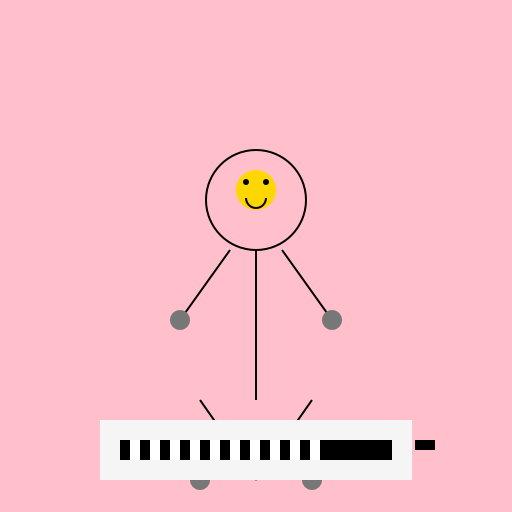

Javascript Code
                        /* The Determined Programmer */

// I'm not chained, I'm just committed to coding!


ctx.fillStyle = "#FFC0CB"; // Setting the canvas background color to light pink

ctx.fillRect(0, 0, 512, 512); // Drawing a rectangle as the background


// Drawing the human figure

ctx.strokeStyle = "#000"; // Setting the stroke color to black

ctx.lineWidth = 2; // Setting the stroke width to 2 pixels


ctx.beginPath();

ctx.arc(256, 200, 50, 0, Math.PI * 2, true); // Drawing the head

ctx.closePath();

ctx.stroke();


ctx.beginPath();

ctx.moveTo(256, 250); // Drawing the body

ctx.lineTo(256, 400);

ctx.stroke();


ctx.beginPath();

ctx.moveTo(200, 400); // Drawing the left leg

ctx.lineTo(256, 480);

ctx.stroke();


ctx.beginPath();

ctx.moveTo(312, 400); // Drawing the right leg

ctx.lineTo(256, 480);

ctx.stroke();


ctx.beginPath();

ctx.moveTo(230, 250); // Drawing the left arm

ctx.lineTo(180, 320);

ctx.stroke();


ctx.beginPath();

ctx.moveTo(282, 250); // Drawing the right arm

ctx.lineTo(332, 320);

ctx.stroke();


// Drawing the shackles on hands and legs

ctx.fillStyle = "#777"; // Setting the color of the shackles to dark gray


ctx.beginPath();

ctx.arc(180, 320, 10, 0, Math.PI * 2, true); // Drawing the left shackle on arm

ctx.closePath();

ctx.fill();


ctx.beginPath();

ctx.arc(332, 320, 10, 0, Math.PI * 2, true); // Drawing the right shackle on arm

ctx.closePath();

ctx.fill();


ctx.beginPath();

ctx.arc(200, 480, 10, 0, Math.PI * 2, true); // Drawing the left shackle on leg

ctx.closePath();

ctx.fill();


ctx.beginPath();

ctx.arc(312, 480, 10, 0, Math.PI * 2, true); // Drawing the right shackle on leg

ctx.closePath();

ctx.fill();


// Drawing the laptop on the office desk

ctx.fillStyle = "#F5F5F5"; // Setting the color of the laptop to light gray


ctx.fillRect(100, 420, 312, 60); // Drawing the base of the laptop


ctx.fillStyle = "#000"; // Setting the color of the keyboard to black


ctx.fillRect(120, 440, 272, 20); // Drawing the keyboard


// Adding some keys to the keyboard for extra detail

ctx.fillStyle = "#FFF"; // Setting the color of the keys to white


ctx.fillRect(130, 440, 10, 20); // Drawing the first key

ctx.fillRect(150, 440, 10, 20); // Drawing the second key

ctx.fillRect(170, 440, 10, 20); // Drawing the third key

ctx.fillRect(190, 440, 10, 20); // Drawing the fourth key

ctx.fillRect(210, 440, 10, 20); // Drawing the fifth key

ctx.fillRect(230, 440, 10, 20); // Drawing the sixth key

ctx.fillRect(250, 440, 10, 20); // Drawing the seventh key

ctx.fillRect(270, 440, 10, 20); // Drawing the eighth key

ctx.fillRect(290, 440, 10, 20); // Drawing the ninth key

ctx.fillRect(310, 440, 10, 20); // Drawing the tenth key


// Adding a mouse next to the laptop for extra detail

ctx.fillStyle = "#000"; // Setting the color of the mouse to black


ctx.fillRect(415, 440, 20, 10); // Drawing the mouse


// Adding a happy face on the head of the human figure

ctx.fillStyle = "#FFD700"; // Setting the color of the happy face to gold


ctx.beginPath();

ctx.arc(256, 190, 20, 0, Math.PI * 2, true); // Drawing the happy face

ctx.closePath();

ctx.fill();


// Adding eyes to the happy face

ctx.fillStyle = "#000"; // Setting the color of the eyes to black


ctx.beginPath();

ctx.arc(246, 182, 3, 0, Math.PI * 2, true); // Drawing the left eye

ctx.closePath();

ctx.fill();


ctx.beginPath();

ctx.arc(266, 182, 3, 0, Math.PI * 2, true); // Drawing the right eye

ctx.closePath();

ctx.fill();


// Adding a smile to the happy face

ctx.beginPath();

ctx.arc(256, 198, 10, 0, Math.PI, false); // Drawing the smile

ctx.stroke();


// All done! Time to break free and code with joy!
AI
Model: gpt-3.5-turbo-16k-0613
Time: 25 seconds
Prompt Tokens: 193
Completion Tokens: 1040
Total Token Cost: 1233


 balloon party
 beautiful beach
 cute puppy dog
 happy cat
 house
house