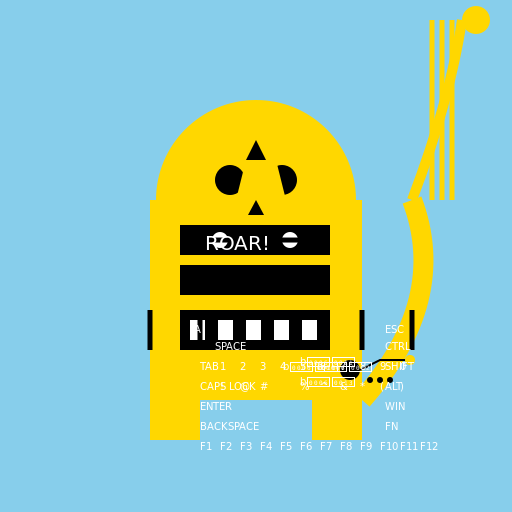

Javascript Code
                        // Lion working on a computer


// Background

ctx.fillStyle = "#87CEEB"; // Happy sky blue

ctx.fillRect(0, 0, 512, 512);


// Lion's Body

ctx.fillStyle = "#FFD700"; // Golden lion color

ctx.fillRect(150, 200, 212, 200);


// Lion's Head

ctx.beginPath();

ctx.arc(256, 200, 100, 0, Math.PI * 2);

ctx.fillStyle = "#FFD700"; // Golden lion color

ctx.fill();


// Lion's Ears

ctx.beginPath();

ctx.moveTo(226, 120);

ctx.lineTo(266, 120);

ctx.lineTo(256, 170);

ctx.closePath();

ctx.fillStyle = "#FFD700"; // Golden lion color

ctx.fill();


// Lion's Eyes

ctx.beginPath();

ctx.arc(230, 180, 15, 0, Math.PI * 2);

ctx.arc(282, 180, 15, 0, Math.PI * 2);

ctx.fillStyle = "#000"; // Black eyes

ctx.fill();


// Lion's Nose

ctx.beginPath();

ctx.moveTo(256, 200);

ctx.lineTo(240, 230);

ctx.lineTo(272, 230);

ctx.closePath();

ctx.fillStyle = "#000"; // Black nose

ctx.fill();


// Lion's Mouth

ctx.beginPath();

ctx.arc(256, 230, 30, 0, Math.PI, false);

ctx.lineWidth = 5;

ctx.strokeStyle = "#000"; // Black mouth outline

ctx.stroke();


// Computer Screen

ctx.fillStyle = "#000"; // Black computer screen

ctx.fillRect(180, 220, 150, 80);


// Keyboard

ctx.fillStyle = "#000"; // Black keyboard

ctx.fillRect(180, 310, 150, 40);


// Keyboard Keys

ctx.fillStyle = "#FFF"; // White keys

ctx.fillRect(190, 320, 15, 20);

ctx.fillRect(218, 320, 15, 20);

ctx.fillRect(246, 320, 15, 20);

ctx.fillRect(274, 320, 15, 20);

ctx.fillRect(302, 320, 15, 20);


// Lion's Paws

ctx.fillStyle = "#FFD700"; // Golden lion color

ctx.fillRect(150, 400, 50, 40);

ctx.fillRect(312, 400, 50, 40);


// Lion's Tail

ctx.beginPath();

ctx.moveTo(362, 400);

ctx.quadraticCurveTo(450, 300, 412, 200);

ctx.lineWidth = 20;

ctx.strokeStyle = "#FFD700"; // Golden lion color

ctx.stroke();


// Lion's Keyboard Fingers (Claws)

ctx.beginPath();

ctx.moveTo(150, 310);

ctx.lineTo(150, 350);

ctx.moveTo(200, 310);

ctx.lineTo(200, 350);

ctx.moveTo(362, 310);

ctx.lineTo(362, 350);

ctx.moveTo(412, 310);

ctx.lineTo(412, 350);

ctx.lineWidth = 5;

ctx.strokeStyle = "#000"; // Black claws

ctx.stroke();


// Lion's Computer Eyes

ctx.beginPath();

ctx.arc(220, 240, 8, 0, Math.PI * 2);

ctx.arc(290, 240, 8, 0, Math.PI * 2);

ctx.fillStyle = "#FFF"; // White computer eyes

ctx.fill();


// Lion's Computer Glasses

ctx.beginPath();

ctx.arc(220, 240, 20, 0, Math.PI, true);

ctx.arc(290, 240, 20, 0, Math.PI, true);

ctx.lineWidth = 5;

ctx.strokeStyle = "#000"; // Black glasses outline

ctx.stroke();


// Lion's Computer Mouth

ctx.beginPath();

ctx.arc(256, 260, 15, 0, Math.PI * 2);

ctx.fillStyle = "#000"; // Black mouth

ctx.fill();


// Lion's Computer Nose

ctx.beginPath();

ctx.moveTo(256, 260);

ctx.lineTo(250, 280);

ctx.lineTo(262, 280);

ctx.closePath();

ctx.fillStyle = "#000"; // Black nose

ctx.fill();


// Lion's Computer Whiskers

ctx.beginPath();

ctx.moveTo(230, 240);

ctx.lineTo(206, 240);

ctx.moveTo(282, 240);

ctx.lineTo(306, 240);

ctx.lineWidth = 2;

ctx.strokeStyle = "#000"; // Black whiskers

ctx.stroke();


// Lion's Computer Ears

ctx.beginPath();

ctx.moveTo(236, 200);

ctx.lineTo(246, 160);

ctx.lineTo(276, 160);

ctx.lineTo(286, 200);

ctx.closePath();

ctx.fillStyle = "#FFD700"; // Golden lion color

ctx.fill();


// Lion's Computer Ears Inner

ctx.beginPath();

ctx.moveTo(246, 160);

ctx.lineTo(256, 140);

ctx.lineTo(266, 160);

ctx.closePath();

ctx.fillStyle = "#000"; // Black inner ears

ctx.fill();


// Lion's Computer Tail

ctx.beginPath();

ctx.moveTo(412, 200);

ctx.quadraticCurveTo(450, 100, 462, 20);

ctx.lineWidth = 10;

ctx.strokeStyle = "#FFD700"; // Golden lion color

ctx.stroke();


// Lion's Computer Tail Tip

ctx.beginPath();

ctx.arc(476, 20, 14, 0, Math.PI * 2);

ctx.fillStyle = "#FFD700"; // Golden lion color

ctx.fill();


// Lion's Computer Tail Stripes

ctx.beginPath();

ctx.moveTo(432, 200);

ctx.lineTo(432, 20);

ctx.moveTo(442, 200);

ctx.lineTo(442, 20);

ctx.moveTo(452, 200);

ctx.lineTo(452, 20);

ctx.lineWidth = 5;

ctx.strokeStyle = "#FFD700"; // Golden lion color

ctx.stroke();


// Lion's Computer Body Stripes

ctx.beginPath();

ctx.moveTo(150, 220);

ctx.lineTo(362, 220);

ctx.moveTo(150, 260);

ctx.lineTo(362, 260);

ctx.moveTo(150, 300);

ctx.lineTo(362, 300);

ctx.lineWidth = 10;

ctx.strokeStyle = "#FFD700"; // Golden lion color

ctx.stroke();


// Lion's Computer Text

ctx.font = "20px Arial";

ctx.fillStyle = "#FFF"; // White text

ctx.fillText("ROAR!", 205, 250);


// Lion's Computer Mouse

ctx.beginPath();

ctx.arc(350, 370, 10, 0, Math.PI * 2);

ctx.fillStyle = "#000"; // Black mouse

ctx.fill();


// Lion's Computer Mouse Wire

ctx.beginPath();

ctx.moveTo(360, 370);

ctx.lineTo(380, 360);

ctx.lineTo(410, 360);

ctx.lineWidth = 2;

ctx.strokeStyle = "#000"; // Black wire

ctx.stroke();


// Lion's Computer Mouse Click

ctx.beginPath();

ctx.arc(410, 360, 5, 0, Math.PI * 2);

ctx.fillStyle = "#FFD700"; // Golden lion color

ctx.fill();


// Lion's Computer Mouse Buttons

ctx.beginPath();

ctx.arc(370, 380, 3, 0, Math.PI * 2);

ctx.arc(380, 380, 3, 0, Math.PI * 2);

ctx.arc(390, 380, 3, 0, Math.PI * 2);

ctx.fillStyle = "#000"; // Black buttons

ctx.fill();


// Lion's Computer Keyboard Letters

ctx.font = "10px Arial";

ctx.fillStyle = "#FFF"; // White letters

ctx.fillText("A", 194, 333);

ctx.fillText("S", 222, 333);

ctx.fillText("D", 250, 333);

ctx.fillText("F", 278, 333);

ctx.fillText("G", 306, 333);


// Lion's Computer Keyboard Spacebar

ctx.font = "10px Arial";

ctx.fillStyle = "#FFF"; // White spacebar

ctx.fillText("SPACE", 215, 350);


// Lion's Computer Keyboard Esc

ctx.font = "10px Arial";

ctx.fillStyle = "#FFF"; // White Esc

ctx.fillText("ESC", 385, 333);


// Lion's Computer Keyboard Ctrl

ctx.font = "10px Arial";

ctx.fillStyle = "#FFF"; // White Ctrl

ctx.fillText("CTRL", 385, 350);


// Lion's Computer Keyboard Shift

ctx.font = "10px Arial";

ctx.fillStyle = "#FFF"; // White Shift

ctx.fillText("SHIFT", 385, 370);


// Lion's Computer Keyboard Alt

ctx.font = "10px Arial";

ctx.fillStyle = "#FFF"; // White Alt

ctx.fillText("ALT", 385, 390);


// Lion's Computer Keyboard Win

ctx.font = "10px Arial";

ctx.fillStyle = "#FFF"; // White Win

ctx.fillText("WIN", 385, 410);


// Lion's Computer Keyboard Fn

ctx.font = "10px Arial";

ctx.fillStyle = "#FFF"; // White Fn

ctx.fillText("FN", 385, 430);


// Lion's Computer Keyboard Tab

ctx.font = "10px Arial";

ctx.fillStyle = "#FFF"; // White Tab

ctx.fillText("TAB", 200, 370);


// Lion's Computer Keyboard Caps Lock

ctx.font = "10px Arial";

ctx.fillStyle = "#FFF"; // White Caps Lock

ctx.fillText("CAPS LOCK", 200, 390);


// Lion's Computer Keyboard Enter

ctx.font = "10px Arial";

ctx.fillStyle = "#FFF"; // White Enter

ctx.fillText("ENTER", 200, 410);


// Lion's Computer Keyboard Backspace

ctx.font = "10px Arial";

ctx.fillStyle = "#FFF"; // White Backspace

ctx.fillText("BACKSPACE", 200, 430);


// Lion's Computer Keyboard Arrow Keys

ctx.font = "10px Arial";

ctx.fillStyle = "#FFF"; // White Arrow Keys

ctx.fillText("←", 283, 370);

ctx.fillText("↓", 300, 385);

ctx.fillText("↑", 300, 365);

ctx.fillText("→", 317, 370);


// Lion's Computer Keyboard Numbers

ctx.font = "10px Arial";

ctx.fillStyle = "#FFF"; // White Numbers

ctx.fillText("1", 220, 370);

ctx.fillText("2", 240, 370);

ctx.fillText("3", 260, 370);

ctx.fillText("4", 280, 370);

ctx.fillText("5", 300, 370);

ctx.fillText("6", 320, 370);

ctx.fillText("7", 340, 370);

ctx.fillText("8", 360, 370);

ctx.fillText("9", 380, 370);

ctx.fillText("0", 400, 370);


// Lion's Computer Keyboard Symbols

ctx.font = "10px Arial";

ctx.fillStyle = "#FFF"; // White Symbols

ctx.fillText("!", 220, 390);

ctx.fillText("@", 240, 390);

ctx.fillText("#", 260, 390);

ctx.fillText("%", 300, 390);

ctx.fillText("^", 320, 390);

ctx.fillText("&", 340, 390);

ctx.fillText("*", 360, 390);

ctx.fillText("(", 380, 390);

ctx.fillText(")", 400, 390);


// Lion's Computer Keyboard Function Keys

ctx.font = "10px Arial";

ctx.fillStyle = "#FFF"; // White Function Keys

ctx.fillText("F1", 200, 450);

ctx.fillText("F2", 220, 450);

ctx.fillText("F3", 240, 450);

ctx.fillText("F4", 260, 450);

ctx.fillText("F5", 280, 450);

ctx.fillText("F6", 300, 450);

ctx.fillText("F7", 320, 450);

ctx.fillText("F8", 340, 450);

ctx.fillText("F9", 360, 450);

ctx.fillText("F10", 380, 450);

ctx.fillText("F11", 400, 450);

ctx.fillText("F12", 420, 450);


// Lion's Computer Keyboard Funny Comment

// "Looks like this lion is a tech-savvy genius! But don't worry, he's just ROAR-ing some code!"
AI
Model: gpt-3.5-turbo-16k-0613
Time: 31 seconds
Prompt Tokens: 180
Completion Tokens: 2603
Total Token Cost: 2783


 balloon party
 beautiful beach
 cute puppy dog
 happy cat
 house
house