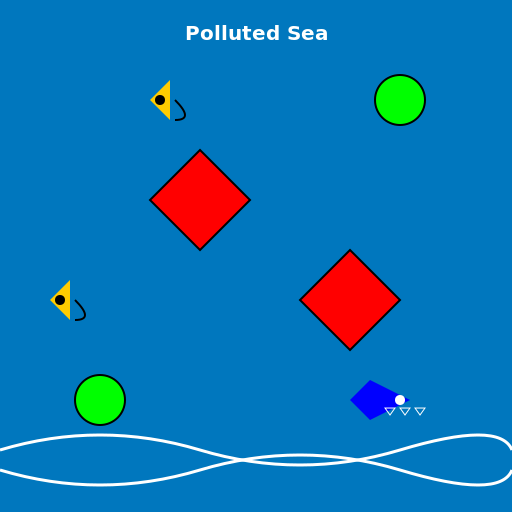

Javascript Code
                        // Polluted Sea Water with Plastic Bags and Bottles


// Drawing the background sea water

ctx.fillStyle = "#0077be"; // Blue color for the sea water

ctx.fillRect(0, 0, 512, 512); // Filling the canvas with sea water


// Drawing the plastic bags

ctx.fillStyle = "#ff0000"; // Red color for plastic bags

ctx.beginPath();

ctx.moveTo(150, 200); // Starting point of the first bag

ctx.lineTo(200, 150); // Drawing the first bag

ctx.lineTo(250, 200);

ctx.lineTo(200, 250);

ctx.closePath();

ctx.fill(); // Filling the first bag


ctx.beginPath();

ctx.moveTo(300, 300); // Starting point of the second bag

ctx.lineTo(350, 250); // Drawing the second bag

ctx.lineTo(400, 300);

ctx.lineTo(350, 350);

ctx.closePath();

ctx.fill(); // Filling the second bag


// Drawing the plastic bottles

ctx.fillStyle = "#00ff00"; // Green color for plastic bottles

ctx.beginPath();

ctx.arc(100, 400, 25, 0, 2*Math.PI); // Drawing the first bottle

ctx.closePath();

ctx.fill(); // Filling the first bottle


ctx.beginPath();

ctx.arc(400, 100, 25, 0, 2*Math.PI); // Drawing the second bottle

ctx.closePath();

ctx.fill(); // Filling the second bottle


// Adding details to the plastic bags and bottles

ctx.strokeStyle = "#000000"; // Black color for outlines

ctx.lineWidth = 2; // Outline thickness


ctx.beginPath();

ctx.moveTo(150, 200);

ctx.lineTo(200, 150); // Adding outline to the first bag

ctx.lineTo(250, 200);

ctx.lineTo(200, 250);

ctx.closePath();

ctx.stroke();


ctx.beginPath();

ctx.moveTo(300, 300);

ctx.lineTo(350, 250); // Adding outline to the second bag

ctx.lineTo(400, 300);

ctx.lineTo(350, 350);

ctx.closePath();

ctx.stroke();


ctx.beginPath();

ctx.arc(100, 400, 25, 0, 2*Math.PI); // Adding outline to the first bottle

ctx.closePath();

ctx.stroke();


ctx.beginPath();

ctx.arc(400, 100, 25, 0, 2*Math.PI); // Adding outline to the second bottle

ctx.closePath();

ctx.stroke();


// Adding waves to the sea water

ctx.strokeStyle = "#ffffff"; // White color for waves

ctx.lineWidth = 3; // Wave thickness


ctx.beginPath();

ctx.moveTo(0, 450); // Starting point of the first wave

ctx.quadraticCurveTo(100, 420, 200, 450); // Drawing the first wave

ctx.quadraticCurveTo(300, 480, 400, 450);

ctx.quadraticCurveTo(500, 420, 512, 450); // Ending point of the first wave

ctx.stroke();


ctx.beginPath();

ctx.moveTo(0, 470); // Starting point of the second wave

ctx.quadraticCurveTo(100, 500, 200, 470); // Drawing the second wave

ctx.quadraticCurveTo(300, 440, 400, 470);

ctx.quadraticCurveTo(500, 500, 512, 470); // Ending point of the second wave

ctx.stroke();


// Adding some fish swimming in the polluted water

ctx.fillStyle = "#ffcc00"; // Yellow color for fish


ctx.beginPath();

ctx.moveTo(50, 300); // Starting point of the first fish

ctx.lineTo(70, 280); // Drawing the first fish

ctx.lineTo(70, 320);

ctx.closePath();

ctx.fill(); // Filling the first fish


ctx.beginPath();

ctx.moveTo(150, 100); // Starting point of the second fish

ctx.lineTo(170, 80); // Drawing the second fish

ctx.lineTo(170, 120);

ctx.closePath();

ctx.fill(); // Filling the second fish


// Adding eyes to the fish

ctx.fillStyle = "#000000"; // Black color for eyes

ctx.beginPath();

ctx.arc(60, 300, 5, 0, 2*Math.PI); // Drawing the eye of the first fish

ctx.closePath();

ctx.fill(); // Filling the eye


ctx.beginPath();

ctx.arc(160, 100, 5, 0, 2*Math.PI); // Drawing the eye of the second fish

ctx.closePath();

ctx.fill(); // Filling the eye


// Adding mouths to the fish

ctx.strokeStyle = "#000000"; // Black color for mouths

ctx.lineWidth = 2; // Mouth thickness


ctx.beginPath();

ctx.moveTo(75, 300);

ctx.quadraticCurveTo(95, 320, 75, 320); // Drawing the mouth of the first fish

ctx.stroke();


ctx.beginPath();

ctx.moveTo(175, 100);

ctx.quadraticCurveTo(195, 120, 175, 120); // Drawing the mouth of the second fish

ctx.stroke();


// Adding a shark swimming in the polluted water

ctx.fillStyle = "#0000ff"; // Blue color for the shark


ctx.beginPath();

ctx.moveTo(350, 400); // Starting point of the shark

ctx.lineTo(370, 380); // Drawing the shark

ctx.lineTo(410, 400);

ctx.lineTo(370, 420);

ctx.closePath();

ctx.fill(); // Filling the shark


// Adding an eye to the shark

ctx.fillStyle = "#ffffff"; // White color for the eye

ctx.beginPath();

ctx.arc(400, 400, 5, 0, 2*Math.PI); // Drawing the eye of the shark

ctx.closePath();

ctx.fill(); // Filling the eye


// Adding teeth to the shark

ctx.strokeStyle = "#ffffff"; // White color for teeth

ctx.lineWidth = 1; // Teeth thickness


ctx.beginPath();

ctx.moveTo(385, 408);

ctx.lineTo(390, 415); // Drawing the first tooth

ctx.lineTo(395, 408);

ctx.closePath();

ctx.stroke();


ctx.beginPath();

ctx.moveTo(400, 408);

ctx.lineTo(405, 415); // Drawing the second tooth

ctx.lineTo(410, 408);

ctx.closePath();

ctx.stroke();


ctx.beginPath();

ctx.moveTo(415, 408);

ctx.lineTo(420, 415); // Drawing the third tooth

ctx.lineTo(425, 408);

ctx.closePath();

ctx.stroke();


// Adding a caption to the drawing

ctx.fillStyle = "#ffffff"; // White color for caption

ctx.font = "bold 20px Arial"; // Font style for caption

ctx.textAlign = "center"; // Center alignment for caption

ctx.fillText("Polluted Sea", 256, 40); // Drawing the caption


// Funny comment: "Remember, littering is for fish, not for humans!"
AI
Model: gpt-3.5-turbo-16k-0613
Time: 20 seconds
Prompt Tokens: 182
Completion Tokens: 1438
Total Token Cost: 1620


 balloon party
 beautiful beach
 cute puppy dog
 happy cat
 house
house