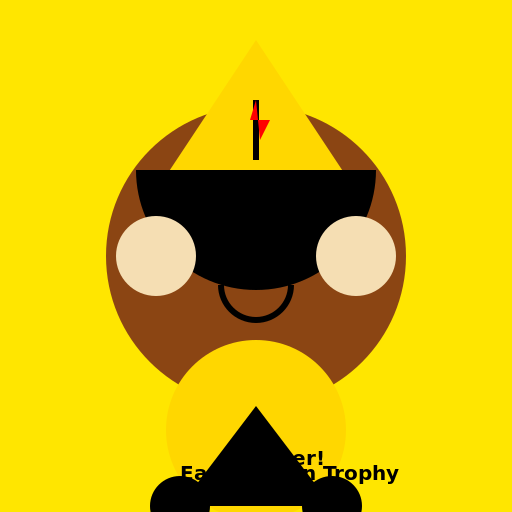

Javascript Code
                        // African Boy Winning East African Trophy


// Creating the background

ctx.fillStyle = "#FFE600"; // yellow color

ctx.fillRect(0, 0, 512, 512);


// Drawing the African boy

ctx.beginPath();

ctx.arc(256, 256, 150, 0, 2 * Math.PI); // head

ctx.fillStyle = "#8B4513"; // brown color

ctx.fill();


// Drawing the boy's body

ctx.beginPath();

ctx.moveTo(256, 406); // starting point for body

ctx.lineTo(156, 256); // left arm

ctx.lineTo(356, 256); // right arm

ctx.closePath();

ctx.fillStyle = "#8B4513"; // brown color

ctx.fill();


// Drawing the trophy

ctx.beginPath();

ctx.moveTo(256, 40); // starting point for trophy top

ctx.lineTo(150, 200); // left side of trophy

ctx.lineTo(362, 200); // right side of trophy

ctx.closePath();

ctx.fillStyle = "#FFD700"; // gold color

ctx.fill();


// Drawing the trophy handles

ctx.beginPath();

ctx.arc(180, 200, 20, 0, 2 * Math.PI); // left handle

ctx.arc(332, 200, 20, 0, 2 * Math.PI); // right handle

ctx.fillStyle = "#FFD700"; // gold color

ctx.fill();


// Adding details to the trophy

ctx.font = "bold 30px Arial"; // trophy text font

ctx.fillStyle = "#FF4500"; // orange color

ctx.fillText("1st", 245, 215); // trophy text


// Adding the boy's face details

ctx.beginPath();

ctx.arc(230, 240, 15, 0, Math.PI, true); // left eye

ctx.arc(282, 240, 15, 0, Math.PI, true); // right eye

ctx.moveTo(230, 280); // starting point for mouth

ctx.lineTo(282, 280); // ending point for mouth

ctx.lineWidth = 3;

ctx.strokeStyle = "#000000"; // black color

ctx.stroke();


// Adding the boy's hair

ctx.beginPath();

ctx.arc(256, 170, 120, 0, Math.PI, false); // hair

ctx.fillStyle = "#000000"; // black color

ctx.fill();


// Adding the boy's eyebrows

ctx.beginPath();

ctx.moveTo(205, 220); // starting point for left eyebrow

ctx.lineTo(230, 230); // ending point for left eyebrow

ctx.moveTo(282, 230); // starting point for right eyebrow

ctx.lineTo(307, 220); // ending point for right eyebrow

ctx.lineWidth = 3;

ctx.strokeStyle = "#000000"; // black color

ctx.stroke();


// Adding the boy's nose

ctx.beginPath();

ctx.moveTo(256, 250); // starting point for nose

ctx.lineTo(240, 270); // left side of nose

ctx.lineTo(256, 270); // bridge of nose

ctx.lineTo(272, 270); // right side of nose

ctx.lineWidth = 3;

ctx.strokeStyle = "#000000"; // black color

ctx.stroke();


// Adding the boy's East African flag

ctx.beginPath();

ctx.moveTo(256, 160); // starting point for flag pole

ctx.lineTo(256, 100); // top of flag pole

ctx.lineWidth = 6;

ctx.strokeStyle = "#000000"; // black color

ctx.stroke();


// Drawing the East African flag

ctx.beginPath();

ctx.moveTo(256, 100); // starting point for flag

ctx.lineTo(250, 120); // top left corner of flag

ctx.lineTo(270, 120); // top right corner of flag

ctx.lineTo(260, 140); // bottom of flag

ctx.closePath();

ctx.fillStyle = "#FF0000"; // red color

ctx.fill();


// Drawing the boy's hands

ctx.beginPath();

ctx.arc(156, 256, 40, 0, 2 * Math.PI); // left hand

ctx.arc(356, 256, 40, 0, 2 * Math.PI); // right hand

ctx.fillStyle = "#F5DEB3"; // wheat color

ctx.fill();


// Adding excitement to the boy's face

ctx.beginPath();

ctx.arc(230, 235, 5, 0, 2 * Math.PI); // left pupil

ctx.arc(282, 235, 5, 0, 2 * Math.PI); // right pupil

ctx.fillStyle = "#000000"; // black color

ctx.fill();


// Adding the boy's smile

ctx.beginPath();

ctx.arc(256, 285, 35, 0, Math.PI, false); // smile

ctx.strokeStyle = "#000000"; // black color

ctx.stroke();


// Adding the trophy base

ctx.beginPath();

ctx.arc(256, 430, 90, 0, 2 * Math.PI); // base of trophy

ctx.fillStyle = "#FFD700"; // gold color

ctx.fill();


// Adding the boy's legs

ctx.beginPath();

ctx.moveTo(256, 406); // starting point for legs

ctx.lineTo(180, 506); // left leg

ctx.lineTo(332, 506); // right leg

ctx.closePath();

ctx.fillStyle = "#000000"; // black color

ctx.fill();


// Adding the boy's shoes

ctx.beginPath();

ctx.arc(180, 506, 30, 0, 2 * Math.PI); // left shoe

ctx.arc(332, 506, 30, 0, 2 * Math.PI); // right shoe

ctx.fillStyle = "#000000"; // black color

ctx.fill();


// Adding the finishing touches

ctx.font = "bold 20px Arial"; // text font

ctx.fillStyle = "#000000"; // black color

ctx.fillText("East African Trophy", 180, 480); // trophy text

ctx.fillText("Winner!", 235, 465); // winner text


// Hurray! The African boy wins the East African trophy!


// P.S. Don't forget to celebrate with a dance! 🎉
AI
Model: gpt-3.5-turbo-16k-0613
Time: 19 seconds
Prompt Tokens: 183
Completion Tokens: 1289
Total Token Cost: 1472


 balloon party
 beautiful beach
 cute puppy dog
 happy cat
 house
house