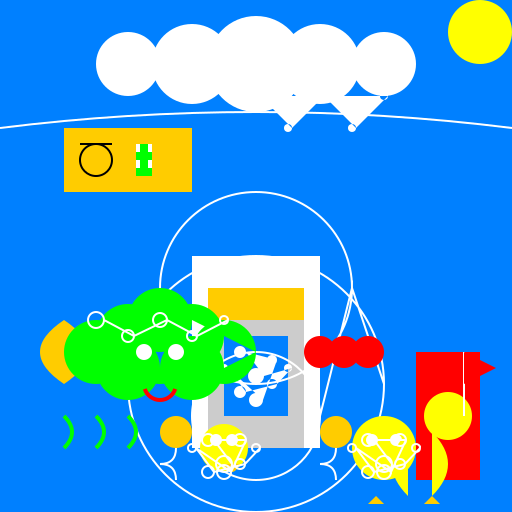

Javascript Code
                        // Title: "Toilet Dive"


// Setting the canvas size


// Drawing the swimming pool

ctx.fillStyle = "#0080FF"; // Blue water

ctx.fillRect(0, 0, 512, 512);


// Adding some waves to the pool

ctx.strokeStyle = "#FFFFFF"; // White waves

ctx.lineWidth = 2;

ctx.beginPath();

ctx.moveTo(0, 128);

ctx.quadraticCurveTo(256, 96, 512, 128);

ctx.stroke();


// Drawing the toilet

ctx.fillStyle = "#FFFFFF"; // White toilet

ctx.fillRect(192, 256, 128, 192);


// Adding the toilet seat

ctx.fillStyle = "#FFCC00"; // Yellow seat

ctx.fillRect(208, 288, 96, 32);


// Adding the toilet bowl

ctx.fillStyle = "#CCCCCC"; // Gray bowl

ctx.fillRect(208, 320, 96, 128);


// Adding the flush button

ctx.fillStyle = "#FF0000"; // Red button

ctx.fillRect(240, 384, 32, 32);


// Adding the water inside the toilet bowl

ctx.fillStyle = "#0080FF"; // Blue water

ctx.fillRect(224, 336, 64, 80);


// Adding some bubbles in the water

ctx.fillStyle = "#FFFFFF"; // White bubbles

ctx.beginPath();

ctx.arc(256, 376, 8, 0, Math.PI * 2);

ctx.arc(240, 352, 6, 0, Math.PI * 2);

ctx.arc(272, 360, 5, 0, Math.PI * 2);

ctx.arc(256, 400, 7, 0, Math.PI * 2);

ctx.arc(224, 368, 4, 0, Math.PI * 2);

ctx.arc(240, 392, 6, 0, Math.PI * 2);

ctx.arc(272, 384, 5, 0, Math.PI * 2);

ctx.arc(288, 368, 4, 0, Math.PI * 2);

ctx.fill();


// Adding some ripples around the toilet

ctx.strokeStyle = "#FFFFFF"; // White ripples

ctx.lineWidth = 2;

ctx.beginPath();

ctx.arc(256, 416, 64, 0, Math.PI * 2);

ctx.arc(256, 288, 96, 0, Math.PI * 2);

ctx.arc(256, 384, 128, 0, Math.PI * 2);

ctx.stroke();


// Adding some happy swimmers in the pool

ctx.fillStyle = "#FFCC00"; // Yellow swimmers

ctx.beginPath();

ctx.arc(176, 432, 16, 0, Math.PI * 2);

ctx.arc(336, 432, 16, 0, Math.PI * 2);

ctx.fill();


// Adding some splashes around the swimmers

ctx.strokeStyle = "#FFFFFF"; // White splashes

ctx.lineWidth = 2;

ctx.beginPath();

ctx.moveTo(176, 448);

ctx.quadraticCurveTo(176, 464, 160, 464);

ctx.quadraticCurveTo(176, 464, 176, 480);

ctx.moveTo(336, 448);

ctx.quadraticCurveTo(336, 464, 320, 464);

ctx.quadraticCurveTo(336, 464, 336, 480);

ctx.stroke();


// Adding some happy fish in the pool

ctx.fillStyle = "#FFCC00"; // Yellow fish

ctx.beginPath();

ctx.moveTo(64, 320);

ctx.quadraticCurveTo(16, 352, 64, 384);

ctx.quadraticCurveTo(112, 352, 64, 320);

ctx.fill();


// Adding some seaweed in the pool

ctx.strokeStyle = "#00FF00"; // Green seaweed

ctx.lineWidth = 4;

ctx.beginPath();

ctx.moveTo(64, 416);

ctx.quadraticCurveTo(80, 432, 64, 448);

ctx.moveTo(96, 416);

ctx.quadraticCurveTo(112, 432, 96, 448);

ctx.moveTo(128, 416);

ctx.quadraticCurveTo(144, 432, 128, 448);

ctx.stroke();


// Adding some sunshine to the pool

ctx.fillStyle = "#FFFF00"; // Yellow sunshine

ctx.beginPath();

ctx.arc(480, 32, 32, 0, Math.PI * 2);

ctx.fill();


// Adding some happy clouds in the sky

ctx.fillStyle = "#FFFFFF"; // White clouds

ctx.beginPath();

ctx.arc(128, 64, 32, 0, Math.PI * 2);

ctx.arc(192, 64, 40, 0, Math.PI * 2);

ctx.arc(256, 64, 48, 0, Math.PI * 2);

ctx.arc(320, 64, 40, 0, Math.PI * 2);

ctx.arc(384, 64, 32, 0, Math.PI * 2);

ctx.fill();


// Adding a friendly lifeguard tower

ctx.fillStyle = "#FF0000"; // Red tower

ctx.fillRect(416, 352, 64, 128);


// Adding a lifeguard on the tower

ctx.fillStyle = "#FFFF00"; // Yellow lifeguard

ctx.beginPath();

ctx.arc(448, 416, 24, 0, Math.PI * 2);

ctx.fill();


// Adding a lifeguard flag

ctx.strokeStyle = "#FFFFFF"; // White flagpole

ctx.lineWidth = 2;

ctx.beginPath();

ctx.moveTo(464, 416);

ctx.lineTo(464, 352);

ctx.stroke();


ctx.fillStyle = "#FF0000"; // Red flag

ctx.beginPath();

ctx.moveTo(464, 352);

ctx.lineTo(496, 368);

ctx.lineTo(464, 384);

ctx.closePath();

ctx.fill();


// Adding a happy sun lounger by the pool

ctx.fillStyle = "#FFCC00"; // Yellow lounger

ctx.fillRect(64, 128, 128, 64);


// Adding a smiley face on the sun lounger

ctx.strokeStyle = "#000000"; // Black smile

ctx.lineWidth = 2;

ctx.beginPath();

ctx.arc(96, 160, 16, 0, Math.PI * 2);

ctx.moveTo(80, 144);

ctx.lineTo(112, 144);

ctx.stroke();


// Adding a refreshing drink on the sun lounger

ctx.fillStyle = "#00FF00"; // Green drink

ctx.fillRect(136, 144, 16, 32);


// Adding some ice cubes in the drink

ctx.fillStyle = "#FFFFFF"; // White ice cubes

ctx.fillRect(136, 144, 4, 8);

ctx.fillRect(148, 144, 4, 8);

ctx.fillRect(136, 160, 4, 8);

ctx.fillRect(148, 160, 4, 8);


// Adding some sparkles to the pool

ctx.fillStyle = "#FFFFFF"; // White sparkles

ctx.beginPath();

ctx.arc(256, 96, 4, 0, Math.PI * 2);

ctx.arc(288, 128, 4, 0, Math.PI * 2);

ctx.arc(320, 96, 4, 0, Math.PI * 2);

ctx.arc(352, 128, 4, 0, Math.PI * 2);

ctx.arc(384, 96, 4, 0, Math.PI * 2);

ctx.fill();


// Adding a pool floatie in the shape of a rubber duck

ctx.fillStyle = "#FFFF00"; // Yellow floatie

ctx.beginPath();

ctx.arc(384, 448, 32, 0, Math.PI * 2);

ctx.fill();


// Adding the duck's beak

ctx.fillStyle = "#FFCC00"; // Yellow beak

ctx.beginPath();

ctx.moveTo(408, 464);

ctx.quadraticCurveTo(400, 480, 392, 464);

ctx.fill();


// Adding the duck's eyes

ctx.fillStyle = "#FFFFFF"; // White eyes

ctx.beginPath();

ctx.arc(372, 440, 6, 0, Math.PI * 2);

ctx.arc(396, 440, 6, 0, Math.PI * 2);

ctx.fill();


// Adding the duck's wings

ctx.fillStyle = "#FFFF00"; // Yellow wings

ctx.beginPath();

ctx.moveTo(408, 432);

ctx.quadraticCurveTo(376, 464, 408, 496);

ctx.moveTo(432, 432);

ctx.quadraticCurveTo(464, 464, 432, 496);

ctx.fill();


// Adding the duck's feet

ctx.fillStyle = "#FFCC00"; // Yellow feet

ctx.beginPath();

ctx.moveTo(376, 496);

ctx.lineTo(384, 504);

ctx.lineTo(368, 504);

ctx.closePath();

ctx.moveTo(432, 496);

ctx.lineTo(440, 504);

ctx.lineTo(424, 504);

ctx.closePath();

ctx.fill();


// Adding some bubbles around the duck

ctx.strokeStyle = "#FFFFFF"; // White bubbles

ctx.lineWidth = 2;

ctx.beginPath();

ctx.arc(384, 464, 8, 0, Math.PI * 2);

ctx.arc(368, 440, 6, 0, Math.PI * 2);

ctx.arc(400, 440, 6, 0, Math.PI * 2);

ctx.arc(384, 472, 7, 0, Math.PI * 2);

ctx.arc(352, 448, 4, 0, Math.PI * 2);

ctx.arc(368, 472, 6, 0, Math.PI * 2);

ctx.arc(400, 464, 5, 0, Math.PI * 2);

ctx.arc(416, 448, 4, 0, Math.PI * 2);

ctx.stroke();


// Adding a friendly octopus in the pool

ctx.fillStyle = "#00FF00"; // Green octopus

ctx.beginPath();

ctx.arc(96, 352, 32, 0, Math.PI * 2);

ctx.arc(128, 368, 32, 0, Math.PI * 2);

ctx.arc(160, 352, 32, 0, Math.PI * 2);

ctx.arc(192, 368, 32, 0, Math.PI * 2);

ctx.arc(224, 352, 32, 0, Math.PI * 2);

ctx.arc(192, 336, 32, 0, Math.PI * 2);

ctx.arc(160, 320, 32, 0, Math.PI * 2);

ctx.arc(128, 336, 32, 0, Math.PI * 2);

ctx.fill();


// Adding the octopus's eyes

ctx.fillStyle = "#FFFFFF"; // White eyes

ctx.beginPath();

ctx.arc(144, 352, 8, 0, Math.PI * 2);

ctx.arc(176, 352, 8, 0, Math.PI * 2);

ctx.fill();


// Adding the octopus's smile

ctx.strokeStyle = "#FF0000"; // Red smile

ctx.lineWidth = 4;

ctx.beginPath();

ctx.arc(160, 384, 16, Math.PI * 0.1, Math.PI * 0.9);

ctx.stroke();


// Adding some bubbles around the octopus

ctx.strokeStyle = "#FFFFFF"; // White bubbles

ctx.lineWidth = 2;

ctx.beginPath();

ctx.arc(96, 320, 8, 0, Math.PI * 2);

ctx.arc(128, 336, 6, 0, Math.PI * 2);

ctx.arc(160, 320, 7, 0, Math.PI * 2);

ctx.arc(192, 336, 5, 0, Math.PI * 2);

ctx.arc(224, 320, 4, 0, Math.PI * 2);

ctx.stroke();


// Adding some fun noodles floating in the pool

ctx.fillStyle = "#FF0000"; // Red noodles

ctx.beginPath();

ctx.arc(320, 352, 16, 0, Math.PI * 2);

ctx.arc(344, 352, 16, 0, Math.PI * 2);

ctx.arc(368, 352, 16, 0, Math.PI * 2);

ctx.fill();


// Adding a happy rubber duck in the pool

ctx.fillStyle = "#FFFF00"; // Yellow duck

ctx.beginPath();

ctx.arc(224, 448, 24, 0, Math.PI * 2);

ctx.fill();


// Adding the duck's beak

ctx.fillStyle = "#FFCC00"; // Yellow beak

ctx.beginPath();

ctx.moveTo(240, 464);

ctx.quadraticCurveTo(232, 480, 224, 464);

ctx.fill();


// Adding the duck's eyes

ctx.fillStyle = "#FFFFFF"; // White eyes

ctx.beginPath();

ctx.arc(216, 440, 6, 0, Math.PI * 2);

ctx.arc(232, 440, 6, 0, Math.PI * 2);

ctx.fill();


// Adding some bubbles around the duck

ctx.strokeStyle = "#FFFFFF"; // White bubbles

ctx.lineWidth = 2;

ctx.beginPath();

ctx.arc(224, 464, 8, 0, Math.PI * 2);

ctx.arc(208, 440, 6, 0, Math.PI * 2);

ctx.arc(240, 440, 6, 0, Math.PI * 2);

ctx.arc(224, 472, 7, 0, Math.PI * 2);

ctx.arc(192, 448, 4, 0, Math.PI * 2);

ctx.arc(208, 472, 6, 0, Math.PI * 2);

ctx.arc(240, 464, 5, 0, Math.PI * 2);

ctx.arc(256, 448, 4, 0, Math.PI * 2);

ctx.stroke();


// Adding a happy
AI
Model: gpt-3.5-turbo-16k-0613
Time: 46 seconds
Prompt Tokens: 179
Completion Tokens: 3000
Total Token Cost: 3179


 balloon party
 beautiful beach
 cute puppy dog
 happy cat
 house
house