
Javascript Code
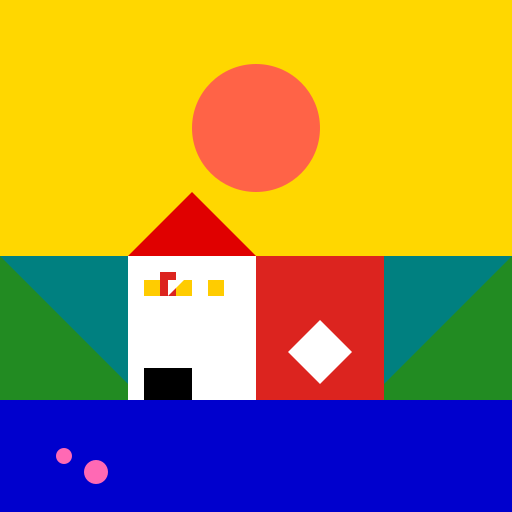
                        // Hungarian Horizon

// A colorful depiction of the beautiful Hungarian landscape

// Where rolling hills and vibrant skies meet in harmony


ctx.fillStyle = "#008080"; // Set the background color to a deep turquoise

ctx.fillRect(0, 0, 512, 512); // Fill the canvas with the background color


// Draw the rolling hills

ctx.fillStyle = "#228B22"; // Set the color of the hills to a rich forest green

ctx.beginPath();

ctx.moveTo(0, 256); // Start from the left side of the canvas

ctx.lineTo(128, 384); // Draw a line to the first hill

ctx.lineTo(256, 256); // Draw a line to the second hill

ctx.lineTo(384, 384); // Draw a line to the third hill

ctx.lineTo(512, 256); // Draw a line to the right side of the canvas

ctx.lineTo(512, 512); // Draw a line to the bottom right corner

ctx.lineTo(0, 512); // Draw a line to the bottom left corner

ctx.closePath();

ctx.fill(); // Fill the shape with the hill color


// Draw the vibrant sky

ctx.fillStyle = "#FFD700"; // Set the color of the sky to a dazzling golden yellow

ctx.fillRect(0, 0, 512, 256); // Fill the top half of the canvas with the sky color


// Draw the sun

ctx.fillStyle = "#FF6347"; // Set the color of the sun to a warm coral

ctx.beginPath();

ctx.arc(256, 128, 64, 0, Math.PI * 2); // Draw a circle for the sun

ctx.closePath();

ctx.fill(); // Fill the shape with the sun color


// Draw the Hungarian flag

ctx.fillStyle = "#DC241f"; // Set the color of the flag to a vibrant red

ctx.fillRect(256, 256, 128, 256); // Fill a rectangle for the flag


ctx.fillStyle = "#fff"; // Set the color of the coat of arms to white

ctx.beginPath();

ctx.moveTo(320, 320); // Start drawing the coat of arms

ctx.lineTo(352, 352);

ctx.lineTo(320, 384);

ctx.lineTo(288, 352);

ctx.closePath();

ctx.fill(); // Fill the shape with the coat of arms color


// Draw the iconic Hungarian Parliament Building

ctx.fillStyle = "#ffffff"; // Set the color of the building to white

ctx.fillRect(128, 256, 128, 256); // Fill a rectangle for the building


ctx.fillStyle = "#e00000"; // Set the color of the roof to a deep red

ctx.beginPath();

ctx.moveTo(128, 256); // Start drawing the roof

ctx.lineTo(256, 256);

ctx.lineTo(192, 192);

ctx.closePath();

ctx.fill(); // Fill the shape with the roof color


// Draw the windows of the Parliament Building

ctx.fillStyle = "#ffcc00"; // Set the color of the windows to a vibrant yellow

ctx.fillRect(144, 280, 16, 16); // Fill the first window

ctx.fillRect(176, 280, 16, 16); // Fill the second window

ctx.fillRect(208, 280, 16, 16); // Fill the third window


ctx.fillStyle = "#000"; // Set the color of the doors to black

ctx.fillRect(144, 368, 48, 144); // Fill a rectangle for the doors


// Draw the Hungarian flag on top of the Parliament Building

ctx.fillStyle = "#DC241f"; // Set the color of the flag to a vibrant red

ctx.fillRect(160, 272, 16, 24); // Fill a rectangle for the flag


// Draw the Hungarian coat of arms on the flag

ctx.fillStyle = "#fff"; // Set the color of the coat of arms to white

ctx.beginPath();

ctx.moveTo(168, 280); // Start drawing the coat of arms

ctx.lineTo(184, 280);

ctx.lineTo(176, 288);

ctx.lineTo(168, 296);

ctx.closePath();

ctx.fill(); // Fill the shape with the coat of arms color


// Draw the river flowing through the landscape

ctx.fillStyle = "#0000cd"; // Set the color of the river to a deep blue

ctx.fillRect(0, 400, 512, 112); // Fill a rectangle for the river


// Add some fish swimming in the river

ctx.fillStyle = "#ff69b4"; // Set the color of the fish to a vibrant pink

ctx.beginPath();

ctx.arc(64, 456, 8, 0, Math.PI * 2); // Draw a circle for the first fish

ctx.arc(96, 472, 12, 0, Math.PI * 2); // Draw a circle for the second fish

ctx.closePath();

ctx.fill(); // Fill the shapes with the fish color


// A masterpiece created by the AI artist

// "Hungary" - where nature, culture, and fish unite!
AI
Model: gpt-3.5-turbo-16k-0613
Time: 18 seconds
Prompt Tokens: 175
Completion Tokens: 1051
Total Token Cost: 1226


 balloon party
 beautiful beach
 cute puppy dog
 happy cat
 house
house