
Javascript Code
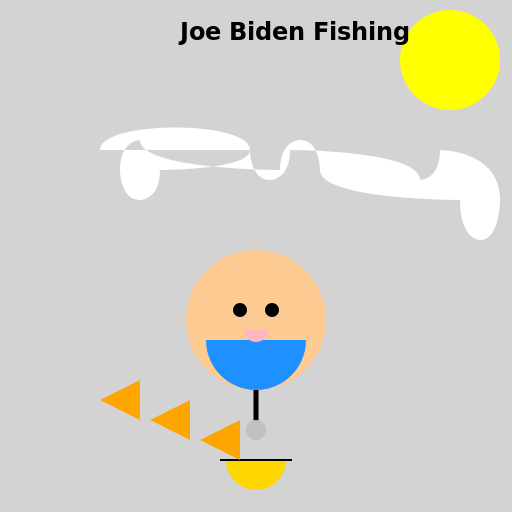
                        // Joe Biden's Fishing Adventure on a Cloudy Day


// Creating a cloudy background

ctx.fillStyle = "lightgray"; // Setting the fill color to light gray

ctx.fillRect(0, 0, 512, 512); // Drawing a rectangle to fill the canvas


// Drawing the sun behind the clouds

ctx.beginPath();

ctx.arc(450, 60, 50, 0, 2 * Math.PI); // Drawing a circle for the sun

ctx.fillStyle = "yellow"; // Setting the fill color to yellow

ctx.fill(); // Filling the sun shape


// Drawing the clouds

ctx.beginPath();

ctx.moveTo(100, 150); // Starting point for the cloud shape

ctx.bezierCurveTo(100, 120, 250, 120, 250, 150); // Drawing the top curve of the cloud

ctx.bezierCurveTo(250, 150, 250, 180, 270, 180); // Drawing the right curve of the cloud

ctx.bezierCurveTo(270, 180, 290, 180, 290, 150); // Drawing the bottom curve of the cloud

ctx.bezierCurveTo(290, 150, 420, 150, 420, 180); // Drawing the right curve of the cloud

ctx.bezierCurveTo(420, 180, 440, 180, 440, 150); // Drawing the bottom curve of the cloud

ctx.bezierCurveTo(440, 150, 500, 150, 500, 200); // Drawing the right curve of the cloud

ctx.bezierCurveTo(500, 200, 500, 240, 480, 240); // Drawing the bottom curve of the cloud

ctx.bezierCurveTo(480, 240, 460, 240, 460, 200); // Drawing the left curve of the cloud

ctx.bezierCurveTo(460, 200, 320, 200, 320, 170); // Drawing the bottom curve of the cloud

ctx.bezierCurveTo(320, 170, 320, 140, 300, 140); // Drawing the left curve of the cloud

ctx.bezierCurveTo(300, 140, 280, 140, 280, 170); // Drawing the top curve of the cloud

ctx.bezierCurveTo(280, 170, 140, 170, 140, 140); // Drawing the left curve of the cloud

ctx.bezierCurveTo(140, 140, 120, 140, 120, 170); // Drawing the top curve of the cloud

ctx.bezierCurveTo(120, 170, 120, 200, 140, 200); // Drawing the right curve of the cloud

ctx.bezierCurveTo(140, 200, 160, 200, 160, 170); // Drawing the top curve of the cloud

ctx.bezierCurveTo(160, 170, 250, 170, 250, 150); // Drawing the left curve of the cloud

ctx.fillStyle = "white"; // Setting the fill color to white

ctx.fill(); // Filling the cloud shape


// Drawing Joe Biden fishing

ctx.beginPath();

ctx.arc(256, 320, 70, 0, 2 * Math.PI); // Drawing a circle for Joe Biden's head

ctx.fillStyle = "#FECB93"; // Setting the fill color to a flesh tone

ctx.fill(); // Filling Joe Biden's head shape


ctx.beginPath();

ctx.arc(256, 340, 50, 0, Math.PI); // Drawing a semicircle for Joe Biden's body

ctx.fillStyle = "#1E90FF"; // Setting the fill color to a blue

ctx.fill(); // Filling Joe Biden's body shape


ctx.beginPath();

ctx.moveTo(256, 390); // Starting point for Joe Biden's fishing rod

ctx.lineTo(256, 430); // Drawing the fishing rod line

ctx.lineWidth = 5; // Setting the line width to 5

ctx.strokeStyle = "black"; // Setting the stroke color to black

ctx.stroke(); // Drawing the fishing rod line


ctx.beginPath();

ctx.arc(256, 430, 10, 0, 2 * Math.PI); // Drawing a circle for the fishing hook

ctx.fillStyle = "silver"; // Setting the fill color to silver

ctx.fill(); // Filling the fishing hook shape


// Adding Joe Biden's facial features

ctx.beginPath();

ctx.arc(240, 310, 7, 0, 2 * Math.PI); // Drawing a circle for Joe Biden's left eye

ctx.fillStyle = "black"; // Setting the fill color to black

ctx.fill(); // Filling Joe Biden's left eye shape


ctx.beginPath();

ctx.arc(272, 310, 7, 0, 2 * Math.PI); // Drawing a circle for Joe Biden's right eye

ctx.fill(); // Filling Joe Biden's right eye shape


ctx.beginPath();

ctx.arc(256, 330, 12, 0, Math.PI); // Drawing a semicircle for Joe Biden's mouth

ctx.fillStyle = "#FFB6C1"; // Setting the fill color to a pinkish tone

ctx.fill(); // Filling Joe Biden's mouth shape


// Adding fishing details

ctx.beginPath();

ctx.arc(256, 460, 30, 0, Math.PI); // Drawing a semicircle for the fishing float

ctx.fillStyle = "#FFD700"; // Setting the fill color to a golden yellow

ctx.fill(); // Filling the fishing float shape


ctx.beginPath();

ctx.moveTo(220, 460); // Starting point for the fishing line

ctx.lineTo(292, 460); // Drawing the fishing line

ctx.lineWidth = 2; // Setting the line width to 2

ctx.strokeStyle = "black"; // Setting the stroke color to black

ctx.stroke(); // Drawing the fishing line


// Adding some fish in the water

ctx.beginPath();

ctx.moveTo(100, 400); // Starting point for the fish shape

ctx.lineTo(140, 380); // Drawing the head of the fish

ctx.lineTo(140, 420); // Drawing the body of the fish

ctx.lineTo(100, 400); // Drawing the tail of the fish

ctx.fillStyle = "orange"; // Setting the fill color to orange

ctx.fill(); // Filling the fish shape


ctx.beginPath();

ctx.moveTo(150, 420); // Starting point for the fish shape

ctx.lineTo(190, 400); // Drawing the head of the fish

ctx.lineTo(190, 440); // Drawing the body of the fish

ctx.lineTo(150, 420); // Drawing the tail of the fish

ctx.fill(); // Filling the fish shape


ctx.beginPath();

ctx.moveTo(200, 440); // Starting point for the fish shape

ctx.lineTo(240, 420); // Drawing the head of the fish

ctx.lineTo(240, 460); // Drawing the body of the fish

ctx.lineTo(200, 440); // Drawing the tail of the fish

ctx.fill(); // Filling the fish shape


// Adding finishing touches

ctx.font = "bold 24px Arial"; // Setting the font style

ctx.fillStyle = "black"; // Setting the fill color to black

ctx.fillText("Joe Biden Fishing", 180, 40); // Drawing the title of the drawing


// Joe Biden: "Reel-y enjoying this fishing trip!" 😄
AI
Model: gpt-3.5-turbo-16k-0613
Time: 18 seconds
Prompt Tokens: 180
Completion Tokens: 1585
Total Token Cost: 1765


 balloon party
 beautiful beach
 cute puppy dog
 happy cat
 house
house