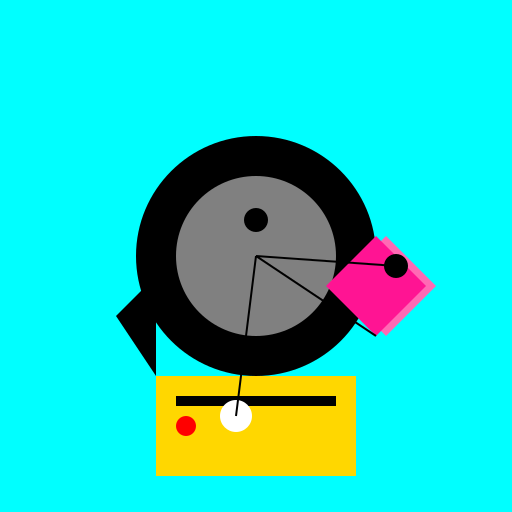

Javascript Code
                        // Dialga and Palkia interacting with Mimikyu


// Creating the background

ctx.fillStyle = "#00FFFF"; // Setting the fill style to a light blue color

ctx.fillRect(0, 0, 512, 512); // Filling the entire canvas with the light blue color


// Drawing Dialga

ctx.fillStyle = "#000000"; // Setting the fill style to black

ctx.beginPath(); // Starting the path for Dialga's body

ctx.arc(256, 256, 120, 0, 2 * Math.PI); // Drawing the circular body of Dialga

ctx.fill(); // Filling the body of Dialga


ctx.fillStyle = "#808080"; // Setting the fill style to a gray color

ctx.beginPath(); // Starting the path for Dialga's pattern

ctx.arc(256, 256, 80, 0, 2 * Math.PI); // Drawing the circular pattern on Dialga's body

ctx.fill(); // Filling the pattern on Dialga's body


ctx.fillStyle = "#000000"; // Setting the fill style back to black

ctx.beginPath(); // Starting the path for Dialga's eye

ctx.arc(256, 220, 12, 0, 2 * Math.PI); // Drawing Dialga's eye

ctx.fill(); // Filling Dialga's eye


// Drawing Palkia

ctx.fillStyle = "#FF69B4"; // Setting the fill style to a light pink color

ctx.beginPath(); // Starting the path for Palkia's body

ctx.moveTo(386, 336); // Moving to the starting point of Palkia's body

ctx.lineTo(436, 286); // Drawing the first side of Palkia's body

ctx.lineTo(386, 236); // Drawing the second side of Palkia's body

ctx.lineTo(336, 286); // Drawing the third side of Palkia's body

ctx.closePath(); // Closing the path for Palkia's body

ctx.fill(); // Filling Palkia's body


ctx.fillStyle = "#FF1493"; // Setting the fill style to a darker pink color

ctx.beginPath(); // Starting the path for Palkia's pattern

ctx.moveTo(376, 336); // Moving to the starting point of Palkia's pattern

ctx.lineTo(426, 286); // Drawing the first side of Palkia's pattern

ctx.lineTo(376, 236); // Drawing the second side of Palkia's pattern

ctx.lineTo(326, 286); // Drawing the third side of Palkia's pattern

ctx.closePath(); // Closing the path for Palkia's pattern

ctx.fill(); // Filling Palkia's pattern


ctx.fillStyle = "#000000"; // Setting the fill style back to black

ctx.beginPath(); // Starting the path for Palkia's eye

ctx.arc(396, 266, 12, 0, 2 * Math.PI); // Drawing Palkia's eye

ctx.fill(); // Filling Palkia's eye


// Drawing Mimikyu

ctx.fillStyle = "#FFD700"; // Setting the fill style to a golden yellow color

ctx.fillRect(156, 376, 200, 100); // Drawing Mimikyu's body


ctx.fillStyle = "#000000"; // Setting the fill style back to black

ctx.fillRect(176, 396, 160, 10); // Drawing Mimikyu's mouth


ctx.fillStyle = "#FFFFFF"; // Setting the fill style to white

ctx.beginPath(); // Starting the path for Mimikyu's eye

ctx.arc(236, 416, 16, 0, 2 * Math.PI); // Drawing Mimikyu's eye

ctx.fill(); // Filling Mimikyu's eye


ctx.fillStyle = "#FF0000"; // Setting the fill style to red

ctx.beginPath(); // Starting the path for Mimikyu's cheek

ctx.arc(186, 426, 10, 0, 2 * Math.PI); // Drawing Mimikyu's cheek

ctx.fill(); // Filling Mimikyu's cheek


ctx.fillStyle = "#000000"; // Setting the fill style back to black

ctx.beginPath(); // Starting the path for Mimikyu's ear

ctx.moveTo(156, 376); // Moving to the starting point of Mimikyu's ear

ctx.lineTo(116, 316); // Drawing the first side of Mimikyu's ear

ctx.lineTo(156, 276); // Drawing the second side of Mimikyu's ear

ctx.closePath(); // Closing the path for Mimikyu's ear

ctx.fill(); // Filling Mimikyu's ear


// Adding interaction lines

ctx.strokeStyle = "#000000"; // Setting the stroke style to black

ctx.lineWidth = 2; // Setting the line width to 2

ctx.beginPath(); // Starting the path for the interaction lines

ctx.moveTo(256, 256); // Moving to the starting point of the first interaction line

ctx.lineTo(376, 336); // Drawing the first interaction line to connect Dialga and Palkia

ctx.moveTo(256, 256); // Moving to the starting point of the second interaction line

ctx.lineTo(236, 416); // Drawing the second interaction line to connect Dialga and Mimikyu

ctx.moveTo(256, 256); // Moving to the starting point of the third interaction line

ctx.lineTo(396, 266); // Drawing the third interaction line to connect Palkia and Mimikyu

ctx.stroke(); // Stroking the interaction lines


// All done, time to admire my masterpiece!

// I hope Dialga, Palkia, and Mimikyu are having a good time together!

// They're quite the trio, don't you think?
AI
Model: gpt-3.5-turbo-16k-0613
Time: 21 seconds
Prompt Tokens: 184
Completion Tokens: 1206
Total Token Cost: 1390


 balloon party
 beautiful beach
 cute puppy dog
 happy cat
 house
house