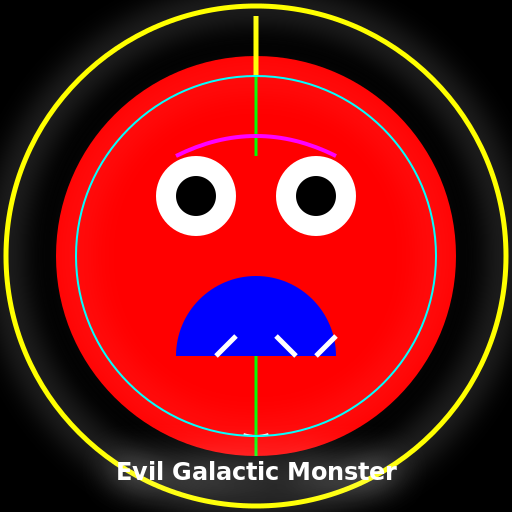

Javascript Code
                        // Evil Galactic Monster


// Drawing the background

ctx.fillStyle = "#000000"; // Setting the canvas background color to black

ctx.fillRect(0, 0, 512, 512); // Filling the entire canvas with black


// Drawing the monster's body

ctx.fillStyle = "#FF0000"; // Setting the fill color to red

ctx.beginPath(); // Starting a new path

ctx.arc(256, 256, 200, 0, Math.PI * 2); // Drawing a large circle for the body

ctx.fill(); // Filling the circle with red


// Drawing the monster's eyes

ctx.fillStyle = "#FFFFFF"; // Setting the fill color to white

ctx.beginPath(); // Starting a new path

ctx.arc(196, 196, 40, 0, Math.PI * 2); // Drawing the left eye

ctx.arc(316, 196, 40, 0, Math.PI * 2); // Drawing the right eye

ctx.fill(); // Filling the eyes with white


// Drawing the monster's pupils

ctx.fillStyle = "#000000"; // Setting the fill color to black

ctx.beginPath(); // Starting a new path

ctx.arc(196, 196, 20, 0, Math.PI * 2); // Drawing the left pupil

ctx.arc(316, 196, 20, 0, Math.PI * 2); // Drawing the right pupil

ctx.fill(); // Filling the pupils with black


// Drawing the monster's mouth

ctx.fillStyle = "#0000FF"; // Setting the fill color to blue

ctx.beginPath(); // Starting a new path

ctx.arc(256, 356, 80, 0, Math.PI, true); // Drawing a semicircle for the mouth

ctx.fill(); // Filling the mouth with blue


// Adding some teeth to the monster's mouth

ctx.strokeStyle = "#FFFFFF"; // Setting the stroke color to white

ctx.lineWidth = 5; // Setting the line width to 5 pixels

ctx.beginPath(); // Starting a new path

ctx.moveTo(216, 356); // Moving to the first tooth position

ctx.lineTo(236, 336); // Drawing the first tooth

ctx.moveTo(276, 336); // Moving to the second tooth position

ctx.lineTo(296, 356); // Drawing the second tooth

ctx.moveTo(316, 356); // Moving to the third tooth position

ctx.lineTo(336, 336); // Drawing the third tooth

ctx.stroke(); // Drawing the teeth


// Adding some evil spikes to the monster's body

ctx.strokeStyle = "#00FF00"; // Setting the stroke color to green

ctx.lineWidth = 3; // Setting the line width to 3 pixels

ctx.beginPath(); // Starting a new path

ctx.moveTo(256, 56); // Moving to the first spike position

ctx.lineTo(256, 156); // Drawing the first spike

ctx.moveTo(256, 356); // Moving to the second spike position

ctx.lineTo(256, 456); // Drawing the second spike

ctx.stroke(); // Drawing the spikes


// Adding a sinister smile to the monster's face

ctx.strokeStyle = "#FFFFFF"; // Setting the stroke color to white

ctx.lineWidth = 2; // Setting the line width to 2 pixels

ctx.beginPath(); // Starting a new path

ctx.arc(256, 396, 40, 0.4 * Math.PI, 0.6 * Math.PI, false); // Drawing a curved line for the smile

ctx.stroke(); // Drawing the smile


// Adding a wicked eyebrow to the monster's face

ctx.strokeStyle = "#FF00FF"; // Setting the stroke color to magenta

ctx.lineWidth = 4; // Setting the line width to 4 pixels

ctx.beginPath(); // Starting a new path

ctx.moveTo(176, 156); // Moving to the starting position of the eyebrow

ctx.quadraticCurveTo(256, 116, 336, 156); // Drawing a curved line for the eyebrow

ctx.stroke(); // Drawing the eyebrow


// Adding a menacing horn to the monster's head

ctx.strokeStyle = "#FFFF00"; // Setting the stroke color to yellow

ctx.lineWidth = 5; // Setting the line width to 5 pixels

ctx.beginPath(); // Starting a new path

ctx.moveTo(256, 16); // Moving to the starting position of the horn

ctx.lineTo(256, 76); // Drawing the horn

ctx.stroke(); // Drawing the horn


// Adding a spooky aura around the monster

ctx.shadowColor = "#FFFFFF"; // Setting the shadow color to white

ctx.shadowBlur = 30; // Setting the shadow blur to 30 pixels

ctx.beginPath(); // Starting a new path

ctx.arc(256, 256, 250, 0, Math.PI * 2); // Drawing a large circle for the aura

ctx.stroke(); // Drawing the aura


// Adding some evil galactic energy to the monster

ctx.strokeStyle = "#00FFFF"; // Setting the stroke color to cyan

ctx.lineWidth = 2; // Setting the line width to 2 pixels

ctx.beginPath(); // Starting a new path

ctx.arc(256, 256, 180, 0, Math.PI * 2); // Drawing a large circle for the energy

ctx.stroke(); // Drawing the energy


// Adding a terrifying title to the artwork

ctx.font = "bold 24px Arial"; // Setting the font style

ctx.fillStyle = "#FFFFFF"; // Setting the text color to white

ctx.textAlign = "center"; // Aligning the text to the center

ctx.fillText("Evil Galactic Monster", 256, 480); // Drawing the title


// And voila! We have created an evil galactic monster artwork! Enjoy!


// "When the monster decided to take up painting, the galaxy was never the same again."
AI
Model: gpt-3.5-turbo-16k-0613
Time: 21 seconds
Prompt Tokens: 178
Completion Tokens: 1223
Total Token Cost: 1401


 balloon party
 beautiful beach
 cute puppy dog
 happy cat
 house
house