
Javascript Code
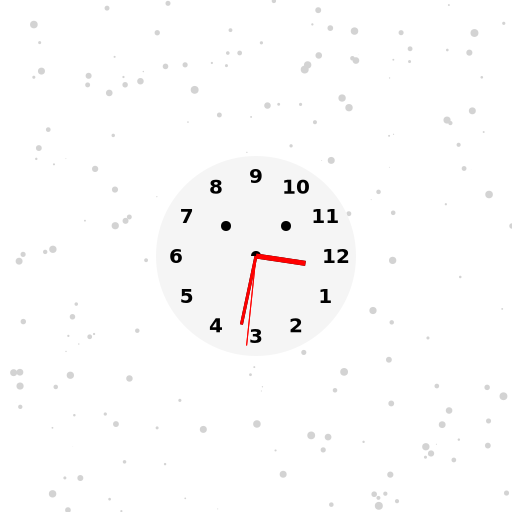
                        // Snowy Day Background with Clock for ОРТ 2 Channel 1997


// Set canvas size to 512x512


// Get 2d context


// Draw snowy background

ctx.fillStyle = '#ffffff'; // Set fill color to white

ctx.fillRect(0, 0, 512, 512); // Draw a rectangle to fill the canvas


// Draw snowflakes

for (let i = 0; i < 200; i++) {

  const x = Math.random() * 512; // Random x-coordinate

  const y = Math.random() * 512; // Random y-coordinate

  const size = Math.random() * 4; // Random size


  ctx.fillStyle = '#d3d3d3'; // Set fill color to light gray

  ctx.beginPath(); // Start a new path

  ctx.arc(x, y, size, 0, Math.PI * 2); // Draw a circle

  ctx.fill(); // Fill the circle

}


// Draw clock

const clockRadius = 100;

const centerX = 512 / 2;

const centerY = 512 / 2;


// Draw clock face

ctx.fillStyle = '#f5f5f5'; // Set fill color to light gray

ctx.beginPath(); // Start a new path

ctx.arc(centerX, centerY, clockRadius, 0, Math.PI * 2); // Draw a circle for clock face

ctx.fill(); // Fill the circle


// Draw clock numbers

ctx.font = "bold 20px Arial"; // Set font style

ctx.fillStyle = '#000000'; // Set fill color to black

ctx.textAlign = 'center'; // Center align text

ctx.textBaseline = 'middle'; // Align vertically in the middle of the text

for (let i = 1; i <= 12; i++) {

  const angle = (i / 12) * Math.PI * 2; // Calculate angle for each number

  const x = centerX + Math.cos(angle) * (clockRadius - 20); // Calculate x-coordinate

  const y = centerY + Math.sin(angle) * (clockRadius - 20); // Calculate y-coordinate

  ctx.fillText(i.toString(), x, y); // Draw number on clock face

}


// Draw clock hands

const date = new Date();

const hours = date.getHours() % 12; // Get current hour in 12-hour format

const minutes = date.getMinutes();

const seconds = date.getSeconds();


// Draw hour hand

const hourAngle = ((hours + minutes / 60) / 12) * Math.PI * 2; // Calculate angle for hour hand

const hourLength = clockRadius * 0.5; // Set length of hour hand

const hourX = centerX + Math.cos(hourAngle) * hourLength; // Calculate x-coordinate

const hourY = centerY + Math.sin(hourAngle) * hourLength; // Calculate y-coordinate

ctx.strokeStyle = '#000000'; // Set stroke color to black

ctx.lineWidth = 5; // Set line width

ctx.beginPath(); // Start a new path

ctx.moveTo(centerX, centerY); // Move to center of the clock face

ctx.lineTo(hourX, hourY); // Draw line for hour hand

ctx.stroke(); // Stroke the line


// Draw minute hand

const minuteAngle = (minutes / 60) * Math.PI * 2; // Calculate angle for minute hand

const minuteLength = clockRadius * 0.7; // Set length of minute hand

const minuteX = centerX + Math.cos(minuteAngle) * minuteLength; // Calculate x-coordinate

const minuteY = centerY + Math.sin(minuteAngle) * minuteLength; // Calculate y-coordinate

ctx.lineWidth = 3; // Set line width

ctx.beginPath(); // Start a new path

ctx.moveTo(centerX, centerY); // Move to center of the clock face

ctx.lineTo(minuteX, minuteY); // Draw line for minute hand

ctx.stroke(); // Stroke the line


// Draw second hand

const secondAngle = (seconds / 60) * Math.PI * 2; // Calculate angle for second hand

const secondLength = clockRadius * 0.9; // Set length of second hand

const secondX = centerX + Math.cos(secondAngle) * secondLength; // Calculate x-coordinate

const secondY = centerY + Math.sin(secondAngle) * secondLength; // Calculate y-coordinate

ctx.strokeStyle = '#ff0000'; // Set stroke color to red

ctx.lineWidth = 1; // Set line width

ctx.beginPath(); // Start a new path

ctx.moveTo(centerX, centerY); // Move to center of the clock face

ctx.lineTo(secondX, secondY); // Draw line for second hand

ctx.stroke(); // Stroke the line


// Add a little clock face smiley

ctx.beginPath(); // Start a new path

ctx.arc(centerX, centerY, clockRadius * 0.05, 0, Math.PI, true); // Draw a semicircle for mouth

ctx.moveTo(centerX - clockRadius * 0.3, centerY - clockRadius * 0.3); // Move to left eye position

ctx.arc(centerX - clockRadius * 0.3, centerY - clockRadius * 0.3, clockRadius * 0.05, 0, Math.PI * 2); // Draw a circle for left eye

ctx.moveTo(centerX + clockRadius * 0.3, centerY - clockRadius * 0.3); // Move to right eye position

ctx.arc(centerX + clockRadius * 0.3, centerY - clockRadius * 0.3, clockRadius * 0.05, 0, Math.PI * 2); // Draw a circle for right eye

ctx.fillStyle = '#000000'; // Set fill color to black

ctx.fill(); // Fill the shapes


// Draw clock hands again to make them bolder

ctx.lineWidth = 5; // Set line width

ctx.beginPath(); // Start a new path

ctx.moveTo(centerX, centerY); // Move to center of the clock face

ctx.lineTo(hourX, hourY); // Draw line for hour hand

ctx.stroke(); // Stroke the line


ctx.lineWidth = 3; // Set line width

ctx.beginPath(); // Start a new path

ctx.moveTo(centerX, centerY); // Move to center of the clock face

ctx.lineTo(minuteX, minuteY); // Draw line for minute hand

ctx.stroke(); // Stroke the line


ctx.lineWidth = 1; // Set line width

ctx.beginPath(); // Start a new path

ctx.moveTo(centerX, centerY); // Move to center of the clock face

ctx.lineTo(secondX, secondY); // Draw line for second hand

ctx.stroke(); // Stroke the line


// All done! Time to admire my masterpiece.

// Why did the clock go to art school? Because it wanted to learn how to "tick"le people's fancy!
AI
Model: gpt-3.5-turbo-16k-0613
Time: 69 seconds
Prompt Tokens: 186
Completion Tokens: 1480
Total Token Cost: 1666


 balloon party
 beautiful beach
 cute puppy dog
 happy cat
 house
house