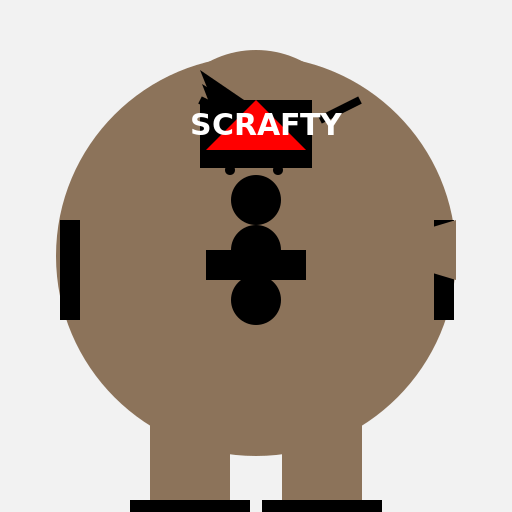

Javascript Code
                        // A Scrafty from the Pokémon franchise


// Drawing the background

ctx.fillStyle = "#F2F2F2"; // Setting the background color to light gray

ctx.fillRect(0, 0, 512, 512); // Filling the canvas with the background color


// Drawing Scrafty's body

ctx.fillStyle = "#8C735A"; // Setting the body color to brown

ctx.beginPath();

ctx.arc(256, 256, 200, 0, Math.PI * 2); // Drawing the body as a circle

ctx.fill();


// Drawing Scrafty's head

ctx.fillStyle = "#8C735A"; // Setting the head color to brown

ctx.beginPath();

ctx.arc(256, 150, 100, 0, Math.PI * 2); // Drawing the head as a smaller circle

ctx.fill();


// Drawing Scrafty's eyes

ctx.fillStyle = "#FFFFFF"; // Setting the eye color to white

ctx.beginPath();

ctx.arc(220, 120, 20, 0, Math.PI * 2); // Drawing the left eye

ctx.fill();


ctx.beginPath();

ctx.arc(292, 120, 20, 0, Math.PI * 2); // Drawing the right eye

ctx.fill();


// Drawing Scrafty's eyebrows

ctx.strokeStyle = "#000000"; // Setting the eyebrow color to black

ctx.lineWidth = 8; // Setting the line width for the eyebrows

ctx.beginPath();

ctx.moveTo(200, 100); // Starting point for the left eyebrow

ctx.lineTo(240, 120); // Drawing the left eyebrow

ctx.stroke();


ctx.beginPath();

ctx.moveTo(320, 120); // Starting point for the right eyebrow

ctx.lineTo(360, 100); // Drawing the right eyebrow

ctx.stroke();


// Drawing Scrafty's mouth

ctx.strokeStyle = "#000000"; // Setting the mouth color to black

ctx.lineWidth = 4; // Setting the line width for the mouth

ctx.beginPath();

ctx.moveTo(220, 150); // Starting point for the mouth

ctx.lineTo(292, 150); // Drawing the mouth

ctx.stroke();


// Drawing Scrafty's nostrils

ctx.fillStyle = "#000000"; // Setting the nostril color to black

ctx.beginPath();

ctx.arc(230, 170, 5, 0, Math.PI * 2); // Drawing the left nostril

ctx.fill();


ctx.beginPath();

ctx.arc(278, 170, 5, 0, Math.PI * 2); // Drawing the right nostril

ctx.fill();


// Drawing Scrafty's legs

ctx.fillStyle = "#8C735A"; // Setting the leg color to brown

ctx.fillRect(150, 350, 80, 150); // Drawing the left leg


ctx.fillRect(282, 350, 80, 150); // Drawing the right leg


// Drawing Scrafty's feet

ctx.fillStyle = "#000000"; // Setting the feet color to black

ctx.fillRect(130, 500, 120, 20); // Drawing the left foot


ctx.fillRect(262, 500, 120, 20); // Drawing the right foot


// Drawing Scrafty's hands

ctx.fillStyle = "#000000"; // Setting the hand color to black

ctx.fillRect(60, 220, 20, 100); // Drawing the left hand


ctx.fillRect(434, 220, 20, 100); // Drawing the right hand


// Drawing Scrafty's spikes

ctx.fillStyle = "#8C735A"; // Setting the spike color to brown

ctx.beginPath();

ctx.moveTo(256, 50); // Starting point for the first spike

ctx.lineTo(206, 150); // Drawing the first spike

ctx.lineTo(306, 150);

ctx.lineTo(256, 50); // Completing the first spike

ctx.fill();


ctx.beginPath();

ctx.moveTo(256, 50); // Starting point for the second spike

ctx.lineTo(212, 150); // Drawing the second spike

ctx.lineTo(300, 150);

ctx.lineTo(256, 50); // Completing the second spike

ctx.fill();


ctx.beginPath();

ctx.moveTo(256, 50); // Starting point for the third spike

ctx.lineTo(218, 150); // Drawing the third spike

ctx.lineTo(294, 150);

ctx.lineTo(256, 50); // Completing the third spike

ctx.fill();


// Drawing Scrafty's belt

ctx.fillStyle = "#000000"; // Setting the belt color to black

ctx.fillRect(206, 250, 100, 30); // Drawing the belt


// Drawing Scrafty's tail

ctx.fillStyle = "#8C735A"; // Setting the tail color to brown

ctx.beginPath();

ctx.moveTo(356, 250); // Starting point for the tail

ctx.lineTo(456, 220); // Drawing the tail

ctx.lineTo(456, 280);

ctx.lineTo(356, 250); // Completing the tail

ctx.fill();


// Drawing Scrafty's scales

ctx.fillStyle = "#000000"; // Setting the scale color to black

ctx.beginPath();

ctx.arc(256, 200, 25, 0, Math.PI * 2); // Drawing the first scale

ctx.fill();


ctx.beginPath();

ctx.arc(256, 250, 25, 0, Math.PI * 2); // Drawing the second scale

ctx.fill();


ctx.beginPath();

ctx.arc(256, 300, 25, 0, Math.PI * 2); // Drawing the third scale

ctx.fill();


// Drawing Scrafty's sunglasses

ctx.fillStyle = "#000000"; // Setting the sunglasses color to black

ctx.fillRect(200, 100, 112, 32); // Drawing the left lens


ctx.fillRect(200, 120, 112, 16); // Drawing the bridge


ctx.fillRect(200, 136, 112, 32); // Drawing the right lens


// Drawing Scrafty's hairstyle

ctx.fillStyle = "#000000"; // Setting the hairstyle color to black

ctx.beginPath();

ctx.moveTo(200, 70); // Starting point for the first hair strand

ctx.lineTo(244, 100); // Drawing the first hair strand

ctx.lineTo(212, 100);

ctx.lineTo(200, 70); // Completing the first hair strand

ctx.fill();


ctx.beginPath();

ctx.moveTo(202, 84); // Starting point for the second hair strand

ctx.lineTo(244, 110); // Drawing the second hair strand

ctx.lineTo(212, 110);

ctx.lineTo(202, 84); // Completing the second hair strand

ctx.fill();


ctx.beginPath();

ctx.moveTo(204, 98); // Starting point for the third hair strand

ctx.lineTo(244, 120); // Drawing the third hair strand

ctx.lineTo(212, 120);

ctx.lineTo(204, 98); // Completing the third hair strand

ctx.fill();


// Drawing Scrafty's bandana

ctx.fillStyle = "#FF0000"; // Setting the bandana color to red

ctx.beginPath();

ctx.moveTo(256, 100); // Starting point for the bandana

ctx.lineTo(306, 150); // Drawing the bandana

ctx.lineTo(206, 150);

ctx.lineTo(256, 100); // Completing the bandana

ctx.fill();


// Drawing Scrafty's text on the bandana

ctx.font = "bold 30px Arial"; // Setting the font for the text

ctx.fillStyle = "#FFFFFF"; // Setting the text color to white

ctx.fillText("SCRAFTY", 190, 135); // Drawing the text on the bandana


// All done! Scrafty is ready to battle!

// Now to train it in the art of fashion.
AI
Model: gpt-3.5-turbo-16k-0613
Time: 47 seconds
Prompt Tokens: 180
Completion Tokens: 1637
Total Token Cost: 1817


 balloon party
 beautiful beach
 cute puppy dog
 happy cat
 house
house