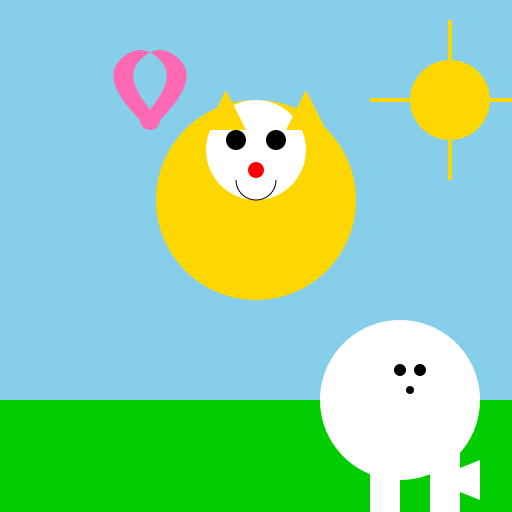

Javascript Code
                        // Little Mee with a West Highland Terrier


// Drawing the background

ctx.fillStyle = "#87CEEB"; // Blue sky color

ctx.fillRect(0, 0, 512, 512); // Fill the canvas with the blue sky


// Drawing the grass

ctx.fillStyle = "#00CD00"; // Green grass color

ctx.fillRect(0, 400, 512, 112); // Fill the bottom part of the canvas with grass


// Drawing Little Mee

ctx.fillStyle = "#FFD700"; // Yellow color for Little Mee's body

ctx.beginPath();

ctx.arc(256, 200, 100, 0, Math.PI * 2); // Draw Little Mee's body as a circle

ctx.fill();


// Drawing Little Mee's face

ctx.fillStyle = "#FFFFFF"; // White color for Little Mee's face

ctx.beginPath();

ctx.arc(256, 150, 50, 0, Math.PI * 2); // Draw Little Mee's face as a smaller circle

ctx.fill();


// Drawing Little Mee's eyes

ctx.fillStyle = "#000000"; // Black color for Little Mee's eyes

ctx.beginPath();

ctx.arc(236, 140, 10, 0, Math.PI * 2); // Draw the left eye

ctx.arc(276, 140, 10, 0, Math.PI * 2); // Draw the right eye

ctx.fill();


// Drawing Little Mee's nose

ctx.fillStyle = "#FF0000"; // Red color for Little Mee's nose

ctx.beginPath();

ctx.arc(256, 170, 8, 0, Math.PI * 2); // Draw Little Mee's nose as a small circle

ctx.fill();


// Drawing Little Mee's mouth

ctx.strokeStyle = "#000000"; // Black color for Little Mee's mouth

ctx.beginPath();

ctx.arc(256, 180, 20, 0, Math.PI, false); // Draw Little Mee's mouth as a half-circle

ctx.stroke();


// Drawing Little Mee's ears

ctx.fillStyle = "#FFD700"; // Yellow color for Little Mee's ears

ctx.beginPath();

ctx.moveTo(206, 130); // Start drawing the left ear

ctx.lineTo(226, 90);

ctx.lineTo(246, 130);

ctx.closePath(); // Close the shape

ctx.fill();


ctx.beginPath();

ctx.moveTo(286, 130); // Start drawing the right ear

ctx.lineTo(306, 90);

ctx.lineTo(326, 130);

ctx.closePath(); // Close the shape

ctx.fill();


// Drawing the West Highland Terrier

ctx.fillStyle = "#FFFFFF"; // White color for the dog's body

ctx.beginPath();

ctx.arc(400, 400, 80, 0, Math.PI * 2); // Draw the dog's body as a circle

ctx.fill();


// Drawing the dog's legs

ctx.fillStyle = "#FFFFFF"; // White color for the dog's legs

ctx.fillRect(370, 430, 30, 70); // Draw the front left leg

ctx.fillRect(430, 430, 30, 70); // Draw the front right leg

ctx.fillRect(370, 500, 30, 70); // Draw the back left leg

ctx.fillRect(430, 500, 30, 70); // Draw the back right leg


// Drawing the dog's tail

ctx.fillStyle = "#FFFFFF"; // White color for the dog's tail

ctx.beginPath();

ctx.moveTo(430, 480); // Start drawing the tail

ctx.lineTo(480, 460);

ctx.lineTo(480, 500);

ctx.closePath(); // Close the shape

ctx.fill();


// Drawing the dog's ears

ctx.fillStyle = "#FFFFFF"; // White color for the dog's ears

ctx.beginPath();

ctx.moveTo(370, 350); // Start drawing the left ear

ctx.lineTo(370, 370);

ctx.lineTo(400, 360);

ctx.closePath(); // Close the shape

ctx.fill();


ctx.beginPath();

ctx.moveTo(430, 350); // Start drawing the right ear

ctx.lineTo(430, 370);

ctx.lineTo(400, 360);

ctx.closePath(); // Close the shape

ctx.fill();


// Adding some details to the dog's face

ctx.fillStyle = "#000000"; // Black color for the dog's eyes and nose

ctx.beginPath();

ctx.arc(400, 370, 6, 0, Math.PI * 2); // Draw the left eye

ctx.fill();


ctx.beginPath();

ctx.arc(420, 370, 6, 0, Math.PI * 2); // Draw the right eye

ctx.fill();


ctx.beginPath();

ctx.arc(410, 390, 4, 0, Math.PI * 2); // Draw the nose

ctx.fill();


// Adding a happy little butterfly in the sky

ctx.fillStyle = "#FF69B4"; // Pink color for the butterfly's body

ctx.beginPath();

ctx.arc(150, 120, 10, 0, Math.PI * 2); // Draw the butterfly's body as a circle

ctx.fill();


ctx.fillStyle = "#FF69B4"; // Pink color for the butterfly's wings

ctx.beginPath();

ctx.moveTo(140, 120); // Start drawing the left wing

ctx.quadraticCurveTo(100, 80, 120, 60); // Draw a curved line for the left wing

ctx.quadraticCurveTo(140, 40, 160, 60); // Draw a curved line for the left wing

ctx.quadraticCurveTo(180, 80, 140, 120); // Draw a curved line for the left wing

ctx.moveTo(160, 120); // Move to the starting point of the right wing

ctx.quadraticCurveTo(200, 80, 180, 60); // Draw a curved line for the right wing

ctx.quadraticCurveTo(160, 40, 140, 60); // Draw a curved line for the right wing

ctx.quadraticCurveTo(120, 80, 160, 120); // Draw a curved line for the right wing

ctx.closePath(); // Close the shape

ctx.fill();


// Adding a happy little sun in the sky

ctx.fillStyle = "#FFD700"; // Yellow color for the sun

ctx.beginPath();

ctx.arc(450, 100, 40, 0, Math.PI * 2); // Draw the sun as a circle

ctx.fill();


// Adding some rays to the sun

ctx.strokeStyle = "#FFD700"; // Yellow color for the rays

ctx.lineWidth = 4; // Set the line width for the rays

ctx.beginPath();

ctx.moveTo(450, 20); // Start drawing the first ray

ctx.lineTo(450, 60);

ctx.moveTo(450, 140); // Start drawing the second ray

ctx.lineTo(450, 180);

ctx.moveTo(410, 100); // Start drawing the third ray

ctx.lineTo(370, 100);

ctx.moveTo(530, 100); // Start drawing the fourth ray

ctx.lineTo(490, 100);

ctx.stroke();


// Adding a funny little caption

// "Little Mee and his furry friend enjoying a sunny day!"
AI
Model: gpt-3.5-turbo-16k-0613
Time: 26 seconds
Prompt Tokens: 183
Completion Tokens: 1517
Total Token Cost: 1700


 balloon party
 beautiful beach
 cute puppy dog
 happy cat
 house
house