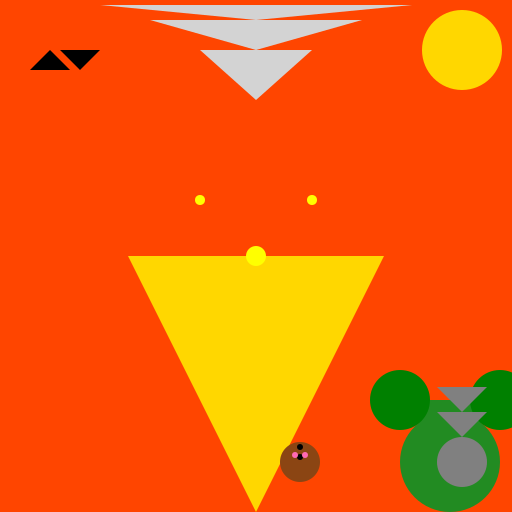

Javascript Code
                        // Title: Cedar Fire


// Creating a canvas


// Getting the 2D context


// Drawing the Cedar Fire

ctx.fillStyle = '#FF4500'; // Setting the fill color to fiery orange

ctx.fillRect(0, 0, 512, 512); // Filling the canvas with fiery color


// Drawing the flames

ctx.beginPath();

ctx.moveTo(256, 512); // Starting from the bottom center

ctx.lineTo(128, 256); // Drawing a line to the left

ctx.lineTo(384, 256); // Drawing a line to the right

ctx.closePath();

ctx.fillStyle = '#FFD700'; // Setting the fill color to golden yellow

ctx.fill(); // Filling the flame shape


// Adding some sparks

ctx.beginPath();

ctx.arc(256, 256, 10, 0, Math.PI * 2); // Drawing a circular spark in the center

ctx.fillStyle = '#FFFF00'; // Setting the fill color to bright yellow

ctx.fill(); // Filling the spark shape


ctx.beginPath();

ctx.arc(200, 200, 5, 0, Math.PI * 2); // Drawing a smaller spark on the left

ctx.fillStyle = '#FFFF00'; // Setting the fill color to bright yellow

ctx.fill(); // Filling the spark shape


ctx.beginPath();

ctx.arc(312, 200, 5, 0, Math.PI * 2); // Drawing a smaller spark on the right

ctx.fillStyle = '#FFFF00'; // Setting the fill color to bright yellow

ctx.fill(); // Filling the spark shape


// Adding some smoke

ctx.beginPath();

ctx.moveTo(256, 100); // Starting from the top center

ctx.lineTo(200, 50); // Drawing a line to the left

ctx.lineTo(312, 50); // Drawing a line to the right

ctx.closePath();

ctx.fillStyle = '#D3D3D3'; // Setting the fill color to light gray

ctx.fill(); // Filling the smoke shape


// Adding more smoke

ctx.beginPath();

ctx.moveTo(256, 50); // Starting from the top center

ctx.lineTo(150, 20); // Drawing a line to the left

ctx.lineTo(362, 20); // Drawing a line to the right

ctx.closePath();

ctx.fillStyle = '#D3D3D3'; // Setting the fill color to light gray

ctx.fill(); // Filling the smoke shape


// Adding even more smoke

ctx.beginPath();

ctx.moveTo(256, 20); // Starting from the top center

ctx.lineTo(100, 5); // Drawing a line to the left

ctx.lineTo(412, 5); // Drawing a line to the right

ctx.closePath();

ctx.fillStyle = '#D3D3D3'; // Setting the fill color to light gray

ctx.fill(); // Filling the smoke shape


// Adding a touch of nature

ctx.beginPath();

ctx.arc(450, 462, 50, 0, Math.PI * 2); // Drawing a circular tree

ctx.fillStyle = '#228B22'; // Setting the fill color to forest green

ctx.fill(); // Filling the tree shape


// Adding some branches

ctx.beginPath();

ctx.moveTo(450, 462); // Starting from the center of the tree

ctx.lineTo(400, 400); // Drawing a branch to the left

ctx.lineTo(500, 400); // Drawing a branch to the right

ctx.closePath();

ctx.fillStyle = '#228B22'; // Setting the fill color to forest green

ctx.fill(); // Filling the branch shape


// Adding some leaves

ctx.beginPath();

ctx.arc(400, 400, 30, 0, Math.PI * 2); // Drawing a circular leaf on the left branch

ctx.fillStyle = '#008000'; // Setting the fill color to dark green

ctx.fill(); // Filling the leaf shape


ctx.beginPath();

ctx.arc(500, 400, 30, 0, Math.PI * 2); // Drawing a circular leaf on the right branch

ctx.fillStyle = '#008000'; // Setting the fill color to dark green

ctx.fill(); // Filling the leaf shape


// Adding a cute squirrel

ctx.beginPath();

ctx.arc(300, 462, 20, 0, Math.PI * 2); // Drawing a circular body for the squirrel

ctx.fillStyle = '#8B4513'; // Setting the fill color to brown

ctx.fill(); // Filling the body shape


ctx.beginPath();

ctx.arc(290, 452, 5, 0, Math.PI * 2); // Drawing a circular head for the squirrel

ctx.fillStyle = '#8B4513'; // Setting the fill color to brown

ctx.fill(); // Filling the head shape


ctx.beginPath();

ctx.arc(310, 452, 5, 0, Math.PI * 2); // Drawing a circular head for the squirrel

ctx.fillStyle = '#8B4513'; // Setting the fill color to brown

ctx.fill(); // Filling the head shape


ctx.beginPath();

ctx.arc(300, 447, 3, 0, Math.PI * 2); // Drawing a circular eye on the left

ctx.fillStyle = '#000'; // Setting the fill color to black

ctx.fill(); // Filling the eye shape


ctx.beginPath();

ctx.arc(300, 457, 3, 0, Math.PI * 2); // Drawing a circular eye on the right

ctx.fillStyle = '#000'; // Setting the fill color to black

ctx.fill(); // Filling the eye shape


ctx.beginPath();

ctx.moveTo(285, 470); // Starting from the bottom left of the squirrel

ctx.lineTo(315, 470); // Drawing a line to the bottom right

ctx.lineTo(300, 480); // Drawing a line to the top

ctx.closePath();

ctx.fillStyle = '#8B4513'; // Setting the fill color to brown

ctx.fill(); // Filling the tail shape


// Adding some squirrel cheeks

ctx.beginPath();

ctx.arc(295, 455, 3, 0, Math.PI * 2); // Drawing a circular cheek on the left

ctx.fillStyle = '#FF69B4'; // Setting the fill color to pink

ctx.fill(); // Filling the cheek shape


ctx.beginPath();

ctx.arc(305, 455, 3, 0, Math.PI * 2); // Drawing a circular cheek on the right

ctx.fillStyle = '#FF69B4'; // Setting the fill color to pink

ctx.fill(); // Filling the cheek shape


// Adding a happy sun

ctx.beginPath();

ctx.arc(462, 50, 40, 0, Math.PI * 2); // Drawing a circular sun

ctx.fillStyle = '#FFD700'; // Setting the fill color to golden yellow

ctx.fill(); // Filling the sun shape


ctx.beginPath();

ctx.moveTo(442, 50); // Starting from the top left of the sun

ctx.lineTo(482, 50); // Drawing a line to the top right

ctx.lineTo(462, 10); // Drawing a line to the bottom

ctx.closePath();

ctx.fillStyle = '#FFD700'; // Setting the fill color to golden yellow

ctx.fill(); // Filling the sun rays shape


// Adding some birds

ctx.beginPath();

ctx.moveTo(50, 50); // Starting from the top left

ctx.lineTo(70, 70); // Drawing a line to the bottom right

ctx.lineTo(30, 70); // Drawing a line to the bottom left

ctx.closePath();

ctx.fillStyle = '#000'; // Setting the fill color to black

ctx.fill(); // Filling the bird shape


ctx.beginPath();

ctx.moveTo(80, 70); // Starting from the bottom left

ctx.lineTo(100, 50); // Drawing a line to the top right

ctx.lineTo(60, 50); // Drawing a line to the top left

ctx.closePath();

ctx.fillStyle = '#000'; // Setting the fill color to black

ctx.fill(); // Filling the bird shape


// Oops, I almost forgot the fire extinguisher!

ctx.beginPath();

ctx.arc(462, 462, 25, 0, Math.PI * 2); // Drawing a circular base for the extinguisher

ctx.fillStyle = '#808080'; // Setting the fill color to gray

ctx.fill(); // Filling the base shape


ctx.beginPath();

ctx.moveTo(462, 437); // Starting from the top center of the base

ctx.lineTo(437, 412); // Drawing a line to the left

ctx.lineTo(487, 412); // Drawing a line to the right

ctx.closePath();

ctx.fillStyle = '#808080'; // Setting the fill color to gray

ctx.fill(); // Filling the handle shape


ctx.beginPath();

ctx.moveTo(462, 412); // Starting from the top center of the base

ctx.lineTo(437, 387); // Drawing a line to the left

ctx.lineTo(487, 387); // Drawing a line to the right

ctx.closePath();

ctx.fillStyle = '#808080'; // Setting the fill color to gray

ctx.fill(); // Filling the nozzle shape


// Phew! That should do it, the Cedar Fire is under control now!


// We hope our little squirrel friend finds a new home soon!


// The birds are probably enjoying the warm glow of the flames.


// Remember, fire safety is important, but we can still appreciate the beauty of nature!


// Stay safe and have a great day!
AI
Model: gpt-3.5-turbo-16k-0613
Time: 54 seconds
Prompt Tokens: 176
Completion Tokens: 2015
Total Token Cost: 2191


 balloon party
 beautiful beach
 cute puppy dog
 happy cat
 house
house