
Javascript Code
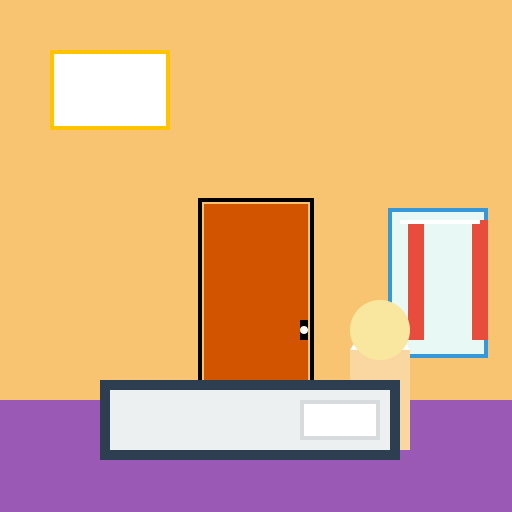
                        // Cartoon Bedroom

// Drawing a room background


// Creating a new canvas


// Getting the 2d context


// Drawing the room background

ctx.fillStyle = '#F8C471'; // Setting the color of the walls

ctx.fillRect(0, 0, 512, 512); // Filling the entire canvas


ctx.fillStyle = '#9B59B6'; // Setting the color of the floor

ctx.fillRect(0, 400, 512, 112); // Drawing the floor


ctx.strokeStyle = '#000000'; // Setting the color of the door frame

ctx.lineWidth = 4; // Setting the thickness of the door frame

ctx.strokeRect(200, 200, 112, 200); // Drawing the door frame


ctx.fillStyle = '#D35400'; // Setting the color of the door

ctx.fillRect(204, 204, 104, 196); // Drawing the door


// Adding some details to the door

ctx.fillStyle = '#000000'; // Setting the color of the door handle

ctx.fillRect(300, 320, 8, 20); // Drawing the door handle


ctx.fillStyle = '#FFFFFF'; // Setting the color of the doorknob

ctx.beginPath();

ctx.arc(304, 330, 4, 0, Math.PI * 2); // Drawing the doorknob

ctx.fill();


// Drawing a window

ctx.fillStyle = '#3498DB'; // Setting the color of the window frame

ctx.fillRect(388, 208, 100, 150); // Drawing the window frame


ctx.fillStyle = '#E8F8F5'; // Setting the color of the window glass

ctx.fillRect(392, 212, 92, 142); // Drawing the window glass


// Adding curtains to the window

ctx.fillStyle = '#E74C3C'; // Setting the color of the curtain

ctx.fillRect(408, 220, 16, 120); // Drawing the left curtain


ctx.fillRect(472, 220, 16, 120); // Drawing the right curtain


// Adding some details to the curtains

ctx.fillStyle = '#FFFFFF'; // Setting the color of the curtain rod

ctx.fillRect(400, 220, 80, 4); // Drawing the curtain rod


// Adding some decorations to the walls

ctx.fillStyle = '#FFC300'; // Setting the color of the picture frame

ctx.fillRect(50, 50, 120, 80); // Drawing the picture frame


ctx.fillStyle = '#FFFFFF'; // Setting the color of the picture

ctx.fillRect(54, 54, 112, 72); // Drawing the picture


// Drawing a lamp on the bedside table

ctx.fillStyle = '#FAD7A0'; // Setting the color of the lamp base

ctx.fillRect(350, 350, 60, 100); // Drawing the lamp base


ctx.fillStyle = '#FDFEFE'; // Setting the color of the lampshade

ctx.beginPath();

ctx.moveTo(350, 350); // Starting point of the lampshade

ctx.lineTo(380, 300); // Drawing the top of the lampshade

ctx.lineTo(410, 350); // Drawing the bottom of the lampshade

ctx.closePath();

ctx.fill();


// Adding some light to the lamp

ctx.fillStyle = '#F9E79F'; // Setting the color of the lamp light

ctx.beginPath();

ctx.arc(380, 330, 30, 0, Math.PI * 2); // Drawing the lamp light

ctx.closePath();

ctx.fill();


// Adding a bed to the room

ctx.fillStyle = '#2C3E50'; // Setting the color of the bed frame

ctx.fillRect(100, 380, 300, 80); // Drawing the bed frame


ctx.fillStyle = '#ECF0F1'; // Setting the color of the bedsheet

ctx.fillRect(110, 390, 280, 60); // Drawing the bedsheet


// Adding a pillow to the bed

ctx.fillStyle = '#D7DBDD'; // Setting the color of the pillow

ctx.fillRect(300, 400, 80, 40); // Drawing the pillow


// Adding some details to the pillow

ctx.fillStyle = '#FFFFFF'; // Setting the color of the pillowcase

ctx.fillRect(304, 404, 72, 32); // Drawing the pillowcase


// Finished drawing the cartoon bedroom!

// Phew, that was a lot of furniture to draw!
AI
Model: gpt-3.5-turbo-16k-0613
Time: 30 seconds
Prompt Tokens: 179
Completion Tokens: 962
Total Token Cost: 1141


 balloon party
 beautiful beach
 cute puppy dog
 happy cat
 house
house