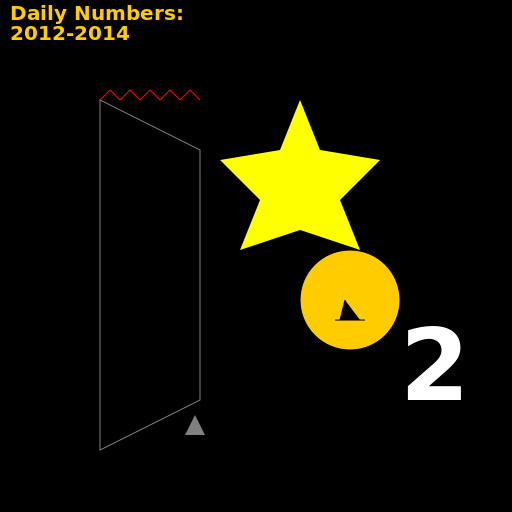

Javascript Code
                        // Slightly Damaged VHS Recording of James

// Dogs, Cats, and Sprinkles

// High Up Star and Number 2

// Daily Numbers: 2012-2014


ctx.fillStyle = "#000"; // Set canvas background color to black

ctx.fillRect(0, 0, 512, 512); // Draw a black rectangle covering the canvas


// Draw the slightly damaged VHS recording of James

ctx.strokeStyle = "#808080"; // Set stroke color to gray


// Draw the warped shape of the VHS tape

ctx.beginPath(); // Begin drawing the shape

ctx.moveTo(100, 100); // Move to starting point

ctx.lineTo(200, 150); // Draw a line to create a slanted edge

ctx.lineTo(200, 400); // Draw a line to create the right side

ctx.lineTo(100, 450); // Draw a line to create the bottom side

ctx.closePath(); // Close the shape

ctx.stroke(); // Draw the shape outline


// Draw the flicked VHS tape

ctx.strokeStyle = "#FF0000"; // Set stroke color to red


// Draw the flick motion lines

ctx.beginPath(); // Begin drawing the lines

ctx.moveTo(100, 100); // Move to starting point

ctx.lineTo(110, 90); // Draw a line to create a diagonal motion line

ctx.moveTo(110, 90); // Move to new starting point

ctx.lineTo(120, 100); // Draw a line to create another diagonal motion line

ctx.moveTo(120, 100); // Move to new starting point

ctx.lineTo(130, 90); // Draw a line to create another diagonal motion line

ctx.moveTo(130, 90); // Move to new starting point

ctx.lineTo(140, 100); // Draw a line to create another diagonal motion line

ctx.moveTo(140, 100); // Move to new starting point

ctx.lineTo(150, 90); // Draw a line to create another diagonal motion line

ctx.moveTo(150, 90); // Move to new starting point

ctx.lineTo(160, 100); // Draw a line to create another diagonal motion line

ctx.moveTo(160, 100); // Move to new starting point

ctx.lineTo(170, 90); // Draw a line to create another diagonal motion line

ctx.moveTo(170, 90); // Move to new starting point

ctx.lineTo(180, 100); // Draw a line to create another diagonal motion line

ctx.moveTo(180, 100); // Move to new starting point

ctx.lineTo(190, 90); // Draw a line to create another diagonal motion line

ctx.moveTo(190, 90); // Move to new starting point

ctx.lineTo(200, 100); // Draw a line to create another diagonal motion line

ctx.stroke(); // Draw the lines


// Draw the dogs and cats

ctx.fillStyle = "#FFCC00"; // Set fill color to yellow

ctx.strokeStyle = "#000"; // Set stroke color to black


// Draw the dog

ctx.beginPath(); // Begin drawing the dog

ctx.arc(350, 300, 50, 0, Math.PI * 2); // Draw the dog's head

ctx.moveTo(345, 300); // Move to starting point

ctx.lineTo(340, 320); // Draw a line to create the dog's ear

ctx.lineTo(360, 320); // Draw a line to create the dog's other ear

ctx.moveTo(335, 320); // Move to starting point

ctx.lineTo(365, 320); // Draw a line to create the dog's mouth

ctx.moveTo(350, 350); // Move to starting point

ctx.lineTo(350, 400); // Draw a line to create the dog's body

ctx.moveTo(350, 400); // Move to starting point

ctx.lineTo(320, 450); // Draw a line to create the dog's front leg

ctx.moveTo(350, 400); // Move to starting point

ctx.lineTo(380, 450); // Draw a line to create the dog's other front leg

ctx.moveTo(350, 400); // Move to starting point

ctx.lineTo(320, 460); // Draw a line to create the dog's hind leg

ctx.moveTo(350, 400); // Move to starting point

ctx.lineTo(380, 460); // Draw a line to create the dog's other hind leg

ctx.fill(); // Fill the dog's head with color

ctx.stroke(); // Draw the dog's outline


// Draw the cat

ctx.fillStyle = "#000"; // Set fill color to black


// Draw the cat's body

ctx.beginPath(); // Begin drawing the cat's body

ctx.arc(200, 450, 30, 0, Math.PI * 2); // Draw the cat's body

ctx.fill(); // Fill the cat's body with color


// Draw the cat's ears

ctx.fillStyle = "#808080"; // Set fill color to gray


ctx.beginPath(); // Begin drawing the cat's ears

ctx.moveTo(185, 435); // Move to starting point

ctx.lineTo(195, 415); // Draw a line to create the cat's left ear

ctx.lineTo(205, 435); // Draw a line to create the cat's right ear

ctx.fill(); // Fill the cat's ears with color


// Draw the sprinkles star

ctx.fillStyle = "#FFFF00"; // Set fill color to yellow


// Draw the star

ctx.beginPath(); // Begin drawing the star

ctx.moveTo(300, 100); // Move to starting point

ctx.lineTo(320, 150); // Draw a line to create one point of the star

ctx.lineTo(380, 160); // Draw a line to create another point of the star

ctx.lineTo(340, 200); // Draw a line to create another point of the star

ctx.lineTo(360, 250); // Draw a line to create another point of the star

ctx.lineTo(300, 230); // Draw a line to create another point of the star

ctx.lineTo(240, 250); // Draw a line to create another point of the star

ctx.lineTo(260, 200); // Draw a line to create another point of the star

ctx.lineTo(220, 160); // Draw a line to create another point of the star

ctx.lineTo(280, 150); // Draw a line to create another point of the star

ctx.closePath(); // Close the shape

ctx.fill(); // Fill the star with color


// Draw the number 2

ctx.fillStyle = "#FFFFFF"; // Set fill color to white

ctx.font = "bold 100px Arial"; // Set font style and size

ctx.fillText("2", 400, 400); // Draw the number 2


// Draw the daily numbers

ctx.fillStyle = "#FFCC00"; // Set fill color to yellow

ctx.font = "bold 20px Arial"; // Set font style and size


// Draw the daily numbers label

ctx.fillText("Daily Numbers:", 10, 20); // Draw the label


// Draw the year range

ctx.fillText("2012-2014", 10, 40); // Draw the year range


// Funny comment: "VHS tapes, where even the flicks are nostalgic!"
AI
Model: gpt-3.5-turbo-16k-0613
Time: 27 seconds
Prompt Tokens: 221
Completion Tokens: 1532
Total Token Cost: 1753


 balloon party
 beautiful beach
 cute puppy dog
 happy cat
 house
house