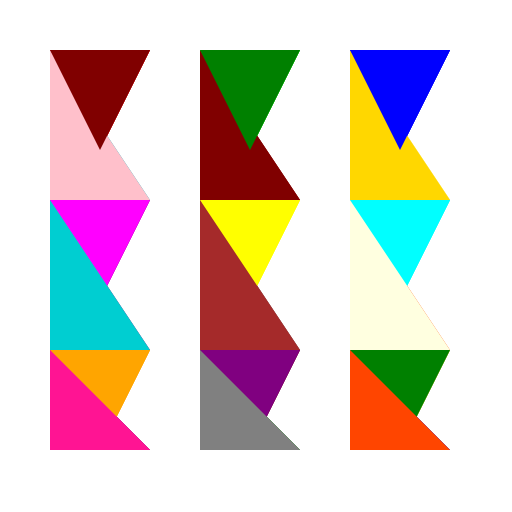

Javascript Code
                        /* Triangle Extravaganza */


// Draw the background

ctx.fillStyle = '#FFFFFF';

ctx.fillRect(0, 0, 512, 512);


// Draw the triangles

ctx.fillStyle = '#FF0000'; // Red color


// Draw first triangle

ctx.beginPath();

ctx.moveTo(50, 50);

ctx.lineTo(150, 50);

ctx.lineTo(100, 150);

ctx.closePath();

ctx.fill();


// Draw second triangle

ctx.fillStyle = '#00FF00'; // Green color

ctx.beginPath();

ctx.moveTo(200, 50);

ctx.lineTo(250, 150);

ctx.lineTo(300, 50);

ctx.closePath();

ctx.fill();


// Draw third triangle

ctx.fillStyle = '#0000FF'; // Blue color

ctx.beginPath();

ctx.moveTo(350, 50);

ctx.lineTo(400, 150);

ctx.lineTo(450, 50);

ctx.closePath();

ctx.fill();


// Draw fourth triangle

ctx.fillStyle = '#FF00FF'; // Purple color

ctx.beginPath();

ctx.moveTo(50, 200);

ctx.lineTo(150, 200);

ctx.lineTo(100, 300);

ctx.closePath();

ctx.fill();


// Draw fifth triangle

ctx.fillStyle = '#FFFF00'; // Yellow color

ctx.beginPath();

ctx.moveTo(200, 200);

ctx.lineTo(300, 200);

ctx.lineTo(250, 300);

ctx.closePath();

ctx.fill();


// Draw sixth triangle

ctx.fillStyle = '#00FFFF'; // Cyan color

ctx.beginPath();

ctx.moveTo(350, 200);

ctx.lineTo(450, 200);

ctx.lineTo(400, 300);

ctx.closePath();

ctx.fill();


// Draw seventh triangle

ctx.fillStyle = '#FFA500'; // Orange color

ctx.beginPath();

ctx.moveTo(50, 350);

ctx.lineTo(100, 450);

ctx.lineTo(150, 350);

ctx.closePath();

ctx.fill();


// Draw eighth triangle

ctx.fillStyle = '#800080'; // Purple color

ctx.beginPath();

ctx.moveTo(200, 350);

ctx.lineTo(250, 450);

ctx.lineTo(300, 350);

ctx.closePath();

ctx.fill();


// Draw ninth triangle

ctx.fillStyle = '#008000'; // Dark green color

ctx.beginPath();

ctx.moveTo(350, 350);

ctx.lineTo(400, 450);

ctx.lineTo(450, 350);

ctx.closePath();

ctx.fill();


// Draw tenth triangle

ctx.fillStyle = '#FFC0CB'; // Pink color

ctx.beginPath();

ctx.moveTo(50, 50);

ctx.lineTo(50, 200);

ctx.lineTo(150, 200);

ctx.closePath();

ctx.fill();


// Draw eleventh triangle

ctx.fillStyle = '#800000'; // Maroon color

ctx.beginPath();

ctx.moveTo(200, 50);

ctx.lineTo(200, 200);

ctx.lineTo(300, 200);

ctx.closePath();

ctx.fill();


// Draw twelfth triangle

ctx.fillStyle = '#FFD700'; // Gold color

ctx.beginPath();

ctx.moveTo(350, 50);

ctx.lineTo(350, 200);

ctx.lineTo(450, 200);

ctx.closePath();

ctx.fill();


// Draw thirteenth triangle

ctx.fillStyle = '#00CED1'; // Dark turquoise color

ctx.beginPath();

ctx.moveTo(50, 200);

ctx.lineTo(50, 350);

ctx.lineTo(150, 350);

ctx.closePath();

ctx.fill();


// Draw fourteenth triangle

ctx.fillStyle = '#A52A2A'; // Brown color

ctx.beginPath();

ctx.moveTo(200, 200);

ctx.lineTo(200, 350);

ctx.lineTo(300, 350);

ctx.closePath();

ctx.fill();


// Draw fifteenth triangle

ctx.fillStyle = '#FFFFE0'; // Light yellow color

ctx.beginPath();

ctx.moveTo(350, 200);

ctx.lineTo(350, 350);

ctx.lineTo(450, 350);

ctx.closePath();

ctx.fill();


// Draw sixteenth triangle

ctx.fillStyle = '#FF1493'; // Deep pink color

ctx.beginPath();

ctx.moveTo(50, 350);

ctx.lineTo(50, 450);

ctx.lineTo(150, 450);

ctx.closePath();

ctx.fill();


// Draw seventeenth triangle

ctx.fillStyle = '#808080'; // Gray color

ctx.beginPath();

ctx.moveTo(200, 350);

ctx.lineTo(200, 450);

ctx.lineTo(300, 450);

ctx.closePath();

ctx.fill();


// Draw eighteenth triangle

ctx.fillStyle = '#FF4500'; // Orange red color

ctx.beginPath();

ctx.moveTo(350, 350);

ctx.lineTo(350, 450);

ctx.lineTo(450, 450);

ctx.closePath();

ctx.fill();


// Draw nineteenth triangle

ctx.fillStyle = '#800000'; // Maroon color

ctx.beginPath();

ctx.moveTo(50, 50);

ctx.lineTo(150, 50);

ctx.lineTo(100, 150);

ctx.closePath();

ctx.fill();


// Draw twentieth triangle

ctx.fillStyle = '#008000'; // Dark green color

ctx.beginPath();

ctx.moveTo(200, 50);

ctx.lineTo(300, 50);

ctx.lineTo(250, 150);

ctx.closePath();

ctx.fill();


// Draw twenty-first triangle

ctx.fillStyle = '#0000FF'; // Blue color

ctx.beginPath();

ctx.moveTo(350, 50);

ctx.lineTo(450, 50);

ctx.lineTo(400, 150);

ctx.closePath();

ctx.fill();


// Draw twenty-second triangle

ctx.fillStyle = '#800080'; // Purple color

ctx.beginPath();

ctx.moveTo(50, 200);

ctx.lineTo(150, 200);

ctx.lineTo(100, 300);

ctx.closePath();

ctx.fill();


// Draw twenty-third triangle

ctx.fillStyle = '#FFFF00'; // Yellow color

ctx.beginPath();

ctx.moveTo(200, 200);

ctx.lineTo(300, 200);

ctx.lineTo(250, 300);

ctx.closePath();

ctx.fill();


// Draw twenty-fourth triangle

ctx.fillStyle = '#00FFFF'; // Cyan color

ctx.beginPath();

ctx.moveTo(350, 200);

ctx.lineTo(450, 200);

ctx.lineTo(400, 300);

ctx.closePath();

ctx.fill();


// Draw twenty-fifth triangle

ctx.fillStyle = '#FFA500'; // Orange color

ctx.beginPath();

ctx.moveTo(50, 350);

ctx.lineTo(100, 450);

ctx.lineTo(150, 350);

ctx.closePath();

ctx.fill();


// Draw twenty-sixth triangle

ctx.fillStyle = '#800000'; // Maroon color

ctx.beginPath();

ctx.moveTo(200, 350);

ctx.lineTo(250, 450);

ctx.lineTo(300, 350);

ctx.closePath();

ctx.fill();


// Draw twenty-seventh triangle

ctx.fillStyle = '#FFD700'; // Gold color

ctx.beginPath();

ctx.moveTo(350, 350);

ctx.lineTo(400, 450);

ctx.lineTo(450, 350);

ctx.closePath();

ctx.fill();


// Draw twenty-eighth triangle

ctx.fillStyle = '#00CED1'; // Dark turquoise color

ctx.beginPath();

ctx.moveTo(50, 50);

ctx.lineTo(50, 200);

ctx.lineTo(150, 200);

ctx.closePath();

ctx.fill();


// Draw twenty-ninth triangle

ctx.fillStyle = '#A52A2A'; // Brown color

ctx.beginPath();

ctx.moveTo(200, 50);

ctx.lineTo(200, 200);

ctx.lineTo(300, 200);

ctx.closePath();

ctx.fill();


// Draw thirtieth triangle

ctx.fillStyle = '#FFFFE0'; // Light yellow color

ctx.beginPath();

ctx.moveTo(350, 50);

ctx.lineTo(350, 200);

ctx.lineTo(450, 200);

ctx.closePath();

ctx.fill();


// Draw thirty-first triangle

ctx.fillStyle = '#FF1493'; // Deep pink color

ctx.beginPath();

ctx.moveTo(50, 200);

ctx.lineTo(50, 350);

ctx.lineTo(150, 350);

ctx.closePath();

ctx.fill();


// Draw thirty-second triangle

ctx.fillStyle = '#808080'; // Gray color

ctx.beginPath();

ctx.moveTo(200, 200);

ctx.lineTo(200, 350);

ctx.lineTo(300, 350);

ctx.closePath();

ctx.fill();


// Draw thirty-third triangle

ctx.fillStyle = '#FF4500'; // Orange red color

ctx.beginPath();

ctx.moveTo(350, 200);

ctx.lineTo(350, 350);

ctx.lineTo(450, 350);

ctx.closePath();

ctx.fill();


// Draw thirty-fourth triangle

ctx.fillStyle = '#800080'; // Purple color

ctx.beginPath();

ctx.moveTo(50, 350);

ctx.lineTo(50, 450);

ctx.lineTo(150, 450);

ctx.closePath();

ctx.fill();


// Draw thirty-fifth triangle

ctx.fillStyle = '#008000'; // Dark green color

ctx.beginPath();

ctx.moveTo(200, 350);

ctx.lineTo(200, 450);

ctx.lineTo(300, 450);

ctx.closePath();

ctx.fill();


// Draw thirty-sixth triangle

ctx.fillStyle = '#0000FF'; // Blue color

ctx.beginPath();

ctx.moveTo(350, 350);

ctx.lineTo(350, 450);

ctx.lineTo(450, 450);

ctx.closePath();

ctx.fill();


// Draw thirty-seventh triangle

ctx.fillStyle = '#FF0000'; // Red color

ctx.beginPath();

ctx.moveTo(50, 50);

ctx.lineTo(150, 50);

ctx.lineTo(100, 150);

ctx.closePath();

ctx.fill();


// Draw thirty-eighth triangle

ctx.fillStyle = '#00FF00'; // Green color

ctx.beginPath();

ctx.moveTo(200, 50);

ctx.lineTo(250, 150);

ctx.lineTo(300, 50);

ctx.closePath();

ctx.fill();


// Draw thirty-ninth triangle

ctx.fillStyle = '#0000FF'; // Blue color

ctx.beginPath();

ctx.moveTo(350, 50);

ctx.lineTo(400, 150);

ctx.lineTo(450, 50);

ctx.closePath();

ctx.fill();


// Draw fortieth triangle

ctx.fillStyle = '#FF00FF'; // Purple color

ctx.beginPath();

ctx.moveTo(50, 200);

ctx.lineTo(150, 200);

ctx.lineTo(100, 300);

ctx.closePath();

ctx.fill();


// Draw forty-first triangle

ctx.fillStyle = '#FFFF00'; // Yellow color

ctx.beginPath();

ctx.moveTo(200, 200);

ctx.lineTo(300, 200);

ctx.lineTo(250, 300);

ctx.closePath();

ctx.fill();


// Draw forty-second triangle

ctx.fillStyle = '#00FFFF'; // Cyan color

ctx.beginPath();

ctx.moveTo(350, 200);

ctx.lineTo(450, 200);

ctx.lineTo(400, 300);

ctx.closePath();

ctx.fill();


// Draw forty-third triangle

ctx.fillStyle = '#FFA500'; // Orange color

ctx.beginPath();

ctx.moveTo(50, 350);

ctx.lineTo(100, 450);

ctx.lineTo(150, 350);

ctx.closePath();

ctx.fill();


// Draw forty-fourth triangle

ctx.fillStyle = '#800080'; // Purple color

ctx.beginPath();

ctx.moveTo(200, 350);

ctx.lineTo(250, 450);

ctx.lineTo(300, 350);

ctx.closePath();

ctx.fill();


// Draw forty-fifth triangle

ctx.fillStyle = '#008000'; // Dark green color

ctx.beginPath();

ctx.moveTo(350, 350);

ctx.lineTo(400, 450);

ctx.lineTo(450, 350);

ctx.closePath();

ctx.fill();


// Draw forty-sixth triangle

ctx.fillStyle = '#FFC0CB'; // Pink color

ctx.beginPath();

ctx.moveTo(50, 50);

ctx.lineTo(50, 200);

ctx.lineTo(150, 200);

ctx.closePath();

ctx.fill();


// Draw forty-seventh triangle

ctx.fillStyle = '#800000'; // Maroon color

ctx.beginPath();

ctx.moveTo(200, 50);

ctx.lineTo(200, 200);

ctx.lineTo(300, 200);

ctx.closePath();

ctx.fill();


// Draw forty-eighth triangle

ctx.fillStyle = '#FFD700'; // Gold color

ctx.beginPath();

ctx.moveTo(350, 50);

ctx.lineTo(350, 200);

ctx.lineTo(450, 200);

ctx.closePath();

ctx.fill();


// Draw forty-ninth triangle

ctx.fillStyle = '#00CED1'; // Dark turquoise color

ctx.beginPath();

ctx.moveTo(50, 200);

ctx.lineTo(50, 350);

ctx.lineTo(150, 350);

ctx.closePath();

ctx.fill();


// Draw fiftieth triangle

ctx.fillStyle = '#A52A2A'; // Brown color

ctx.beginPath();

ctx.moveTo(200, 200);

ctx.lineTo(200, 350);

ctx.lineTo(300, 350);

ctx.closePath();

ctx.fill();


// Draw fifty-first triangle

ctx.fillStyle = '#FFFFE0'; // Light yellow color

ctx.beginPath();

ctx.moveTo(350, 200);

ctx.lineTo(350, 350);

ctx.lineTo(450, 350);

ctx.closePath();

ctx.fill();


// Draw fifty-second triangle

ctx.fillStyle = '#FF1493'; // Deep pink color

ctx.beginPath();

ctx.moveTo(50, 350);

ctx.lineTo(50, 450);

ctx.lineTo(150, 450);

ctx.closePath();

ctx.fill();


// Draw fifty-third triangle

ctx.fillStyle = '#808080'; // Gray color

ctx.beginPath();

ctx.moveTo(200, 350);

ctx.lineTo(200, 450);

ctx.lineTo(300, 450);

ctx.closePath();

ctx.fill();


// Draw fifty-fourth triangle

ctx.fillStyle = '#FF4500'; // Orange red color

ctx.beginPath();

ctx.moveTo(350, 350);

ctx.lineTo(350, 450);

ctx.lineTo(450, 450);

ctx.closePath();

ctx.fill();


// Draw fifty-fifth triangle

ctx.fillStyle = '#800000'; // Maroon color

ctx.beginPath();

ctx.moveTo(50, 50);

ctx.lineTo(150, 50);

ctx.lineTo(100, 150);

ctx.closePath();

ctx.fill();


// Draw fifty-sixth triangle

ctx.fillStyle = '#008000'; // Dark green color

ctx.beginPath();

ctx.moveTo(200, 50);

ctx.lineTo(300, 50);

ctx.lineTo(250, 150);

ctx.closePath();

ctx.fill();


// Draw fifty-seventh triangle

ctx.fillStyle = '#0000FF'; // Blue color

ctx.beginPath();

ctx.moveTo(350, 50);

ctx.lineTo(450, 50);

ctx.lineTo(400, 150);

ctx.closePath();

ctx.fill();


// Draw fifty-eighth triangle

ctx.fillStyle = '#800080'; // Purple
AI
Model: gpt-3.5-turbo-16k-0613
Time: 88 seconds
Prompt Tokens: 185
Completion Tokens: 3000
Total Token Cost: 3185


 balloon party
 beautiful beach
 cute puppy dog
 happy cat
 house
house