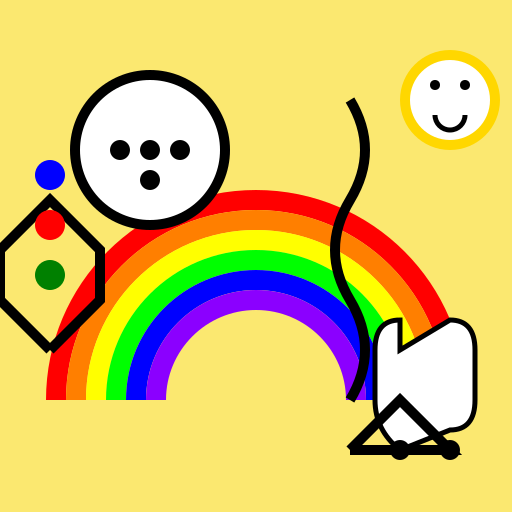

Javascript Code
                        // Title: "Youthful Dreams Unleashed"


// Creating a vibrant canvas for the youth center!

ctx.fillStyle = "#FBE870"; // Setting the background color to a sunny yellow

ctx.fillRect(0, 0, 512, 512); // Filling the entire canvas with the background color


// Drawing a colorful rainbow to represent diversity and inclusivity

ctx.beginPath();

ctx.arc(256, 400, 200, Math.PI, 2 * Math.PI); // Drawing the outer arc of the rainbow

ctx.lineWidth = 20;

ctx.strokeStyle = "#FF0000"; // Red

ctx.stroke();


ctx.beginPath();

ctx.arc(256, 400, 180, Math.PI, 2 * Math.PI); // Drawing the second arc of the rainbow

ctx.lineWidth = 20;

ctx.strokeStyle = "#FF7F00"; // Orange

ctx.stroke();


ctx.beginPath();

ctx.arc(256, 400, 160, Math.PI, 2 * Math.PI); // Drawing the third arc of the rainbow

ctx.lineWidth = 20;

ctx.strokeStyle = "#FFFF00"; // Yellow

ctx.stroke();


ctx.beginPath();

ctx.arc(256, 400, 140, Math.PI, 2 * Math.PI); // Drawing the fourth arc of the rainbow

ctx.lineWidth = 20;

ctx.strokeStyle = "#00FF00"; // Green

ctx.stroke();


ctx.beginPath();

ctx.arc(256, 400, 120, Math.PI, 2 * Math.PI); // Drawing the fifth arc of the rainbow

ctx.lineWidth = 20;

ctx.strokeStyle = "#0000FF"; // Blue

ctx.stroke();


ctx.beginPath();

ctx.arc(256, 400, 100, Math.PI, 2 * Math.PI); // Drawing the innermost arc of the rainbow

ctx.lineWidth = 20;

ctx.strokeStyle = "#8B00FF"; // Violet

ctx.stroke();


// Adding a soccer ball to represent sports and physical activities

ctx.beginPath();

ctx.arc(150, 150, 80, 0, 2 * Math.PI); // Drawing the outer circle of the soccer ball

ctx.fillStyle = "#000000"; // Black

ctx.fill();


ctx.beginPath();

ctx.arc(150, 150, 70, 0, 2 * Math.PI); // Drawing the inner circle of the soccer ball

ctx.fillStyle = "#FFFFFF"; // White

ctx.fill();


ctx.beginPath();

ctx.arc(150, 150, 10, 0, 2 * Math.PI); // Drawing the first small circle on the soccer ball

ctx.fillStyle = "#000000"; // Black

ctx.fill();


ctx.beginPath();

ctx.arc(180, 150, 10, 0, 2 * Math.PI); // Drawing the second small circle on the soccer ball

ctx.fillStyle = "#000000"; // Black

ctx.fill();


ctx.beginPath();

ctx.arc(120, 150, 10, 0, 2 * Math.PI); // Drawing the third small circle on the soccer ball

ctx.fillStyle = "#000000"; // Black

ctx.fill();


ctx.beginPath();

ctx.arc(150, 180, 10, 0, 2 * Math.PI); // Drawing the fourth small circle on the soccer ball

ctx.fillStyle = "#000000"; // Black

ctx.fill();


// Adding a musical note to represent creativity and artistic expression

ctx.beginPath();

ctx.moveTo(350, 100); // Starting point of the musical note

ctx.quadraticCurveTo(380, 150, 350, 200); // Drawing the curve of the musical note

ctx.quadraticCurveTo(320, 250, 350, 300); // Drawing the second curve of the musical note

ctx.quadraticCurveTo(380, 350, 350, 400); // Drawing the last curve of the musical note

ctx.lineWidth = 10;

ctx.strokeStyle = "#000000"; // Black

ctx.stroke();


// Adding a speech bubble to represent communication and expression

ctx.beginPath();

ctx.moveTo(400, 350); // Starting point of the speech bubble

ctx.lineTo(450, 320); // Drawing the first line of the speech bubble

ctx.quadraticCurveTo(475, 320, 475, 350); // Drawing the curve of the speech bubble

ctx.lineTo(475, 400); // Drawing the second line of the speech bubble

ctx.quadraticCurveTo(475, 430, 450, 430); // Drawing the second curve of the speech bubble

ctx.lineTo(400, 450); // Drawing the third line of the speech bubble

ctx.quadraticCurveTo(375, 430, 375, 400); // Drawing the third curve of the speech bubble

ctx.lineTo(375, 350); // Drawing the fourth line of the speech bubble

ctx.quadraticCurveTo(375, 320, 400, 320); // Drawing the last curve of the speech bubble

ctx.closePath();

ctx.fillStyle = "#FFFFFF"; // White

ctx.fill();

ctx.lineWidth = 5;

ctx.strokeStyle = "#000000"; // Black

ctx.stroke();


// Adding a smiling sun to spread positivity and happiness

ctx.beginPath();

ctx.arc(450, 100, 50, 0, 2 * Math.PI); // Drawing the outer circle of the sun

ctx.fillStyle = "#FFD700"; // Gold

ctx.fill();


ctx.beginPath();

ctx.arc(450, 100, 40, 0, 2 * Math.PI); // Drawing the inner circle of the sun

ctx.fillStyle = "#FFFFFF"; // White

ctx.fill();


ctx.beginPath();

ctx.arc(435, 85, 5, 0, 2 * Math.PI); // Drawing the first eye of the sun

ctx.fillStyle = "#000000"; // Black

ctx.fill();


ctx.beginPath();

ctx.arc(465, 85, 5, 0, 2 * Math.PI); // Drawing the second eye of the sun

ctx.fillStyle = "#000000"; // Black

ctx.fill();


ctx.beginPath();

ctx.arc(450, 115, 15, 0, Math.PI); // Drawing the smiling mouth of the sun

ctx.lineWidth = 5;

ctx.strokeStyle = "#000000"; // Black

ctx.stroke();


// Adding a skateboard to represent adventure and thrill

ctx.beginPath();

ctx.moveTo(350, 450); // Starting point of the skateboard

ctx.lineTo(400, 400); // Drawing the first line of the skateboard

ctx.lineTo(450, 450); // Drawing the second line of the skateboard

ctx.lineTo(350, 450); // Drawing the third line of the skateboard

ctx.lineWidth = 10;

ctx.strokeStyle = "#000000"; // Black

ctx.stroke();


ctx.beginPath();

ctx.arc(400, 450, 10, 0, 2 * Math.PI); // Drawing the first wheel of the skateboard

ctx.fillStyle = "#000000"; // Black

ctx.fill();


ctx.beginPath();

ctx.arc(450, 450, 10, 0, 2 * Math.PI); // Drawing the second wheel of the skateboard

ctx.fillStyle = "#000000"; // Black

ctx.fill();


// Adding a rocket ship to symbolize ambition and exploration

ctx.beginPath();

ctx.moveTo(50, 350); // Starting point of the rocket ship

ctx.lineTo(100, 300); // Drawing the first line of the rocket ship

ctx.lineTo(100, 250); // Drawing the second line of the rocket ship

ctx.lineTo(50, 200); // Drawing the third line of the rocket ship

ctx.lineTo(0, 250); // Drawing the fourth line of the rocket ship

ctx.lineTo(0, 300); // Drawing the fifth line of the rocket ship

ctx.lineTo(50, 350); // Drawing the last line of the rocket ship

ctx.lineWidth = 10;

ctx.strokeStyle = "#000000"; // Black

ctx.stroke();


ctx.beginPath();

ctx.arc(50, 175, 15, 0, 2 * Math.PI); // Drawing the first window of the rocket ship

ctx.fillStyle = "#0000FF"; // Blue

ctx.fill();


ctx.beginPath();

ctx.arc(50, 225, 15, 0, 2 * Math.PI); // Drawing the second window of the rocket ship

ctx.fillStyle = "#FF0000"; // Red

ctx.fill();


ctx.beginPath();

ctx.arc(50, 275, 15, 0, 2 * Math.PI); // Drawing the third window of the rocket ship

ctx.fillStyle = "#008000"; // Green

ctx.fill();


// Adding a funny comment to brighten up your day!

// Remember, the sky is not the limit for these young dreamers!
AI
Model: gpt-3.5-turbo-16k-0613
Time: 92 seconds
Prompt Tokens: 182
Completion Tokens: 1807
Total Token Cost: 1989


 balloon party
 beautiful beach
 cute puppy dog
 happy cat
 house
house