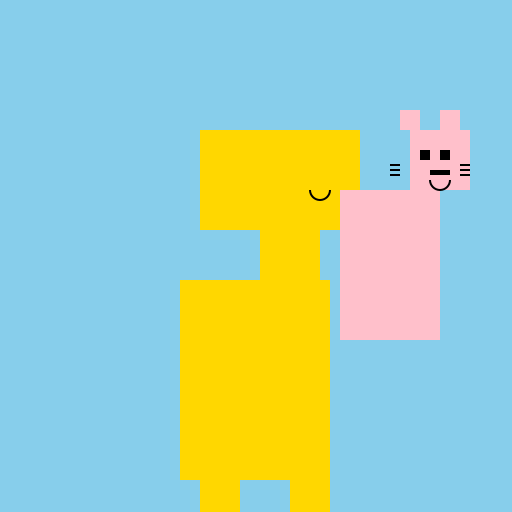

Javascript Code
                        // Happy Cat on a Giraffe's Head


// Draw the background

ctx.fillStyle = "#87CEEB"; // Set the sky blue color

ctx.fillRect(0, 0, 512, 512); // Fill the entire canvas with sky blue


// Draw the giraffe's body

ctx.fillStyle = "#FFD700"; // Set the giraffe's body color to gold

ctx.fillRect(180, 280, 150, 200); // Draw the giraffe's body


// Draw the giraffe's legs

ctx.fillStyle = "#FFD700"; // Set the giraffe's leg color to gold

ctx.fillRect(200, 480, 40, 80); // Draw the first leg

ctx.fillRect(290, 480, 40, 80); // Draw the second leg


// Draw the giraffe's neck

ctx.fillStyle = "#FFD700"; // Set the giraffe's neck color to gold

ctx.fillRect(260, 200, 60, 150); // Draw the giraffe's neck


// Draw the giraffe's head

ctx.fillStyle = "#FFD700"; // Set the giraffe's head color to gold

ctx.fillRect(200, 130, 160, 100); // Draw the giraffe's head


// Draw the cat's body

ctx.fillStyle = "#FFC0CB"; // Set the cat's body color to pink

ctx.fillRect(340, 190, 100, 150); // Draw the cat's body


// Draw the cat's head

ctx.fillStyle = "#FFC0CB"; // Set the cat's head color to pink

ctx.fillRect(410, 130, 60, 60); // Draw the cat's head


// Draw the cat's ears

ctx.fillStyle = "#FFC0CB"; // Set the cat's ear color to pink

ctx.fillRect(400, 110, 20, 20); // Draw the first ear

ctx.fillRect(440, 110, 20, 20); // Draw the second ear


// Draw the cat's eyes

ctx.fillStyle = "#000000"; // Set the cat's eye color to black

ctx.fillRect(420, 150, 10, 10); // Draw the first eye

ctx.fillRect(440, 150, 10, 10); // Draw the second eye


// Draw the cat's mouth

ctx.fillStyle = "#000000"; // Set the cat's mouth color to black

ctx.fillRect(430, 170, 20, 5); // Draw the cat's mouth


// Draw the cat's whiskers

ctx.strokeStyle = "#000000"; // Set the cat's whiskers color to black

ctx.lineWidth = 2; // Set the whiskers' line width to 2

ctx.beginPath(); // Start drawing the whiskers

ctx.moveTo(400, 165); // Move to the first whisker's starting point

ctx.lineTo(390, 165); // Draw the first whisker

ctx.moveTo(400, 170); // Move to the second whisker's starting point

ctx.lineTo(390, 170); // Draw the second whisker

ctx.moveTo(400, 175); // Move to the third whisker's starting point

ctx.lineTo(390, 175); // Draw the third whisker

ctx.moveTo(460, 165); // Move to the fourth whisker's starting point

ctx.lineTo(470, 165); // Draw the fourth whisker

ctx.moveTo(460, 170); // Move to the fifth whisker's starting point

ctx.lineTo(470, 170); // Draw the fifth whisker

ctx.moveTo(460, 175); // Move to the sixth whisker's starting point

ctx.lineTo(470, 175); // Draw the sixth whisker

ctx.stroke(); // Finish drawing the whiskers


// Add a smile to the giraffe's face

ctx.strokeStyle = "#000000"; // Set the smile color to black

ctx.lineWidth = 2; // Set the smile's line width to 2

ctx.beginPath(); // Start drawing the smile

ctx.arc(320, 190, 10, 0, Math.PI, false); // Draw the smile

ctx.stroke(); // Finish drawing the smile


// Add a smile to the cat's face

ctx.strokeStyle = "#000000"; // Set the smile color to black

ctx.lineWidth = 2; // Set the smile's line width to 2

ctx.beginPath(); // Start drawing the smile

ctx.arc(440, 180, 10, 0, Math.PI, false); // Draw the smile

ctx.stroke(); // Finish drawing the smile


// Meow-nificent masterpiece complete! 🐱🦒
AI
Model: gpt-3.5-turbo-16k-0613
Time: 67 seconds
Prompt Tokens: 183
Completion Tokens: 987
Total Token Cost: 1170


 balloon party
 beautiful beach
 cute puppy dog
 happy cat
 house
house