
Javascript Code
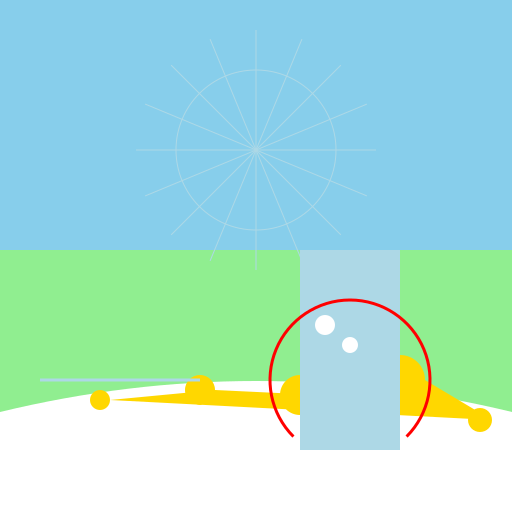
                        // A Secluded Beach in a Meadow of Wildflowers

// Don't forget your sunscreen!


ctx.fillStyle = "#87CEEB"; // Set the background color to sky blue

ctx.fillRect(0, 0, 512, 512); // Fill the entire canvas with the background color


// Draw the meadow

ctx.fillStyle = "#90EE90"; // Set the color to light green for the meadow

ctx.fillRect(0, 250, 512, 262); // Fill the lower part of the canvas with the meadow


// Draw the beach

ctx.fillStyle = "#F5DEB3"; // Set the color to sandy brown for the beach

ctx.fillRect(0, 412, 512, 100); // Fill the lower part of the canvas with the beach


// Draw the waves

ctx.fillStyle = "#FFFFFF"; // Set the color to white for the waves

ctx.beginPath();

ctx.moveTo(0, 412); // Start drawing from the left edge of the beach

ctx.quadraticCurveTo(256, 350, 512, 412); // Draw a curved line representing the waves

ctx.lineTo(512, 512); // Draw a line to the bottom right corner of the canvas

ctx.lineTo(0, 512); // Draw a line to the bottom left corner of the canvas

ctx.closePath();

ctx.fill();


// Draw the wildflowers

ctx.fillStyle = "#FFD700"; // Set the color to golden yellow for the wildflowers

ctx.beginPath();

ctx.arc(100, 400, 10, 0, Math.PI * 2); // Draw a small wildflower

ctx.arc(200, 390, 15, 0, Math.PI * 2); // Draw a medium wildflower

ctx.arc(300, 395, 20, 0, Math.PI * 2); // Draw a larger wildflower

ctx.arc(400, 380, 25, 0, Math.PI * 2); // Draw an even larger wildflower

ctx.arc(480, 420, 12, 0, Math.PI * 2); // Draw another small wildflower

ctx.closePath();

ctx.fill();


// Draw the brook

ctx.strokeStyle = "#ADD8E6"; // Set the color to light blue for the brook

ctx.lineWidth = 3; // Set the line width to 3 pixels

ctx.beginPath();

ctx.moveTo(40, 380); // Start drawing from the left side of the canvas

ctx.lineTo(200, 380); // Draw a line to represent the brook

ctx.stroke();


// Draw the sun rays and rainbow

ctx.lineWidth = 1; // Reset the line width to 1 pixel

ctx.beginPath();

ctx.arc(256, 150, 80, 0, Math.PI * 2); // Draw a large circle for the sun

ctx.stroke();


// Draw the sun rays

for (let angle = 0; angle < Math.PI * 2; angle += Math.PI / 8) {

  ctx.beginPath();

  ctx.moveTo(256, 150); // Start drawing from the center of the sun

  ctx.lineTo(256 + Math.cos(angle) * 120, 150 + Math.sin(angle) * 120); // Draw a ray extending from the sun

  ctx.stroke();

}


// Draw the waterfall and rainbow

ctx.fillStyle = "#ADD8E6"; // Set the color to light blue for the waterfall

ctx.fillRect(300, 250, 100, 200); // Draw a rectangle representing the waterfall


// Draw the water droplets

ctx.fillStyle = "#FFFFFF"; // Set the color to white for the water droplets

ctx.beginPath();

ctx.arc(325, 325, 10, 0, Math.PI * 2); // Draw a small water droplet

ctx.arc(350, 345, 8, 0, Math.PI * 2); // Draw another water droplet

ctx.closePath();

ctx.fill();


// Draw the rainbow

ctx.strokeStyle = "#FF0000"; // Set the color to red for the rainbow

ctx.lineWidth = 3; // Set the line width to 3 pixels

ctx.beginPath();

ctx.arc(350, 380, 80, Math.PI * 0.75, Math.PI * 2.25); // Draw an arc for the rainbow

ctx.stroke();


// Draw a happy little artwork!

// Just imagine relaxing on that secluded beach, surrounded by colorful wildflowers and the soothing sound of waves.

// Ah, paradise!
AI
Model: gpt-3.5-turbo-16k-0613
Time: 27 seconds
Prompt Tokens: 229
Completion Tokens: 942
Total Token Cost: 1171


 balloon party
 beautiful beach
 cute puppy dog
 happy cat
 house
house