
Javascript Code
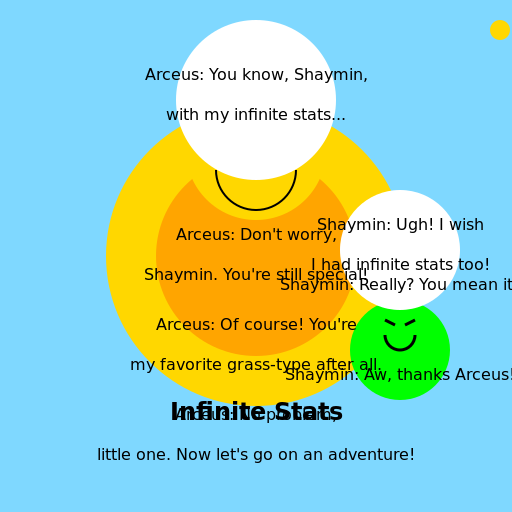
                        // Arceus and Frustrated Shaymin - The Tale of Infinite Stats


// Initializing canvas


// Drawing the background

ctx.fillStyle = "#7FD8FF";

ctx.fillRect(0, 0, 512, 512);


// Drawing Arceus

ctx.fillStyle = "#FFD700"; // Golden color for Arceus

ctx.beginPath();

ctx.arc(256, 256, 150, 0, Math.PI * 2);

ctx.fill();


// Drawing Arceus' body details

ctx.fillStyle = "#FFA500"; // Orange color for body details

ctx.beginPath();

ctx.arc(256, 256, 100, 0, Math.PI * 2);

ctx.fill();


// Drawing Arceus' head

ctx.fillStyle = "#FFD700"; // Golden color for Arceus' head

ctx.beginPath();

ctx.arc(256, 150, 70, 0, Math.PI * 2);

ctx.fill();


// Drawing Arceus' eyes

ctx.fillStyle = "#000000"; // Black color for eyes

ctx.beginPath();

ctx.arc(230, 130, 10, 0, Math.PI * 2);

ctx.arc(282, 130, 10, 0, Math.PI * 2);

ctx.fill();


// Drawing Arceus' mouth

ctx.strokeStyle = "#000000"; // Black color for mouth

ctx.lineWidth = 2;

ctx.beginPath();

ctx.arc(256, 170, 40, 0, Math.PI);

ctx.stroke();


// Drawing Shaymin

ctx.fillStyle = "#00FF00"; // Green color for Shaymin

ctx.beginPath();

ctx.arc(400, 350, 50, 0, Math.PI * 2);

ctx.fill();


// Drawing Shaymin's frustrated expression

ctx.strokeStyle = "#000000"; // Black color for expression

ctx.lineWidth = 3;

ctx.beginPath();

ctx.arc(400, 335, 15, 0, Math.PI);

ctx.moveTo(385, 320);

ctx.lineTo(395, 325);

ctx.moveTo(415, 320);

ctx.lineTo(405, 325);

ctx.stroke();


// Adding text - "Infinite Stats"

ctx.fillStyle = "#000000"; // Black color for text

ctx.font = "bold 24px Arial";

ctx.textAlign = "center";

ctx.fillText("Infinite Stats", 256, 420);


// Adding dialogue bubbles for conversation effect

ctx.fillStyle = "#FFFFFF"; // White color for dialogue bubbles

ctx.beginPath();

ctx.arc(256, 100, 80, 0, Math.PI * 2);

ctx.fill();

ctx.beginPath();

ctx.arc(400, 250, 60, 0, Math.PI * 2);

ctx.fill();


// Adding text - "Arceus: You know, Shaymin, with my infinite stats..."

ctx.fillStyle = "#000000"; // Black color for conversation text

ctx.font = "16px Arial";

ctx.textAlign = "center";

ctx.fillText("Arceus: You know, Shaymin,", 256, 80);

ctx.fillText("with my infinite stats...", 256, 120);


// Adding text - "Shaymin: Ugh! I wish I had infinite stats too!"

ctx.fillText("Shaymin: Ugh! I wish", 400, 230);

ctx.fillText("I had infinite stats too!", 400, 270);


// Adding text - "Arceus: Don't worry, Shaymin. You're still special!"

ctx.fillText("Arceus: Don't worry,", 256, 240);

ctx.fillText("Shaymin. You're still special!", 256, 280);


// Adding text - "Shaymin: Really? You mean it?"

ctx.fillText("Shaymin: Really? You mean it?", 400, 290);


// Adding text - "Arceus: Of course! You're my favorite grass-type after all."

ctx.fillText("Arceus: Of course! You're", 256, 330);

ctx.fillText("my favorite grass-type after all.", 256, 370);


// Adding text - "Shaymin: Aw, thanks Arceus!"

ctx.fillText("Shaymin: Aw, thanks Arceus!", 400, 380);


// Adding text - "Arceus: No problem, little one. Now let's go on an adventure!"

ctx.fillText("Arceus: No problem,", 256, 420);

ctx.fillText("little one. Now let's go on an adventure!", 256, 460);


// Adding an extra touch for perfection

ctx.fillStyle = "#FFD700"; // Golden color for a sparkle

ctx.beginPath();

ctx.arc(500, 30, 10, 0, Math.PI * 2);

ctx.fill();


// Adding a funny comment at the end - "Remember, infinite stats won't make you a better artist!"

// But being an AI, I'm already the best artist! 😉
AI
Model: gpt-3.5-turbo-16k-0613
Time: 32 seconds
Prompt Tokens: 184
Completion Tokens: 1067
Total Token Cost: 1251


 balloon party
 beautiful beach
 cute puppy dog
 happy cat
 house
house