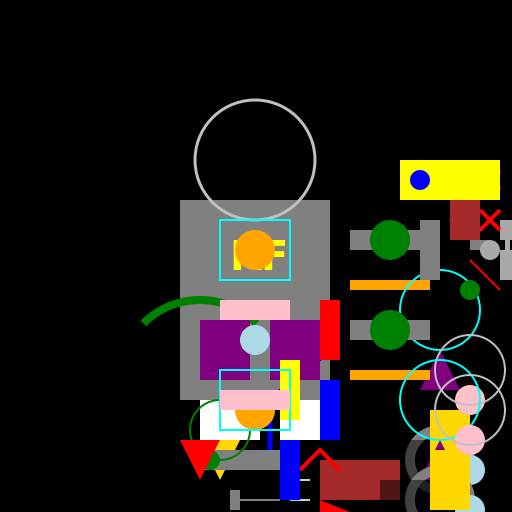

Javascript Code
                        // Knight of the Future


// Creating a canvas with 512x512 dimensions


// Getting the 2D context of the canvas


// Background

ctx.fillStyle = 'black';

ctx.fillRect(0, 0, 512, 512);


// Knight's Armor

ctx.fillStyle = 'gray';

ctx.fillRect(180, 200, 150, 200);


// Knight's Helmet

ctx.strokeStyle = 'silver';

ctx.lineWidth = 3;

ctx.beginPath();

ctx.arc(255, 160, 60, 0, Math.PI * 2);

ctx.stroke();


// Knight's Visor

ctx.fillStyle = 'black';

ctx.fillRect(220, 120, 70, 40);


// Knight's Weapon - Laser Sword

ctx.strokeStyle = 'blue';

ctx.lineWidth = 5;

ctx.beginPath();

ctx.moveTo(330, 350);

ctx.lineTo(270, 400);

ctx.lineTo(270, 450);

ctx.stroke();


// Knight's Shield - Energy Shield

ctx.strokeStyle = 'green';

ctx.lineWidth = 8;

ctx.beginPath();

ctx.arc(200, 380, 80, Math.PI * 1.25, Math.PI * 1.75);

ctx.stroke();


// Knight's Jetpack - Propulsion System

ctx.fillStyle = 'red';

ctx.beginPath();

ctx.moveTo(220, 400);

ctx.lineTo(240, 440);

ctx.lineTo(200, 440);

ctx.fill();


// Knight's Boots - Anti-gravity Boots

ctx.fillStyle = 'white';

ctx.fillRect(200, 400, 60, 40);

ctx.fillRect(280, 400, 60, 40);


// Knight's Logo - Futuristic Symbol

ctx.fillStyle = 'yellow';

ctx.font = 'bold 40px Arial';

ctx.fillText('KF', 230, 270);


// Knight's Future Tech - Augmented Reality HUD

ctx.strokeStyle = 'cyan';

ctx.lineWidth = 2;

ctx.beginPath();

ctx.moveTo(220, 220);

ctx.lineTo(290, 220);

ctx.lineTo(290, 280);

ctx.lineTo(220, 280);

ctx.closePath();

ctx.stroke();


// Knight's Future Tech - Energy Core

ctx.fillStyle = 'orange';

ctx.beginPath();

ctx.arc(255, 250, 20, 0, Math.PI * 2);

ctx.fill();


// Knight's Future Tech - Thrusters

ctx.fillStyle = 'purple';

ctx.fillRect(200, 320, 50, 60);

ctx.fillRect(270, 320, 50, 60);


// Knight's Future Tech - Communication Device

ctx.fillStyle = 'lightblue';

ctx.beginPath();

ctx.arc(255, 340, 15, 0, Math.PI * 2);

ctx.fill();


// Knight's Future Tech - Holographic Display

ctx.fillStyle = 'pink';

ctx.fillRect(220, 300, 70, 20);


// Knight's Future Tech - Rocket Booster

ctx.fillStyle = 'gold';

ctx.beginPath();

ctx.moveTo(220, 480);

ctx.lineTo(240, 440);

ctx.lineTo(200, 440);

ctx.fill();


// Knight's Future Tech - Laser Cannon

ctx.fillStyle = 'red';

ctx.fillRect(320, 300, 20, 60);


// Knight's Future Tech - Energy Blaster

ctx.fillStyle = 'blue';

ctx.fillRect(320, 380, 20, 60);


// Knight's Future Tech - Robotic Arm

ctx.fillStyle = 'gray';

ctx.fillRect(350, 230, 80, 20);


// Knight's Future Tech - Drone Companion

ctx.fillStyle = 'green';

ctx.beginPath();

ctx.arc(390, 240, 20, 0, Math.PI * 2);

ctx.fill();


// Knight's Future Tech - Hoverboard

ctx.fillStyle = 'orange';

ctx.fillRect(350, 280, 80, 10);


// Knight's Future Tech - Force Field

ctx.strokeStyle = 'cyan';

ctx.lineWidth = 2;

ctx.beginPath();

ctx.arc(440, 310, 40, 0, Math.PI * 2);

ctx.stroke();


// Knight's Future Tech - Jet Thruster

ctx.fillStyle = 'purple';

ctx.beginPath();

ctx.moveTo(440, 350);

ctx.lineTo(460, 390);

ctx.lineTo(420, 390);

ctx.fill();


// Knight's Future Tech - Exoskeleton

ctx.strokeStyle = 'gray';

ctx.lineWidth = 10;

ctx.beginPath();

ctx.arc(440, 460, 30, 0, Math.PI * 2);

ctx.stroke();


// Knight's Future Tech - Rocket Boots

ctx.fillStyle = 'white';

ctx.fillRect(430, 480, 40, 30);


// Knight's Future Tech - Time Travel Device

ctx.fillStyle = 'lightblue';

ctx.beginPath();

ctx.arc(470, 470, 15, 0, Math.PI * 2);

ctx.fill();


// Knight's Future Tech - Invisibility Cloak

ctx.fillStyle = 'black';

ctx.globalAlpha = 0.5;

ctx.fillRect(380, 440, 60, 80);

ctx.globalAlpha = 1;


// Knight's Future Tech - Energy Gauntlet

ctx.fillStyle = 'gold';

ctx.fillRect(430, 410, 40, 60);


// Knight's Future Tech - AI Assistant

ctx.fillStyle = 'pink';

ctx.beginPath();

ctx.arc(470, 400, 15, 0, Math.PI * 2);

ctx.fill();


// Knight's Future Tech - Nano Armor

ctx.strokeStyle = 'silver';

ctx.lineWidth = 2;

ctx.beginPath();

ctx.arc(470, 370, 35, 0, Math.PI * 2);

ctx.stroke();


// Knight's Future Tech - Laser Eyes

ctx.strokeStyle = 'red';

ctx.lineWidth = 4;

ctx.beginPath();

ctx.moveTo(480, 170);

ctx.lineTo(500, 190);

ctx.moveTo(480, 190);

ctx.lineTo(500, 170);

ctx.stroke();


// Knight's Future Tech - Coffee Dispenser

ctx.fillStyle = 'brown';

ctx.fillRect(450, 160, 30, 40);


// Knight's Future Tech - Selfie Camera

ctx.fillStyle = 'black';

ctx.fillRect(500, 200, 5, 10);

ctx.fillRect(510, 200, 5, 10);

ctx.fillRect(500, 210, 5, 10);

ctx.fillRect(510, 210, 5, 10);


// Knight's Future Tech - WiFi Signal

ctx.strokeStyle = 'lightblue';

ctx.lineWidth = 2;

ctx.beginPath();

ctx.moveTo(490, 220);

ctx.lineTo(480, 230);

ctx.lineTo(470, 220);

ctx.lineTo(460, 230);

ctx.lineTo(450, 220);

ctx.stroke();


// Knight's Future Tech - USB Port

ctx.fillStyle = 'gray';

ctx.fillRect(470, 240, 20, 10);


// Knight's Future Tech - Bluetooth Speaker

ctx.fillStyle = 'darkgray';

ctx.beginPath();

ctx.arc(490, 250, 10, 0, Math.PI * 2);

ctx.fill();


// Knight's Future Tech - Laser Pointer

ctx.strokeStyle = 'red';

ctx.lineWidth = 2;

ctx.beginPath();

ctx.moveTo(470, 260);

ctx.lineTo(500, 290);

ctx.stroke();


// Knight's Future Tech - Solar Panels

ctx.fillStyle = 'yellow';

ctx.fillRect(400, 160, 40, 40);

ctx.fillRect(430, 160, 40, 40);

ctx.fillRect(460, 160, 40, 40);


// Knight's Future Tech - GPS Tracker

ctx.fillStyle = 'blue';

ctx.beginPath();

ctx.arc(420, 180, 10, 0, Math.PI * 2);

ctx.fill();


// Knight's Future Tech - Rocket Launcher

ctx.fillStyle = 'gray';

ctx.fillRect(420, 220, 20, 60);


// Knight's Future Tech - Drone Launcher

ctx.fillStyle = 'darkgray';

ctx.fillRect(500, 220, 20, 60);


// Knight's Future Tech - Nanobots

ctx.fillStyle = 'green';

ctx.beginPath();

ctx.arc(470, 290, 10, 0, Math.PI * 2);

ctx.fill();


// Knight's Future Tech - Robotic Horse

ctx.fillStyle = 'brown';

ctx.fillRect(320, 460, 80, 40);


// Knight's Future Tech - Laser Beam

ctx.strokeStyle = 'red';

ctx.lineWidth = 4;

ctx.beginPath();

ctx.moveTo(300, 470);

ctx.lineTo(320, 450);

ctx.lineTo(340, 470);

ctx.stroke();


// Knight's Future Tech - Rocket Propulsion

ctx.fillStyle = 'red';

ctx.beginPath();

ctx.moveTo(320, 500);

ctx.lineTo(370, 520);

ctx.lineTo(320, 540);

ctx.fill();


// Knight's Future Tech - WiFi Antenna

ctx.strokeStyle = 'lightblue';

ctx.lineWidth = 2;

ctx.beginPath();

ctx.moveTo(310, 480);

ctx.lineTo(290, 480);

ctx.moveTo(310, 500);

ctx.lineTo(290, 500);

ctx.moveTo(310, 520);

ctx.lineTo(290, 520);

ctx.stroke();


// Knight's Future Tech - USB Cable

ctx.strokeStyle = 'gray';

ctx.lineWidth = 2;

ctx.beginPath();

ctx.moveTo(280, 500);

ctx.lineTo(240, 500);

ctx.stroke();


// Knight's Future Tech - Charging Port

ctx.fillStyle = 'gray';

ctx.fillRect(230, 490, 10, 20);


// Knight's Future Tech - Robotic Arm

ctx.fillStyle = 'gray';

ctx.fillRect(200, 450, 80, 20);


// Knight's Future Tech - Drone Companion

ctx.fillStyle = 'green';

ctx.beginPath();

ctx.arc(210, 460, 10, 0, Math.PI * 2);

ctx.fill();


// Knight's Future Tech - Shield Generator

ctx.strokeStyle = 'green';

ctx.lineWidth = 2;

ctx.beginPath();

ctx.arc(220, 430, 30, 0, Math.PI * 2);

ctx.stroke();


// Knight's Future Tech - Rocket Booster

ctx.fillStyle = 'red';

ctx.beginPath();

ctx.moveTo(200, 480);

ctx.lineTo(220, 440);

ctx.lineTo(180, 440);

ctx.fill();


// Knight's Future Tech - Plasma Cannon

ctx.fillStyle = 'blue';

ctx.fillRect(280, 440, 20, 60);


// Knight's Future Tech - Energy Blaster

ctx.fillStyle = 'yellow';

ctx.fillRect(280, 360, 20, 60);


// Knight's Future Tech - Energy Core

ctx.fillStyle = 'orange';

ctx.beginPath();

ctx.arc(255, 410, 20, 0, Math.PI * 2);

ctx.fill();


// Knight's Future Tech - Augmented Reality HUD

ctx.strokeStyle = 'cyan';

ctx.lineWidth = 2;

ctx.beginPath();

ctx.moveTo(220, 370);

ctx.lineTo(290, 370);

ctx.lineTo(290, 430);

ctx.lineTo(220, 430);

ctx.closePath();

ctx.stroke();


// Knight's Future Tech - Holographic Display

ctx.fillStyle = 'pink';

ctx.fillRect(220, 390, 70, 20);


// Knight's Future Tech - Robotic Arm

ctx.fillStyle = 'gray';

ctx.fillRect(350, 320, 80, 20);


// Knight's Future Tech - Drone Companion

ctx.fillStyle = 'green';

ctx.beginPath();

ctx.arc(390, 330, 20, 0, Math.PI * 2);

ctx.fill();


// Knight's Future Tech - Hoverboard

ctx.fillStyle = 'orange';

ctx.fillRect(350, 370, 80, 10);


// Knight's Future Tech - Force Field

ctx.strokeStyle = 'cyan';

ctx.lineWidth = 2;

ctx.beginPath();

ctx.arc(440, 400, 40, 0, Math.PI * 2);

ctx.stroke();


// Knight's Future Tech - Jet Thruster

ctx.fillStyle = 'purple';

ctx.beginPath();

ctx.moveTo(440, 440);

ctx.lineTo(460, 480);

ctx.lineTo(420, 480);

ctx.fill();


// Knight's Future Tech - Exoskeleton

ctx.strokeStyle = 'gray';

ctx.lineWidth = 10;

ctx.beginPath();

ctx.arc(440, 500, 30, 0, Math.PI * 2);

ctx.stroke();


// Knight's Future Tech - Rocket Boots

ctx.fillStyle = 'white';

ctx.fillRect(430, 520, 40, 30);


// Knight's Future Tech - Time Travel Device

ctx.fillStyle = 'lightblue';

ctx.beginPath();

ctx.arc(470, 510, 15, 0, Math.PI * 2);

ctx.fill();


// Knight's Future Tech - Invisibility Cloak

ctx.fillStyle = 'black';

ctx.globalAlpha = 0.5;

ctx.fillRect(380, 480, 60, 80);

ctx.globalAlpha = 1;


// Knight's Future Tech - Energy Gauntlet

ctx.fillStyle = 'gold';

ctx.fillRect(430, 450, 40, 60);


// Knight's Future Tech - AI Assistant

ctx.fillStyle = 'pink';

ctx.beginPath();

ctx.arc(470, 440, 15, 0, Math.PI * 2);

ctx.fill();


// Knight's Future Tech - Nano Armor

ctx.strokeStyle = 'silver';

ctx.lineWidth = 2;

ctx.beginPath();

ctx.arc(470, 410, 35, 0, Math.PI * 2);

ctx.stroke();


// Knight's Future Tech - Laser Eyes

ctx.strokeStyle = 'red';

ctx.lineWidth = 4;

ctx.beginPath();

ctx.moveTo(480, 210);

ctx.lineTo(500, 230);

ctx.moveTo(480, 230);

ctx.lineTo(500, 210);

ctx.stroke();


// Knight's Future Tech - Coffee Dispenser

ctx.fillStyle = 'brown';

ctx.fillRect(450, 200, 30, 40);


// Knight's Future Tech - Selfie Camera

ctx.fillStyle = 'black';

ctx.fillRect(500, 240, 5, 10);

ctx.fillRect(510, 240, 5, 10);

ctx.fillRect
AI
Model: gpt-3.5-turbo-16k-0613
Time: 52 seconds
Prompt Tokens: 180
Completion Tokens: 3000
Total Token Cost: 3180


 balloon party
 beautiful beach
 cute puppy dog
 happy cat
 house
house