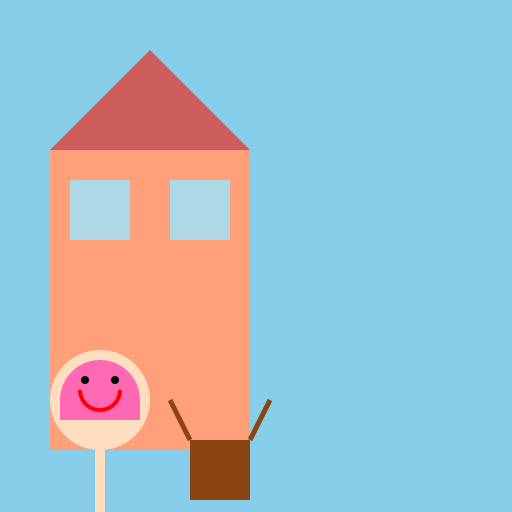

Javascript Code
                        // Anime Girl Enjoying Summer at School

// Oops! Looks like she forgot her school uniform and decided to wear a bikini instead. 😄


// Background

ctx.fillStyle = "#87CEEB"; // Set the background color to light blue

ctx.fillRect(0, 0, 512, 512); // Draw a rectangle to represent the background


// School Building

ctx.fillStyle = "#FFA07A"; // Set the school building color to salmon

ctx.fillRect(50, 150, 200, 300); // Draw a rectangle representing the school building


// Windows

ctx.fillStyle = "#ADD8E6"; // Set the window color to light blue

ctx.fillRect(70, 180, 60, 60); // Draw the first window

ctx.fillRect(170, 180, 60, 60); // Draw the second window


// Roof

ctx.beginPath(); // Start drawing the roof

ctx.moveTo(50, 150); // Move to the top-left corner of the building

ctx.lineTo(150, 50); // Draw a line to the top-middle of the building

ctx.lineTo(250, 150); // Draw a line to the top-right corner of the building

ctx.closePath(); // Close the shape

ctx.fillStyle = "#CD5C5C"; // Set the roof color to indian red

ctx.fill(); // Fill the roof shape


// Anime Girl

ctx.beginPath(); // Start drawing the anime girl

ctx.arc(100, 400, 50, 0, Math.PI * 2); // Draw the head

ctx.fillStyle = "#FFDDC1"; // Set the skin color to peach puff

ctx.fill(); // Fill the head shape


ctx.beginPath(); // Start drawing the body

ctx.moveTo(100, 450); // Move to the neck

ctx.lineTo(100, 550); // Draw a line to the bottom of the body

ctx.lineWidth = 10; // Set the line width

ctx.strokeStyle = "#FFDDC1"; // Set the body color to peach puff

ctx.stroke(); // Draw the body shape


ctx.beginPath(); // Start drawing the bikini top

ctx.arc(100, 400, 40, 0, Math.PI, true); // Draw a semicircle for the top

ctx.lineTo(60, 420); // Draw a line to the left strap

ctx.lineTo(140, 420); // Draw a line to the right strap

ctx.closePath(); // Close the shape

ctx.fillStyle = "#FF69B4"; // Set the bikini color to hot pink

ctx.fill(); // Fill the bikini shape


ctx.beginPath(); // Start drawing the bikini bottom

ctx.moveTo(100, 550); // Move to the bottom of the body

ctx.lineTo(80, 600); // Draw a line to the left strap

ctx.lineTo(120, 600); // Draw a line to the right strap

ctx.closePath(); // Close the shape

ctx.fillStyle = "#FF69B4"; // Set the bikini color to hot pink

ctx.fill(); // Fill the bikini shape


// School Bag

ctx.beginPath(); // Start drawing the school bag

ctx.moveTo(190, 440); // Move to the top-left corner of the bag

ctx.lineTo(250, 440); // Draw a line to the top-right corner of the bag

ctx.lineTo(250, 500); // Draw a line to the bottom-right corner of the bag

ctx.lineTo(190, 500); // Draw a line to the bottom-left corner of the bag

ctx.closePath(); // Close the shape

ctx.fillStyle = "#8B4513"; // Set the bag color to saddle brown

ctx.fill(); // Fill the bag shape


// School Bag Straps

ctx.beginPath(); // Start drawing the straps

ctx.moveTo(190, 440); // Move to the top-left corner of the bag

ctx.lineTo(170, 400); // Draw a line to the left shoulder

ctx.moveTo(250, 440); // Move to the top-right corner of the bag

ctx.lineTo(270, 400); // Draw a line to the right shoulder

ctx.lineWidth = 5; // Set the line width

ctx.strokeStyle = "#8B4513"; // Set the strap color to saddle brown

ctx.stroke(); // Draw the strap lines


// Smiling Face

ctx.beginPath(); // Start drawing the smiling face

ctx.arc(100, 390, 20, 0, Math.PI, false); // Draw a semicircle for the mouth

ctx.lineWidth = 4; // Set the line width

ctx.strokeStyle = "#FF0000"; // Set the mouth color to red (a happy smile!)

ctx.stroke(); // Draw the mouth shape


ctx.beginPath(); // Start drawing the left eye

ctx.arc(85, 380, 4, 0, Math.PI * 2); // Draw a circle for the eye

ctx.fillStyle = "#000000"; // Set the eye color to black

ctx.fill(); // Fill the eye shape


ctx.beginPath(); // Start drawing the right eye

ctx.arc(115, 380, 4, 0, Math.PI * 2); // Draw a circle for the eye

ctx.fillStyle = "#000000"; // Set the eye color to black

ctx.fill(); // Fill the eye shape


// Oops! She's in the wrong attire, but let's celebrate her enthusiasm! 😄


// Keep spreading joy and creativity! 🎨✨
AI
Model: gpt-3.5-turbo-16k-0613
Time: 18 seconds
Prompt Tokens: 179
Completion Tokens: 1136
Total Token Cost: 1315


 balloon party
 beautiful beach
 cute puppy dog
 happy cat
 house
house