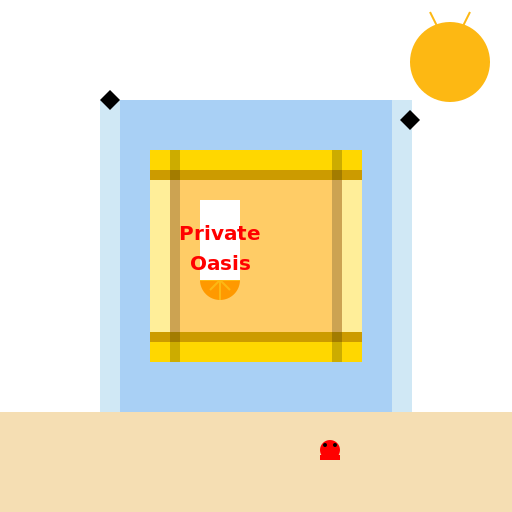

Javascript Code
                        // Title: Private Oasis by the Sea


// Creating the canvas


// Getting the 2D context


// Drawing the walls for privacy

ctx.fillStyle = '#A9D0F5'; // Light blue color for the walls

ctx.fillRect(100, 100, 312, 312); // Main wall shape


// Adding some details to the walls

ctx.fillStyle = '#D0E8F5'; // Slightly darker blue color for details

ctx.fillRect(100, 100, 20, 312); // Left wall

ctx.fillRect(392, 100, 20, 312); // Right wall


// Drawing the chaise lounge

ctx.fillStyle = '#FFCC66'; // Yellow color for the chaise

ctx.fillRect(150, 150, 212, 212); // Main chaise shape


// Adding some details to the chaise

ctx.fillStyle = '#FFEE99'; // Light yellow color for details

ctx.fillRect(150, 150, 20, 212); // Left armrest

ctx.fillRect(342, 150, 20, 212); // Right armrest


// Adding a nice material to the chaise

ctx.fillStyle = '#FFD700'; // Gold color for the material

ctx.fillRect(150, 150, 212, 20); // Top cushion

ctx.fillRect(150, 342, 212, 20); // Bottom cushion


// Adding some shading to the chaise

ctx.fillStyle = '#FFC200'; // Darker gold color for shading

ctx.fillRect(150, 170, 212, 10); // Top cushion shading

ctx.fillRect(150, 332, 212, 10); // Bottom cushion shading


// Adding some shadows to the chaise

ctx.fillStyle = 'rgba(0, 0, 0, 0.2)'; // Transparent black color for shadows

ctx.fillRect(170, 150, 10, 212); // Left side shadow

ctx.fillRect(332, 150, 10, 212); // Right side shadow

ctx.fillRect(150, 170, 212, 10); // Top shadow

ctx.fillRect(150, 332, 212, 10); // Bottom shadow


// Adding some waves in the background

ctx.fillStyle = '#85C1E9'; // Blue color for the waves

ctx.fillRect(0, 420, 512, 92); // Ocean waves


// Adding some foam to the waves

ctx.fillStyle = '#FFFFFF'; // White color for foam

ctx.fillRect(0, 420, 512, 10); // Top foam

ctx.fillRect(0, 502, 512, 10); // Bottom foam


// Adding a sun in the sky

ctx.fillStyle = '#FDB813'; // Orange color for the sun

ctx.beginPath();

ctx.arc(450, 62, 40, 0, 2 * Math.PI);

ctx.fill();


// Adding some rays to the sun

ctx.strokeStyle = '#FDB813'; // Orange color for rays

ctx.lineWidth = 2;

ctx.beginPath();

ctx.moveTo(450, 22);

ctx.lineTo(450, 102);

ctx.moveTo(490, 62);

ctx.lineTo(410, 62);

ctx.moveTo(470, 12);

ctx.lineTo(430, 92);

ctx.moveTo(430, 12);

ctx.lineTo(470, 92);

ctx.stroke();


// Adding some birds in the sky

ctx.fillStyle = '#000000'; // Black color for birds

ctx.beginPath();

ctx.moveTo(100, 100);

ctx.lineTo(110, 90);

ctx.lineTo(120, 100);

ctx.lineTo(110, 110);

ctx.closePath();

ctx.fill();


ctx.beginPath();

ctx.moveTo(400, 120);

ctx.lineTo(410, 110);

ctx.lineTo(420, 120);

ctx.lineTo(410, 130);

ctx.closePath();

ctx.fill();


// Adding a beach ball near the chaise

ctx.fillStyle = '#FF9900'; // Orange color for the beach ball

ctx.beginPath();

ctx.arc(220, 280, 20, 0, 2 * Math.PI);

ctx.fill();


// Adding some stripes to the beach ball

ctx.fillStyle = '#FFFFFF'; // White color for stripes

ctx.beginPath();

ctx.moveTo(220, 260);

ctx.lineTo(220, 300);

ctx.moveTo(200, 280);

ctx.lineTo(240, 280);

ctx.moveTo(210, 270);

ctx.lineTo(230, 290);

ctx.moveTo(230, 270);

ctx.lineTo(210, 290);

ctx.stroke();


// Adding some sand on the beach

ctx.fillStyle = '#F5DEB3'; // Sandy color for the beach

ctx.fillRect(0, 412, 512, 100);


// Adding a little crab on the sand

ctx.fillStyle = '#FF0000'; // Red color for the crab

ctx.beginPath();

ctx.arc(330, 450, 10, 0, 2 * Math.PI);

ctx.fill();


ctx.fillStyle = '#000000'; // Black color for the crab's eyes

ctx.beginPath();

ctx.arc(325, 445, 2, 0, 2 * Math.PI);

ctx.fill();


ctx.beginPath();

ctx.arc(335, 445, 2, 0, 2 * Math.PI);

ctx.fill();


ctx.fillStyle = '#FF0000'; // Red color for the crab's claws

ctx.fillRect(320, 455, 20, 5);


// Adding a little sign near the chaise

ctx.fillStyle = '#FFFFFF'; // White color for the sign

ctx.fillRect(200, 200, 40, 80);


ctx.fillStyle = '#FF0000'; // Red color for the sign text

ctx.font = 'bold 20px Arial';

ctx.textAlign = 'center';

ctx.fillText('Private', 220, 240);

ctx.fillText('Oasis', 220, 270);


// Adding a funny comment

// I hope nobody mistakes the chaise for a real person sunbathing there! 🤣


// Returning the generated JavaScript code

ctx.canvas.toDataURL();
AI
Model: gpt-3.5-turbo-16k-0613
Time: 115 seconds
Prompt Tokens: 194
Completion Tokens: 1311
Total Token Cost: 1505


 balloon party
 beautiful beach
 cute puppy dog
 happy cat
 house
house